Silent install of custom RDM MSI

I created a custom installer using the custom installer feature in RDM. I'm trying to install it silently as a test before we deploy using SCCM. I keep getting the attached error message. I'll also include the verbose output from the log file as well. The command I'm trying to use is:
msiexec /i msifilename.msi /quiet /l*v install.log
I've also tried /qb (how I got the attached error message and /qn instead of quiet they all perform the same way.
Thanks!
Contents of install.log after trying to install it:
=== Verbose logging started: 9/15/2025 17:01:30 Build type: SHIP UNICODE 5.00.10011.00 Calling process: C:\WINDOWS\system32\msiexec.exe ===
MSI (c) (4C:D8) [17:01:30:375]: Font created. Charset: Req=0, Ret=0, Font: Req=MS Shell Dlg, Ret=MS Shell Dlg
MSI (c) (4C:D8) [17:01:30:375]: Font created. Charset: Req=0, Ret=0, Font: Req=MS Shell Dlg, Ret=MS Shell Dlg
MSI (c) (4C:10) [17:01:30:400]: Resetting cached policy values
MSI (c) (4C:10) [17:01:30:400]: Machine policy value 'Debug' is 0
MSI (c) (4C:10) [17:01:30:400]: ******* RunEngine:
******* Product: .\S7-Setup.RemoteDesktopManager.win-x64.2025.2.28.0 (1).msi
******* Action:
******* CommandLine: **********
MSI (c) (4C:10) [17:01:30:401]: Client-side and UI is none or basic: Running entire install on the server.
MSI (c) (4C:10) [17:01:30:401]: Grabbed execution mutex.
MSI (c) (4C:10) [17:01:30:791]: Cloaking enabled.
MSI (c) (4C:10) [17:01:30:791]: Attempting to enable all disabled privileges before calling Install on Server
MSI (c) (4C:10) [17:01:30:794]: Incrementing counter to disable shutdown. Counter after increment: 0
MSI (s) (9C:EC) [17:01:30:812]: Running installation inside multi-package transaction C:\Users\matt.lytle\Downloads\.\S7-Setup.RemoteDesktopManager.win-x64.2025.2.28.0 (1).msi
MSI (s) (9C:EC) [17:01:30:812]: Grabbed execution mutex.
MSI (s) (9C:38) [17:01:30:816]: Resetting cached policy values
MSI (s) (9C:38) [17:01:30:816]: Machine policy value 'Debug' is 0
MSI (s) (9C:38) [17:01:30:816]: ******* RunEngine:
******* Product: C:\Users\matt.lytle\Downloads\.\S7-Setup.RemoteDesktopManager.win-x64.2025.2.28.0 (1).msi
******* Action:
******* CommandLine: **********
MSI (s) (9C:38) [17:01:31:823]: Machine policy value 'DisableUserInstalls' is 0
MSI (s) (9C:38) [17:01:31:830]: Note: 1: 2203 2: C:\WINDOWS\Installer\inprogressinstallinfo.ipi 3: -2147287038
MSI (s) (9C:38) [17:01:32:855]: SRSetRestorePoint skipped for this transaction.
MSI (s) (9C:38) [17:01:32:858]: Note: 1: 1324 2: . 3: 1
MSI (s) (9C:38) [17:01:32:858]: MainEngineThread is returning 2
MSI (s) (9C:EC) [17:01:32:859]: No System Restore sequence number for this installation.
MSI (s) (9C:EC) [17:01:32:860]: User policy value 'DisableRollback' is 0
MSI (s) (9C:EC) [17:01:32:860]: Machine policy value 'DisableRollback' is 0
MSI (s) (9C:EC) [17:01:32:860]: Incrementing counter to disable shutdown. Counter after increment: 0
MSI (s) (9C:EC) [17:01:32:860]: Note: 1: 1402 2: HKEY_LOCAL_MACHINE\Software\Microsoft\Windows\CurrentVersion\Installer\Rollback\Scripts 3: 2
MSI (s) (9C:EC) [17:01:32:861]: Note: 1: 1402 2: HKEY_LOCAL_MACHINE\Software\Microsoft\Windows\CurrentVersion\Installer\Rollback\Scripts 3: 2
MSI (s) (9C:EC) [17:01:32:861]: Decrementing counter to disable shutdown. If counter >= 0, shutdown will be denied. Counter after decrement: -1
MSI (c) (4C:10) [17:01:32:863]: Decrementing counter to disable shutdown. If counter >= 0, shutdown will be denied. Counter after decrement: -1
MSI (c) (4C:10) [17:01:32:865]: MainEngineThread is returning 2
=== Verbose logging stopped: 9/15/2025 17:01:32 ===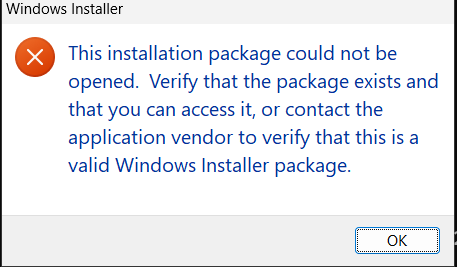
{D8262701-EC0F-4176-A105-1150877C81D4}.png
All Comments (4)
Hello,
Thank you for reaching out to us regarding this,
I see, unfortunately, these errors are not directly related to RDM, so I am fairly limited in what assistance I can provide.
However, from quickly looking into this, I have found the following documentation from Microsoft giving some additional details on what these errors mean:
https://learn.microsoft.com/en-us/windows/win32/msi/windows-installer-error-messages
Note 1324 seems to be the most probable cause of the issue. According to that documentation, it seems to indicate an invalid folder path, could you try changing the file name from "S7-Setup.RemoteDesktopManager.win-x64.2025.2.28.0 " to something without "."s?
"1324: The folder path '[2]' contains an invalid character."
Best regards,
Samuel Dery
Hello
I think Samuel is correct, and in the log file the path is ".\S7-Setup.RemoteDesktopManager.win-x64.2025.2.28.0 (1).msi".
If you're using e.g. PowerShell it will tab-complete the .\ at the start of the filename, if the file is in your current directory. But msiexec doesn't understand that syntax. So: double-check you just have the filename (in the current directory) without any special characters. Given the spaces in the filename, you probably need to quote it as well.
If you still have problems, please give us the exact command as used to launch msiexec.
Kind regards,
Richard Markievicz
Thank you both. I think I was getting caught by the .\ from PowerShell. I had renamed it quiet.msi and moved it to c:\temp\ so there would be no special characters or long file names and it still failed. So what must have been catching me was the .\ from PowerShell's auto completion.
The installer just completed successfully and silently :)
Hello
Excellent news. Personally I was pretty confident about that being the issue - just because I've made the exact same mistake lots of times. Windows Installer has weird edges like this but it's also a 26 year old technology.
Don't hesitate with further questions or comments
Kind regards,
Richard Markievicz