Permission problems after Group rename

I recently renamed the Usergroups in RDM and now have issues with some users which get "access denied" when trying to access credentials via powershell (they can access the credentials in RDM...)
I disregarded the warning which gets shown when one renames a group (had a snapshot of the database, so i was not worried, first mistake!)
After a few days without issues i deleted the snapshot as everything worked for me (second mistake! i have admin rights, they don't, and i did not check in with the other users)
And now we have the issue that the other rdm users can no longer access credentials via powershell, is there a way to restore/fix the permissions?
I already tried to change the groupnames back to the original ones and renamed the groups with the script from this post Renaming a role and update permissions
BR,
Stefan Simmerstatter
All Comments (8)
Hello,
Thank you for your feedback.
Are they using the same data source in PowerShell as in RDM? If not, is this data source user account a member of the group?
What Devolutions PowerShell module are they using? You can get the information with the Get-RDMInstance cmdlet.
Best regards,
Érica Poirier
Hi Erica,
thanks for the fast answer!
The datasource is a MSSQL 2022, and yes it is the same DS for RDM as well as Powershell.
We tested it with both PS5 (RemoteDesktopManager 2022.3.1.8) and PS7 (Devolutions.Powershell 2025.2.4.0).
Hello,
any news or things i can try on our side?
This is quite the problem for us as it affects quite a few powershell scripts which my colleagues use for their daily operations!
Otherwise i will have to restore the database to an older state, which means troubleshooting with the current state would no longer be possible, or at least quite hard.
Hello,
Thank you for your feedback.
You could export the permissions in a CSV file using the following script.
https://github.com/Devolutions/DevoSamples-ps/blob/main/RDM/security/Export-RDMPermissions.ps1
Then, after editing the CSV file to ensure the permissions are the right ones, you can import it back using this script.
https://github.com/Devolutions/DevoSamples-ps/blob/main/RDM/security/SetPermissionsonFoldersInVault.ps1
Let me know if that helps.
Best regards,
Érica Poirier
HI, thanks for the script.
just to clarify what exactly do i have to replace with the group name? the "Default"
every line of the export is like this:
"VaultName","Networking\Site","Default","","","","","","","","","","","","","","","","",""
EDIT:
the output of the export script is identical between the database which has the permission issues and an older backup of the database which does not have the issue.
Hello,
Thank you for your feedback.
The lines set with Default don't have any permissions set on them.
Please email service@devolutions.net with a reference to this thread. We will send you a link to book a support session to troubleshoot this permission problem.
Best regards,
Érica Poirier
just sent the mail, thank you for your support till now!
The Casenumber is 00099572
Hello Stefan,
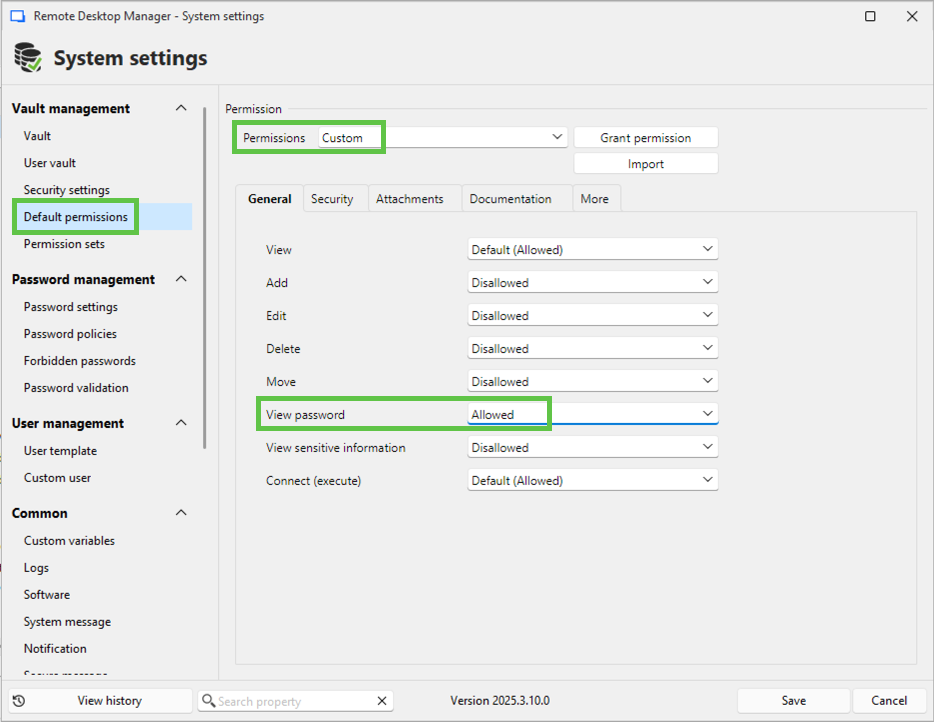
Because the vault's root record permissions are now inherited from the System Settings Default permissions set, we solved the issue by setting the system View password permission from Default (Disallowed) to Allowed with a custom configuration in Administration - System Settings - Default permissions.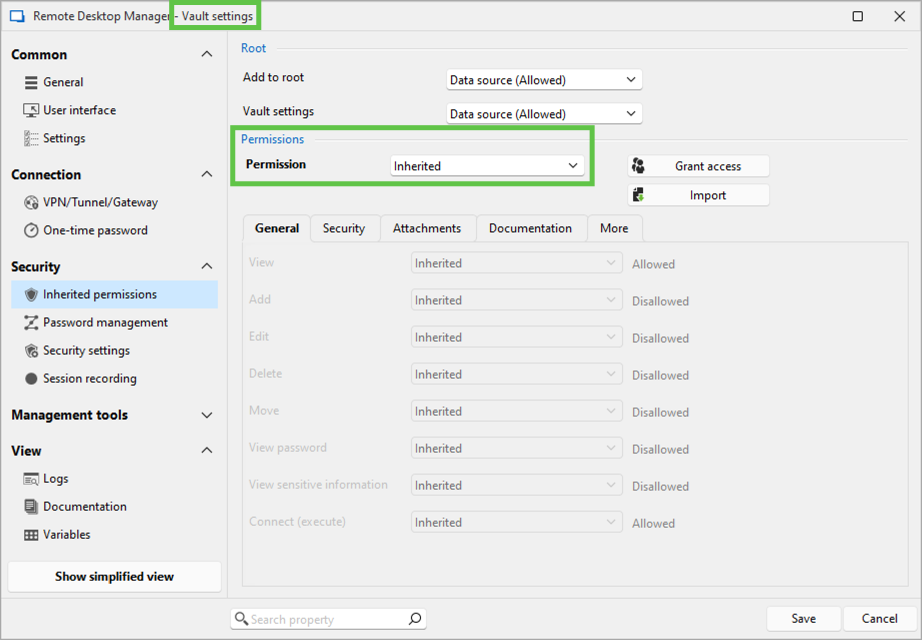
Best regards,
Érica Poirier
60d23de3-b4df-4873-bdc9-4ff5d79b5238.png
c0c74c29-5f01-4702-ad88-287290930ecc.png
ff3925d2-6fc8-4490-9e6f-b6402d6c7d98.png