Flag entries with a color dot, very simple
1 vote

On macs, you can add a color tag to a file in the Finder. I want something like that for entries in the nav pane? just a little right click and add a colored dot next to the entry. Or maybe modify the Status tool to be a little more customizable? I tried to make it do what I want, but it didn't really work. I just want to be able to add a kind of ad-hoc category to a listing. For like when I am patching a bunch of machines, or doing the same set of steps to a few machines, it would be nice to put a red dot on to let me know I started something and I need to get back to it, or use the dots to indicate progress through a set of steps. Let me know if I need to clarify this...
Thanks!
All Comments (8)
Hello,
I have two questions for you.
- From your description, I assume you want this marker to apply only on your local machine, is that correct? As opposed to applying to anyone with access to your datasource, where this would need to be stored in the entry like a status.
- Would you need this to only show up in the navigation pane, or do you also want this to show up in the opened tabs? This could also be customizable without much of an issue, which might be the best.
Regards,
Hubert Mireault
Hi Hubert - thanks so much for your reply!
re your questions:
- Yes, local only is fine - I'm a solo practitioner so a moot point in my case, but yes, this is really just an ad-hoc memory aid, not meant to communicate to others. Just a way to flag a machine to come back to or as a tool for managing processes applied to multiple machines.
- I really don't use the tabs much. I use the nav pane much more since the order is predictable - the tabs are in order of opening and since I can have 10-15 sessions open it's not efficient to scan for the session I want, I know where it is in the nav pane, which I keep open at all times. But this could be useful for someone that uses tabs more than me.
Best wishes for continued success!
---- Andrew
Perfect, thank you for the answers!
And just one other thing that I forgot to ask, do you expect these color markers to stay between restarts of RDM? This would help us determine whether we should persist this information or not.
Regards,
Hubert Mireault
Yes, I think it should be persistent through restarts of the program.
Thanks!
Perfect, thank you once again. I'll open an internal ticket and we'll see what we can do to support this.
Regards,
Hubert Mireault
Thanks so much Hubert! I hope it's as useful to other users as I know it will be to me.
Hello,
We've added Local color coding, which should support essentially all the same features as the Finder tag color that can be found in mac. You will be able to set colors on entries, modify said colors (rename, change color, etc). This feature can be found under in the contextual menu under Edit. It will be available with the upcoming 2025.3.17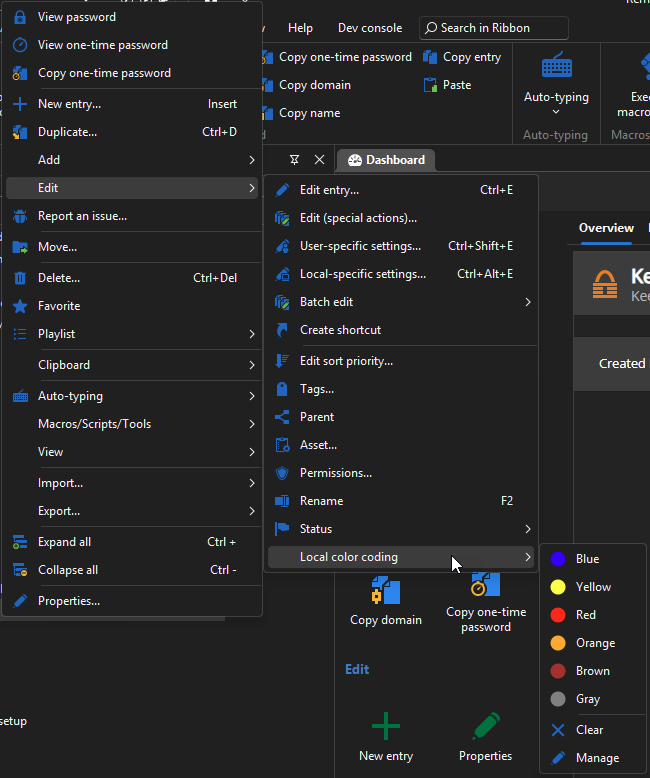
Regards,
Jafran Majeau
6b6d3b76-fa0d-491c-827d-34f60c524a32.png
Amazing! Well done Devolutions!