Backwards Compatibility with RDM versions after Database Upgrade
Backwards Compatibility with RDM versions after Database Upgrade

Hi,
We currently have Remote Desktop Manager 2024.3.25.0 deployed, and are planning on deploying the latest version, which will require a database upgrade. Will the version we have currently have deployed still work after the database upgrade?
Ideally we'd like to do a staged rollout of the update, so not everyone will get the update at the same time. Would that cause any issues? Or would all users need to be on the latest version?
All Comments (10)
Hi Nick,
Thank you for reaching out to us.
Once the database has been upgraded, we don’t recommend continuing to use an older version of Remote Desktop Manager, as this may cause compatibility issues. To ensure everything runs smoothly, it’s best if all users are on the same version after the database update.
Here you can find the Version schema compatibility for Remote Desktop Manager:
https://docs.devolutions.net/rdm/kb/how-to-articles/portable-rdm-installation/
If you’d like to proceed with a staged rollout, one option is to create a copy of your database and upgrade that copy. You can then configure the updated clients to connect to the upgraded database, while the others continue using the current one until you’re ready to transition everyone.
To do this, you can use the portable version of RDM so that your main installation remains unchanged:
https://docs.devolutions.net/rdm/kb/how-to-articles/portable-rdm-installation/
After the upgrade, you can take advantage of the Version Management feature to ensure all clients are running the correct version:
https://docs.devolutions.net/rdm/commands/administration/system-settings/application-specific/version-management/
Please let us know if you’d like more details—we’ll be happy to assist.
Best regards,
Hi Nick,
Thank you for reaching out to us.
Once the database has been upgraded, we don’t recommend continuing to use an older version of Remote Desktop Manager, as this may cause compatibility issues. To ensure everything runs smoothly, it’s best if all users are on the same version after the database update.
Here you can find the Version schema compatibility for Remote Desktop Manager:
https://docs.devolutions.net/rdm/kb/how-to-articles/portable-rdm-installation/
If you’d like to proceed with a staged rollout, one option is to create a copy of your database and upgrade that copy. You can then configure the updated clients to connect to the upgraded database, while the others continue using the current one until you’re ready to transition everyone.
To do this, you can use the portable version of RDM so that your main installation remains unchanged:
https://docs.devolutions.net/rdm/kb/how-to-articles/portable-rdm-installation/
After the upgrade, you can take advantage of the Version Management feature to ensure all clients are running the correct version:
https://docs.devolutions.net/rdm/commands/administration/system-settings/application-specific/version-management/
Please let us know if you’d like more details—we’ll be happy to assist.
Best regards,
@Stephan Haupt
Hi! Sorry to revive this thread, this got put on the back-burner for us. So we do have a Test data source that is just a copy of our prod one, and previously our old licenses would apply to both - we haven't had a need to use the test one in a while, but now when i try to enter our current license key on our test data source, the application says it is invalid - how can I make our one license apply to both data sources?
Hello,
Thank you for getting back to us!
My initial guess is that your Test data source might be running on an older version of Remote Desktop Manager. Could you please confirm which version you’re using, or try updating it to the latest release to see if that resolves the issue?
I’d also like to mention the Portable License feature, which may help in your situation:
https://docs.devolutions.net/rdm/commands/administration/system-settings/application-specific/application/#license
With this feature, as long as you’ve authenticated with a valid license within the specified expiry period on your main database, your user will remain licensed when connecting to your test database as well.
Please let us know the version details, and we’ll be happy to guide you further!
Kind regards,
Stephan
Hello,
Thank you for getting back to us!
My initial guess is that your Test data source might be running on an older version of Remote Desktop Manager. Could you please confirm which version you’re using, or try updating it to the latest release to see if that resolves the issue?
I’d also like to mention the Portable License feature, which may help in your situation:
https://docs.devolutions.net/rdm/commands/administration/system-settings/application-specific/application/#license
With this feature, as long as you’ve authenticated with a valid license within the specified expiry period on your main database, your user will remain licensed when connecting to your test database as well.
Please let us know the version details, and we’ll be happy to guide you further!
Kind regards,
Stephan
@Stephan Haupt
I installed 2025.2.28.0 on my workstation and updated our test datasource as the app required - is there something else that should be done? The portable license seems interesting though but I can't seem to find that setting
Hey Nick,
That should be all the steps to get the data source up to date!
Regarding the portable license, you can find the settings here: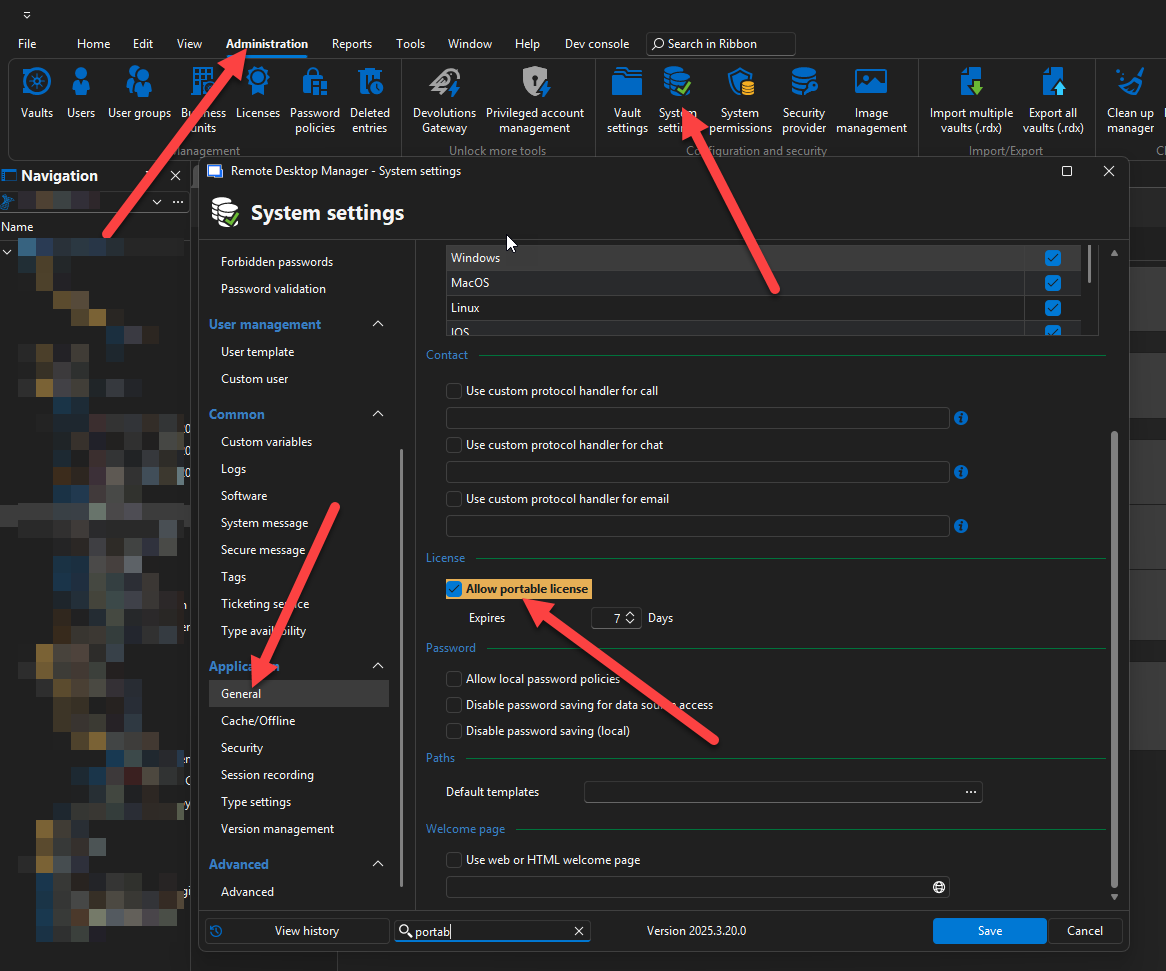
Please let me know if you have additional questions.
Thanks,
Stephan
1ed82f81-73f0-49e0-8586-263694473039.png
Hey Nick,
That should be all the steps to get the data source up to date!
Regarding the portable license, you can find the settings here:
Please let me know if you have additional questions.
Thanks,
Stephan
@Stephan Haupt
Hey Stephan, sorry again for the delay and resurrecting this thread. It was put on the back-burner and I'm just getting back to it after the holidays.
Our currently deployed version of RDM is 2024.3.13.0, which does not appear to have this option in the settings. We used to be able to have a second datasource working in the past (as in, since 2023) so I'm not sure what changed. I don't believe we had multiple licenses.
Hey Nick,
You're right, the portable license was added in the 2025 version. Apologies for the confusion.
Once you update, you'll be able to use it to access multiple data sources with your license. Until then, you can also use your existing license on your test database.
Would this assist with your update plans?
Thanks
Stephan
Hey Nick,
You're right, the portable license was added in the 2025 version. Apologies for the confusion.
Once you update, you'll be able to use it to access multiple data sources with your license. Until then, you can also use your existing license on your test database.
Would this assist with your update plans?
Thanks
Stephan
@Stephan Haupt
So the issue I'm having is that when I try to connect to the test data source from the latest version of the application, I'm prompted with the 'Manage License' menu. showing all of our old expired licenses. When i try to apply our current license key that's working on our Production data source, it says 'Your serial number is not valid.'
Hey Nick,
I think it would be best if we had a quick look at this together.
Would it be okay for you if I created a ticket using your Forum Email and reached out to schedule a quick session?
Best regards,
Stephan
Hey Nick,
I think it would be best if we had a quick look at this together.
Would it be okay for you if I created a ticket using your Forum Email and reached out to schedule a quick session?
Best regards,
Stephan
@Stephan Haupt
That would be great!