internal server error connecting to server using remote desktop
internal server error connecting to server using remote desktop

I have 3 identical servers. They are the farm servers for a remote desktop farm. When I try to connect to 2 of the servers I get an "internal error" message in remote desktop and nothing else. One server does however work. Not sure how to troubleshoot this.
I can connect to all of those servers through mstsc and using the same IP address.
All Comments (12)
Hello,
Thank you for reaching out to us regarding this,
Could you please specify the version of RDM you are currently using?
What type of data source are you using?
Additionally, could you provide us with a screenshot of this error message?
Let me know,
Best regards,
Samuel Dery
Version 2025.2.23.0 64-bit
.Net 9.0.5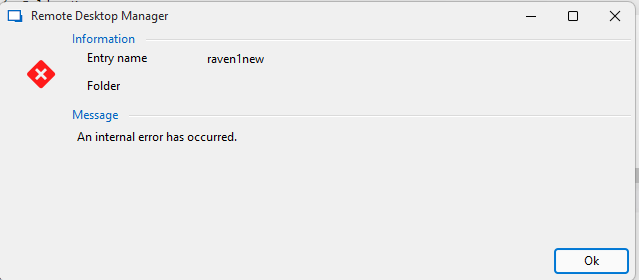
devolutions.png
Hello,
Thank you for your reply,
I see, if you go into your entry Properties and change the "Display" to "External," does it work as expected when attempting the connection?
With this, the entry should launch in MSTSC using the configuration you have created in RDM.
Let me know the results.
Best regards,
Samuel Dery
Works correctly in External
Spoke too soon. Testing the wrong server. Get the same error in all three possible modes. External does get this error result:
[Window Title]
Remote Desktop Connection
[Content]
An internal error has occurred.
[^] Hide details [OK]
[Expanded Information]
Error code: 0x0
Extended error code: 0x0
Timestamp (UTC): 09/04/25 06:32:12 PM
Press Ctrl+C to copy.
Now the only issue I see is that we get a certificate error message when connecting. Which we can and do safely ignore, since it's a wildcard certificate and RDP doesn't like the main certificate name which doesn't match the server. The wildcard is part of an alias.
Hello,
Thank you for your reply,
Does it still work for you when manually attempting the connection outside RDM using MSTSC? If so, it could mean this is an issue with the configuration inside RDM.
You could try exporting the working configuration from MSTSC in the .rdp format and importing it in RDM by going under "File" -> "Import" -> "Session" -> "RDP Configuration (.rdp)."
Let me know,
Best regards,
Samuel Dery
Still does not work.
Hello
I'm interested in this thread because we've recently had another support case with exactly the same problem, and we've been struggling to get to the bottom of it.
The Microsoft ActiveX control that we use for embedded RDP connections is something like a "black box" to us; it doesn't offer much in the way of diagnostics or logging. The "internet error" is coming from that control, rather than something in RDM. What's really strange is that it works when you launch mstsc yourself, but not when you run the RDM session in "External" mode.
My guess is that if you change the "RDP Version" in the "Advanced" tab to "FreeRDP (Latest)" the connection will work. If that's true, you could use it for a workaround in the short term.
Although this might not be very convenient, can you try restarting one of the remote machines and see if the problem goes away?
Another thing I'd like you to check is if you have any saved credentials in Windows for the problematic servers. You can open "Credential Manager" and check in "Windows Credentials. Saved RDP server credentials have the prefix "TERMSRV/". If you have saved credentials, try removing them and again, see if the problem still occurs.
Please let me know if something isn't clear or you have other questions
Kind regards,
Richard Markievicz
I did find something interesting. I didn't change to freeRDP yet. Trying to log in with administrator always fails, however if I try to log in with a different account it works. Knowing this if I set the profile to admin console then the administrator account logs in successfully. Hope this helps
Hello
No need to try with FreeRDP if you found a different workaround, I was just trying to help unblock you.
It's interesting that other accounts work ok.
If you're interested in continuing to troubleshoot the problem (we have not been able to recreate the issue on our side)
- Does the problem go away (at least temporarily) if you restart RDM?
- Does the problem go away (at least temporarily) if you reboot the remote machine?
- Do you have saved credentials in Windows Credential Manager for the problematic machine(s)? If so, does removing them help?
Thanks and kind regards,
Richard Markievicz
Problem is not affected by rebooting RDM.
Production machine, so rebooting for this kind of troubleshooting is not possible
Did not have any credentials saved for that machine.
If I can help with anything else let me know.
Hello
Yes, I understand not wanting to reboot a production machine.
If you can still reproduce the issue, can you please do so and then send me an export from Event Viewer (on the client / RDM machine) of:
Application and Services Logs/Microsoft/Windows/TerminalServices-ClientActiveXCore/Microsoft-Windows-TerminalServices-RDPClient/Operational
You could send that to me by PM here on the forum.
Thanks for the help, and don't hesitate with further questions or comments
Kind regards,
Richard Markievicz