Faster UI for RDM
1 vote

In my brand new i5 work pc RDM takes ages to start (5 min I'd say sometimes). I admit it is very stable once it is started, but it feels like 3d rendering beast of software. WTH!
I am back to MremoteNG in this particular pc. What a relief! I can't edit Av exclusions unfortunately.
Anyway also on my i7 tower pc you can see lagging while using the UI.
It's a shame! RDM does not deserve this.
I have used RDM for over 2 years now. Also some notification of failed connections are locking the main window, I do realize how annoying that is, do you? Who cares of failed rdp connections, it happens at all times. Or am I missing one of the 2000 options?
Make it simpler please. Smarter. Make it Lite. A breeze.
And thanks for your software.
All Comments (1)
Hello,
Have you tried the new Ready2Run installation?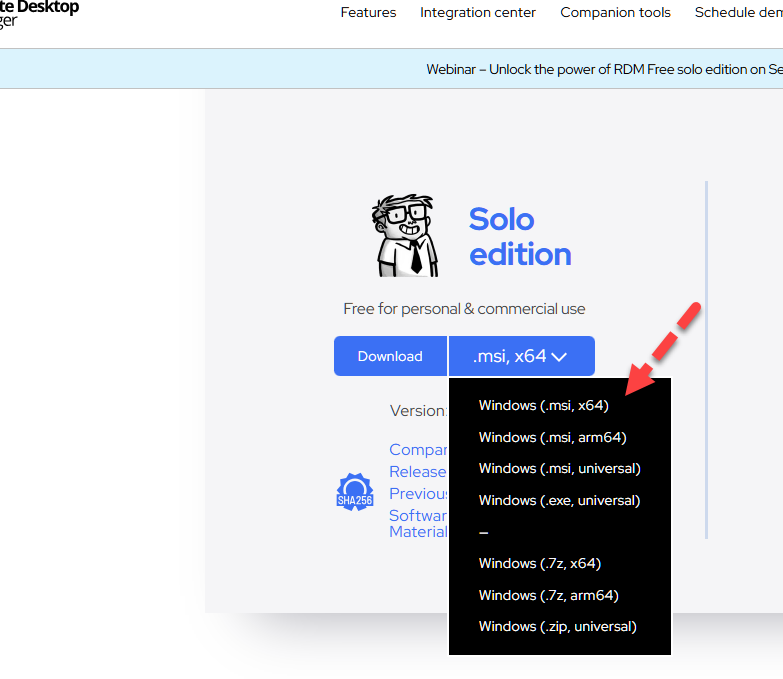
Universal was previously the default.
About the complexity of the UI, we always try to improve it. However, RDM is a very powerful application and this presents a constant challenge.
RDM 2025.3, coming this fall, will no longer show a modal error when a connection fails or disconnects. I personally implemented it, and there will be a notification in the tray icon.
Regards
David Hervieux
1b84a4ed-31cc-4fb9-b936-193b975fbbc9.png