Windows 11 24H2 ARM(Apple Sil) - August 29, 2025—KB5064081 (OS Build 26100.5074) Preview
Windows 11 24H2 ARM(Apple Sil) - August 29, 2025—KB5064081 (OS Build 26100.5074) Preview

Yes I'm on a preview build. It just updated yesterday. Just a warning to others.
After this update RDM 2025.2.27.0 crashes when launching any RDP Desktop. (with or without API hooking disabled)
Faulting application name: RemoteDesktopManager.exe, version: 2025.2.27.0, time stamp: 0x68760000
Faulting module name: unknown, version: 0.0.0.0, time stamp: 0x00000000
Exception code: 0xc0000005
Fault offset: 0x000000177a27e180
Not much info here.
I'm pretty sure I can't remove the hotfix. But trying that next.
Recommended Answer
I can confirm removing that hotfix KB5064081 resolved the issue.
All Comments (11)
I can confirm removing that hotfix KB5064081 resolved the issue.
Hello
In general it's hard for us to support preview builds as the underlying RDP components (e.g. mstscax.dll) ship as part of the OS, and Microsoft commonly breaks core functionality in preview and insider builds. We're hopeful that in the future Microsoft will provide a way to maintain these components separately from the OS (Their modern Remote Desktop Client did exactly that, but is now deprecated).
I'm glad you were able to resolve it by uninstalling the update.
Thanks and kind regards,
Richard Markievicz
So I have additional information on this issue.
After disabling the pre-release updates for my Win11. My system yesterday did the upgrade for CU for Win 11 24H2. KB5065426
I have the same issue with this production update. Anyone else having this problem?
It also upgraded .NET 9.0.9 Update FYI.
Hello
I have a somewhat equivalent setup here (Windows 1124H2 running in Parallels on an M1 Mac) - you wrote "Apple Sil" in the post title, so can I assume you're running in Parallels? Or something else?
I've installed the KB5065246 and didn't get a problem after updating.
Can you check the precise RDM install version (a screenshot of the "About" window will suffice, to know if you have a JIT or PreJIT build and if you are running ARM native).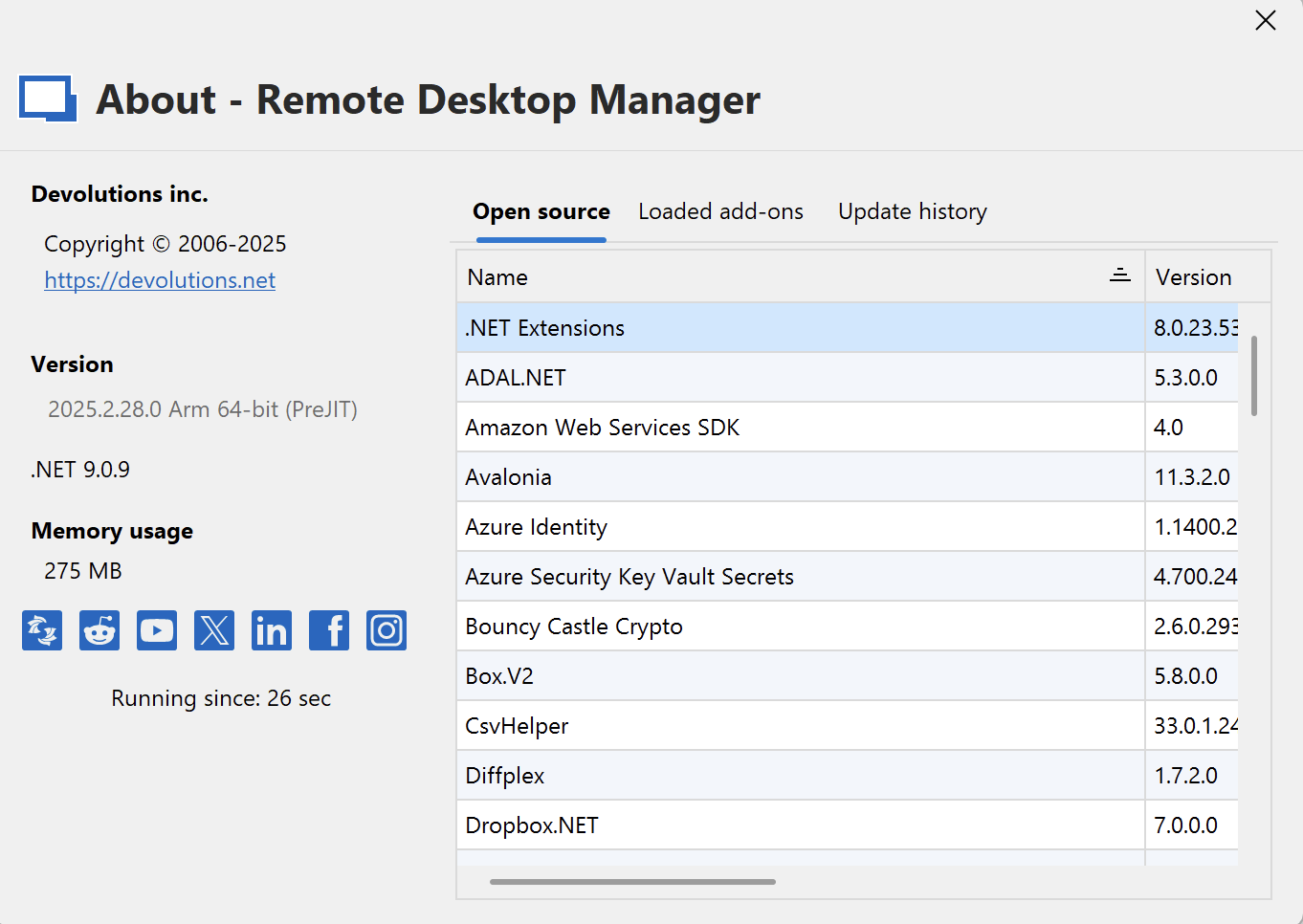
And please let us know if you are using Parallels or some other virtual environment.
Kind regards,
Richard Markievicz
Screenshot 2025-09-11 at 09.37.16.png
Im on Parallels on a Mac Mini M2 Pro. After I uninstalled the KB5065426 I can launch sessions again. When the issue is occurring this is the error I have in the event viewer.
Faulting application name: RemoteDesktopManager.exe, version: 2025.2.27.0, time stamp: 0x68760000
Faulting module name: unknown, version: 0.0.0.0, time stamp: 0x00000000
Exception code: 0xc0000005
Fault offset: 0x0000003bd65fddd0
Faulting process id: 0x3530
Faulting application start time: 0x1DC22C5EDE3010F
Faulting application path: C:\Program Files\Devolutions\Remote Desktop Manager\RemoteDesktopManager.exe
Faulting module path: unknown
Report Id: 4935bb62-1413-4cde-aa20-6a943ffab11c
Faulting package full name:
Faulting package-relative application ID: 
Screenshot 2025-09-11 at 11.35.16 AM.png
Hello
Ok, so your setup seems roughly the same as mine. Do you have a corresponding core dump (.dmp) in %localappdata%\crashdumps? If so, can you send it to me by PM?
Thanks and kind regards,
Richard Markievicz
Hello,
I’ve sent you an email containing a secure link where you can safely upload the .dmp file.
Could you please let us know once the file has been sent?
Best regards,
Carl Marien
I uploaded 2 dmp files for you.
Hello
Thanks for that. I strongly suspect that SentinelOne is injecting code into RDM that's interacting weirdly with KB5065426 on ARM.
Please can you try excluding RDM from SentinelOne and verify if the problem goes away?
Thanks and kind regards,
Richard Markievicz
So, I actually don't this S1 had anything to do with this. I checked every log, and nothing indicated it stopped or blocked anything.
But here is what I did next. I installed the Hotfix Again, and sure enough same issue. Can't launch any Remote Desktop.
I then uninstalled the version I had 25.2.27, and installed the latest from the site, 25.2.29. I am happy to say I am no longer having the issue. Desktops launch fine.
Not sure if the version is the difference or the removal and re-install. But all good now. Ty.
Hello
Thanks for the feedback! I don't think SentintelOne was blocking us, but rather one of their code hooks was interacting with us and one or more system libraries in a way that caused a crash. Unfortunately it's just the nature of applications hooking and running code inside other applications.
Since this seems resolved by running the 2025.2.29, that's excellent news. Please don't hesitate to post back if you have problems again.
Kind regards,
Richard Markievicz