Dynamic HTML-Inputfields
1 vote

Hello Devolutions Team,
We recently switched to Remote Desktop Manager for our password management, and we’re very happy with the overall experience – thank you for building such a great tool!
However, we’ve encountered some challenges with the autofill feature on certain websites that use dynamically generated input field IDs. Since RDM currently relies on static input field identifiers, autofill doesn’t work reliably in these cases.
It would be a fantastic improvement if RDM could support alternative selectors such as input types (e.g., type="password"), name attributes, or even labels. This approach seems to be used by other password managers like Bitwarden or Proton Pass, which handle these dynamic fields quite well.
We truly appreciate your work and look forward to future updates!
Kind regards,
Sean Heinzelmann
All Comments (5)
Hi,
Dynamic HTML input fields are supported in Remote Desktop Manager (RDM). Within an entry’s edit window, you can enable this by clicking the Automatic button under Login → HTML Control. This will automatically set the Username ID to [UserName] and the Password ID to [Password], meaning RDM will attempt to detect the correct input fields without requiring you to manually specify the IDs or names.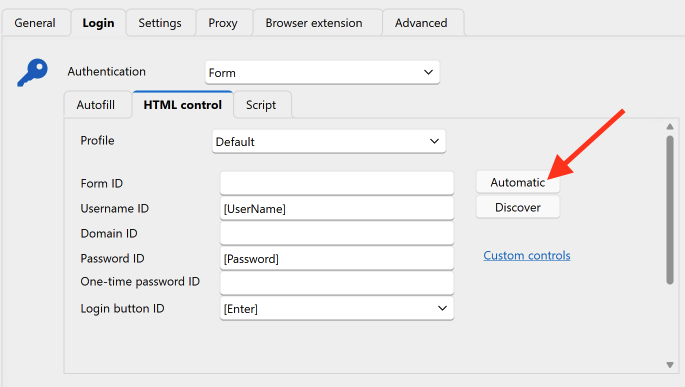
Although the fields are labeled Username ID and Password ID, you can enter an element’s id attribute, name attribute, or placeholder.
When you mention Bitwarden or Proton Pass, are you referring to their browser extensions?
Dynamic HTML input fields are also supported with the Devolutions Workspace Extension, which can connect directly to RDM, Devolutions Server, or Devolutions Hub Business/Personal, depending on the data source you use.
Best regards,
Olivier Désalliers
RDMWebAutomatic.png
Hi,
Dynamic HTML input fields are supported in Remote Desktop Manager (RDM). Within an entry’s edit window, you can enable this by clicking the Automatic button under Login → HTML Control. This will automatically set the Username ID to [UserName] and the Password ID to [Password], meaning RDM will attempt to detect the correct input fields without requiring you to manually specify the IDs or names.
Although the fields are labeled Username ID and Password ID, you can enter an element’s id attribute, name attribute, or placeholder.
When you mention Bitwarden or Proton Pass, are you referring to their browser extensions?
Dynamic HTML input fields are also supported with the Devolutions Workspace Extension, which can connect directly to RDM, Devolutions Server, or Devolutions Hub Business/Personal, depending on the data source you use.
Best regards,
@Olivier Desalliers
Hi,
Thanks for the clarification.
It's good to know that these are dynamic fields. However, the autofill still doesn't work on those websites. We're using the embedded browser to open them.
Do you have any idea why the password might not be filled in?
Best regards,
Sean
Hi,
Are these websites public? We can try to reproduce the issue on our side. If you prefer not to share the URLs in the forum, you can send them to me via direct message instead.
Have you tested them with the Devolutions Workspace Extension to see if they work there?
Best regards,
Olivier Désalliers
Hi,
Are these websites public? We can try to reproduce the issue on our side. If you prefer not to share the URLs in the forum, you can send them to me via direct message instead.
Have you tested them with the Devolutions Workspace Extension to see if they work there?
Best regards,
@Olivier Desalliers
Hi,
Sure, I can share one of them. For the others, I’d need to search again as I don’t have them in mind at the moment.
Here’s one: https://account.synology.com
The Workspace extension seems to be working. I'm curious, how does the extension detect dynamic fields, but RDM doesn’t?
Best regards,
Sean
Hi,
The main issue is that the website uses a multi-page authentication flow, where the username and password fields are not visible at the same time.
Currently, RDM behaves strictly in both cases—whether it is autofilling on load (Autofill Login) or when clicking the key button in the navigation bar with dynamic fields. At this time with dynamic fields, RDM requires a password field to be present on the page in order to detect and associate it with a username for login.
We will open a ticket to adjust this behavior so that it works more like the browser extension, allowing when clicking the key button to handle multi-page logins with dynamic fields.
Best regards,
Olivier Désalliers