Add multiple MAC addresses for assets
1 vote

Hello everyone,
I would like to add more MAC address to an IT asset (LAN, WiFi etc.) but there is only one field.
So I guess I am wrong approaching the way to add an asset and its info. How can I add MAC address of LAN, WiFi Card, Bluetooth linked to an asset like a PC Desktop, smartphone, laptop etc?
All Comments (8)
Hello,
I will transfer this forum thread to the Feature Request section so that the development team can review your request.
Best regards,
Carl Marien
Hello,
I have a solution to suggest. While it's not directly available, you could leverage the custom fields feature. This would allow you to add these fields to any entry, as well as rename them to be more representative of what they are.
In this example I've added two fields for different mac addresses: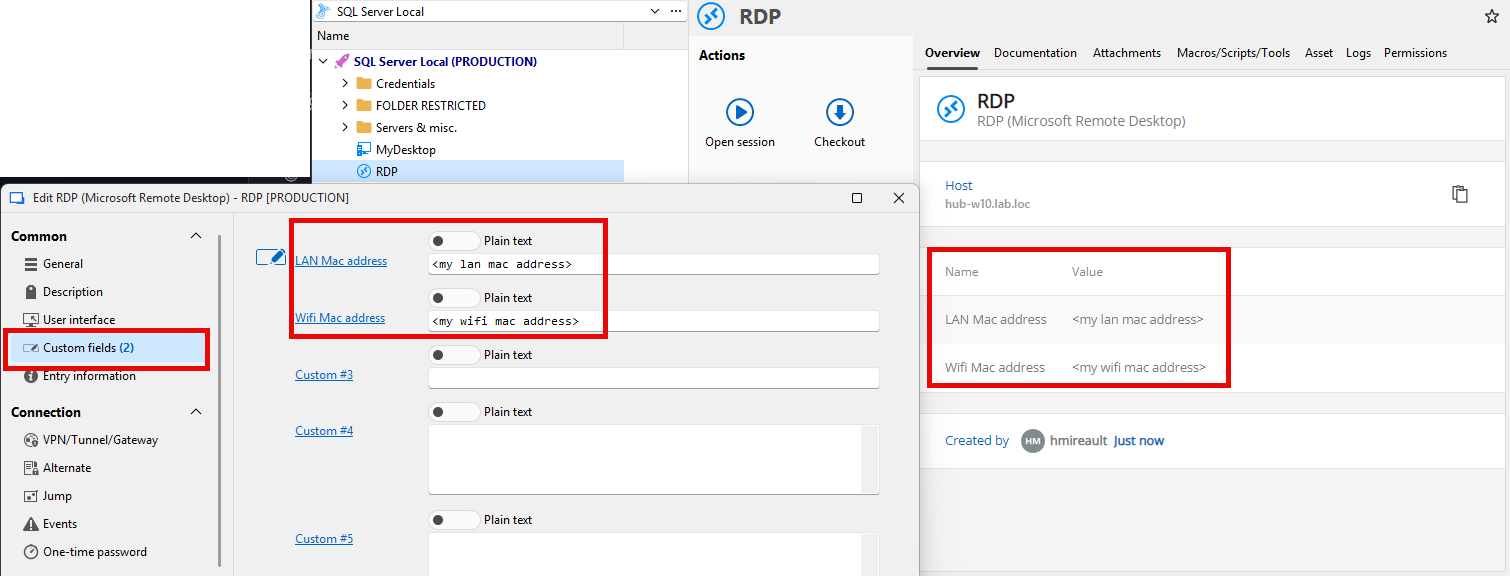
These values also show up in the dashboard for quick access.
Does this work for what you need?
Regards,
Hubert Mireault
6865322a-1cff-4897-94f1-147ee116c5ec.png
Hello,
thanks for your suggestion.
Do you plan to add such a feature in the future?
This solution involves some considerations:
- search by mac address is a little bit tricky
- if, in the future, this feature will be added, I hope there will be a way to bulk move custom fields to the new mac fields
- it would be great to customize the overview tab with the field I want... I know this is not a problem of the software but of my head's one... XD
I saved a customized search but it's not too bad...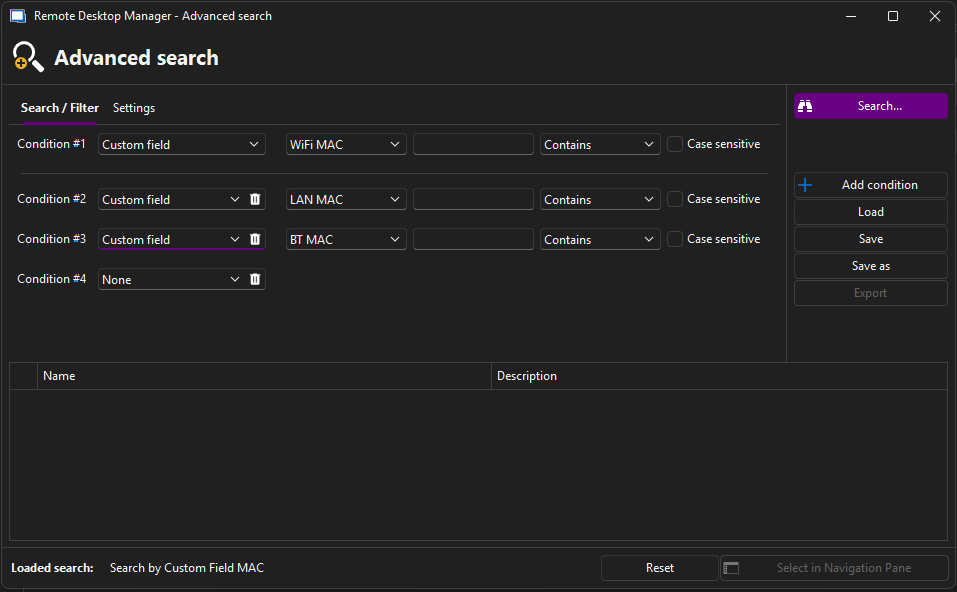
The problem is that the Custom Field WiFi MAC is case sensitive, I think if I do a mistake and for an asset I set the field name as "WIFI MAC" it will be not included in the search results, and, I am sure, the day I will search the most important MAC address of my life it will be the one in the wrong typed field name... XD
By the way, I'll test your solution, thank you! :)
immagine.png
Do you plan to add such a feature in the future?
If you mean for having multiple MAC addresses in the same entry, at the moment it's not in our plans, but we're always open to new ideas—hence the purpose of our feature request side of the forum. There's different criterias that will help us prioritize these requests, like the amount of users asking for a feature, if there's a different way to achieve this or not, and if it lines up with our own internal developments. So in this case, while I still suggested an alternative for you, it doesn't mean we won't implement this in the future.
if, in the future, this feature will be added, I hope there will be a way to bulk move custom fields to the new mac fields
This should already be possible with either the powershell module, or with our powershell "edit (special action)".
it would be great to customize the overview tab with the field I want... I know this is not a problem of the software but of my head's one... XD
This is something that's been requested by our users in the past, and something we want to allow someday. Our dashboards will need a rework with how they're generated, so it's not a simple change, but we're noting your interest in this.
The problem is that the Custom Field WiFi MAC is case sensitive, I think if I do a mistake and for an asset I set the field name as "WIFI MAC" it will be not included in the search results, and, I am sure, the day I will search the most important MAC address of my life it will be the one in the wrong typed field name... XD
If you always store your MAC address information in specific custom fields and don't use them for anything else, leaving the value to the pre-filled information like "Custom #1" will search all values in the first custom field, regardless of whether their label was changed. This should allow you to find this information whether you have made a typo in the label of the field or not.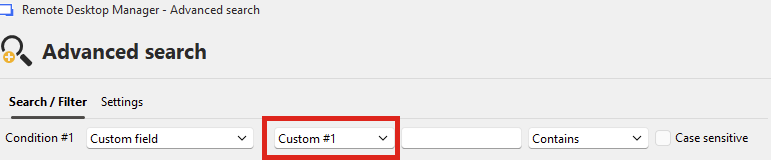
Hopefully this additional information helps you understand our processes as well as possibilities that are available with RDM.
Regards,
Hubert Mireault
bf8340f9-cfd5-4862-a879-e5086ebc2c76.png
I think I tested the search by custom fields too quickly... 😅
Just another request: it could be useful to search all the custom fields together without having to add custom#1, custom#2 etc.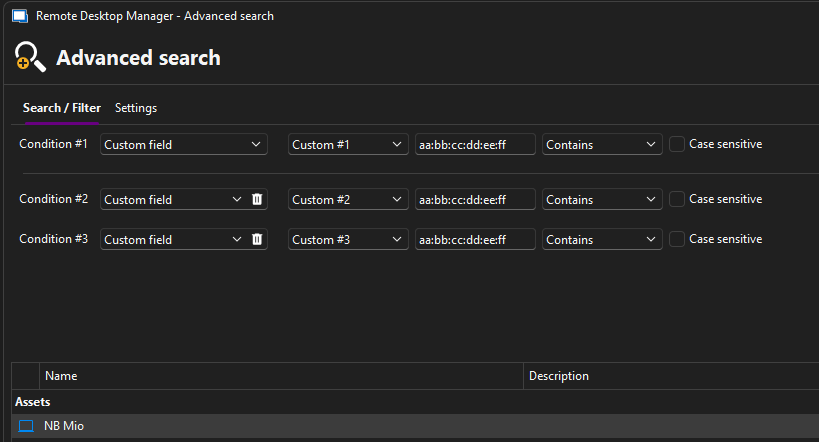
Hopefully this additional information helps you understand our processes as well as possibilities that are available with RDM.
Absolutely yes, thank you very much for your support.
immagine.png
I will open a ticket to add an option to search all custom fields at once to simplify things.
In the meantime if this is a search you perform a lot, you can save and load a search with the buttons on the right (which are cut off in your screen capture), which would avoid you re-entering the three different conditions you've manually input. Let me know if this helps you.
Regards,
Hubert Mireault
Hello,
We've just added the option to search across all custom fields. This will be available in our next major release, 2026.1.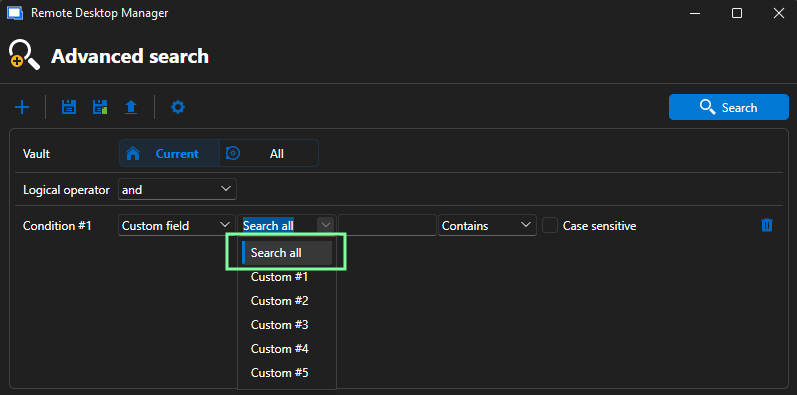
Regards,
Léon Le Brun
f3aef6d4-c436-4016-8cc6-d6bbc3725ed8.png
Awesome! Thank you!!! 😊🍻