Getting logged off website sessions

I’m running macOS and using a web-client for a KVM-over-IP device via its local IP address. When I launch the connection through Remote Desktop Manager’s connection manager (using a web session tab), everything works correctly—I can access the device and fully control the remote PC.
The issue occurs when I switch away from that session. If I move to another tab within Remote Desktop Manager or bring a different macOS window to the front, the KVM session disconnects after a short period. When I return, I’m forced to log back in and re-establish the session. This becomes disruptive, especially when I only step away for a few minutes to check connections in other tabs.
From what I can tell, Remote Desktop Manager appears to suspend or alter the state of background website sessions. This seems to cause the KVM web session to expire and terminate, requiring a re-login when I come back. Importantly, this behavior does not happen in standard browsers (Chrome, Firefox, Safari). In those cases, I can leave the KVM session open in a tab, switch to other tabs or even other applications for extended periods, and the session remains active and responsive when I return.
My question:
Does Remote Desktop Manager handle background website connections differently than a regular browser, potentially causing sessions to close? If so, are there settings or configuration options to prevent the session from expiring when a web session tab loses focus?
All Comments (16)
Hello
I have a little knowledge about how this works in RDM Mac so I can provide some supposition. But perhaps one of my colleagues on the RDM Mac team will also step in with a more authoritative answer.
Web sessions are provided by the WebKit WKWebView control which is part of the macOS SDK. This is their "modern" web control which works like modern Safari (and other browsers): the actual web engine is hosted in a separate process. What I suspect is happening, is that when you background the tab, the OS is aggressively unloading the process hosting that session. This could happen much more aggressively in a non-browser application; I'm not sure exactly what heuristics the system uses here.
We'd need to look into it and confirm if that's what is actually happening; the actual name of the KVMIP server you're using could be helpful. I know there are techniques to save and restore the user session in this case, but like I say, we'd need to investigate.
As this seems like a real annoyance, in the short term: can you try going to Settings > Types > Others > Web and enabling the legacy webview engine?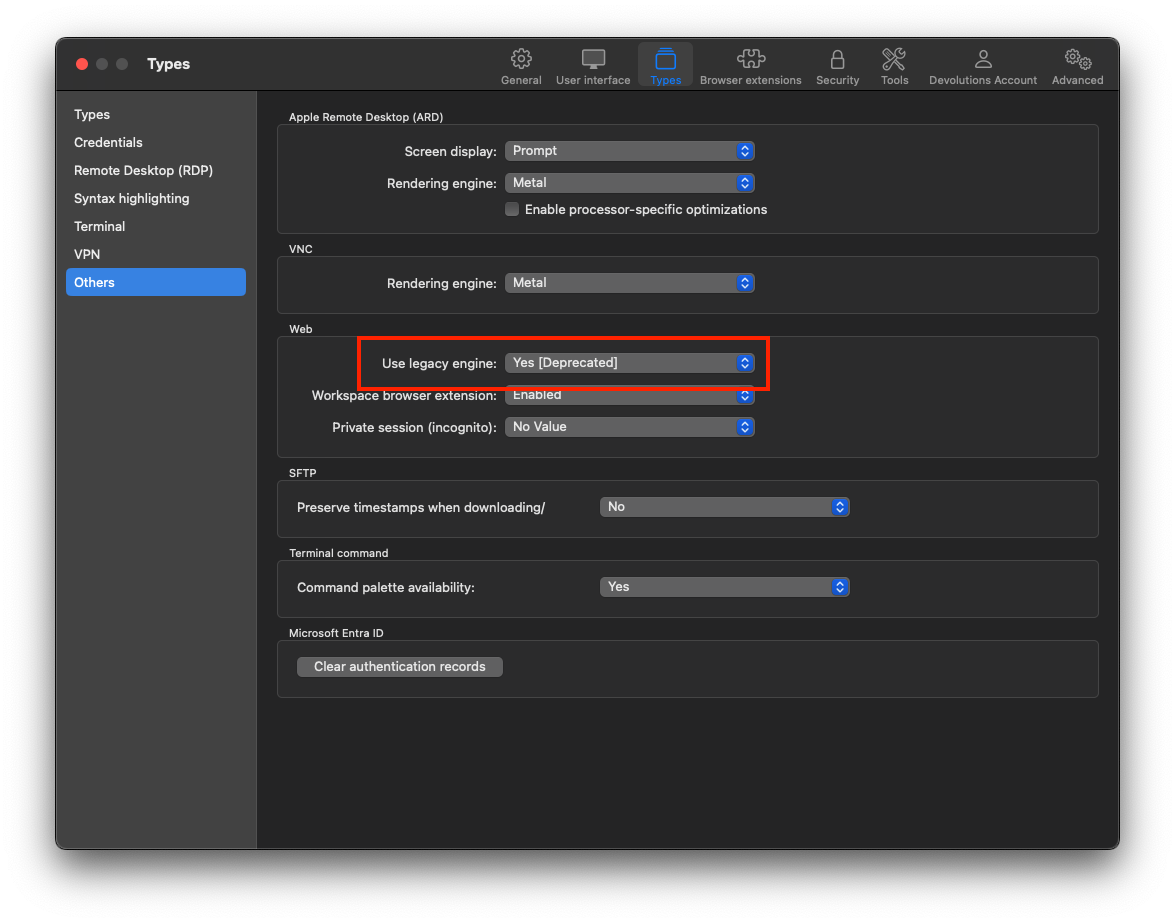 Letting us know if this is helpful will also help with the analysis of the issue.
Kind regards,
Richard Markievicz
Screenshot 2025-08-26 at 12.42.07.png
Thank you for the reply.
The KVM device i'm using is: https://www.aten.com/global/en/products/kvm/kvm-over-ip-switches/cn9950/
When I try enabling the legacy webview engine, it crashes the app when launching the viewer. When connecting the the KVM device UI, there are no issues. I'm able to login and do whatever, but from there, when I launch the viewer to connect to my remote machine, the viewer launches another tab within the manger and that's when it crashes.
Hello
Thanks for the information.
I don't have an equivalent device to test with. Overall I'm a bit confused by the problem. I've tried some experiments with another KVM that I assume behaves in a similar way (an HP iLO) and what I've noticed is: the tab is relatively resource heavy with the native console open (it consumes a lot of CPU). Very quickly after I send the tab to the background, the web content helper process goes into an "App Nap" state. Restoring the tab restores the session exactly as it was, however. I've also noticed exactly the same thing in Safari - the backgrounded tab quickly goes to App Nap, but restores perfectly when I bring it back into view.
So I had thought that this behaviour might be related to your issue, but I expect actually it's not: since you say the same scenario works for you in Safari. That's actually good news because App Nap of another process is something outside our control.
I think the next step to debug this is to see if the web site itself gives any clues as to why you're being logged out. Unfortunately when we switched to `WKWebView` we lost the ability to inspect web views inside RDM. I've gone ahead and restored that capability but we'll have to wait for an upcoming update before we can enable it on your side and look deeper at the issue. I'll have to post an update here once something is available for you to test.
Otherwise, for the legacy web view which might be the best option, it would be good to try and see what the issue is there and if it can be fixed. If it's a problem in RDM, we can likely fix it, if it's a problem on Apple's side maybe not (that control is deprecated for some time, but continues in macOS because it offers features that WKWebView does not). Does the application crash completely, and is there an error reported in Console.app that you could send to us?
Thanks and kind regards,
Richard Markievicz
When I use legacy engine: I log into the device UI, authenticate as an admin, then launch the viewer (which launches a new tab) and the the app crashes completely. I don't see any errors that pop up before it crashes, but here is what I see in the RDM application logs:
[8/27/2025 2:33:50 PM - 2025.2.11.0 - 64-bit] Error: Arg_NullReferenceException
[8/27/2025 2:33:34 PM - 2025.2.11.0 - 64-bit] Error: FailedProvisionalLoad - Error code: -999, Error description: The operation couldn’t be completed. (NSURLErrorDomain error -999.)
[8/27/2025 2:33:33 PM - 2025.2.11.0 - 64-bit] Error: FailedProvisionalLoad - Error code: -999, Error description: The operation couldn’t be completed. (NSURLErrorDomain error -999.)
[8/27/2025 2:33:17 PM - 2025.2.11.0 - 64-bit] Info: Attempting authentication challenge with method NSURLAuthenticationMethodServerTrust
Hello
Thanks for that. It doesn't give enough information to understand the issue. If you open Console.app on your Mac and check the "Crash Reports" section, do you have a corresponding crash report for RDM?
Thanks and kind regards,
Richard Markievicz
I'm not finding anything in the crash reports related to RDM. I do see some messages in the Log Reports (launchd.log), but nothing that would appear to be useful. I am not very skilled at diagnosing mac issues. I did run the streaming log messages feature and some errors were captured. I attached that file if it helps. Might need to wait until your restored feature comes out through an update to allow deeper troubleshooting. Let me know if there's anything else I can do or provide for you. Thanks.
streaming_log_msgs.rtf
Hello
Thanks for sending that. It's weird because it doesn't look like a crash, launchservices is asking the application to terminate gracefully.
For the deeper debugging of the true problem, my colleagues inform me that that will be restored as of 2025.2.14 so once that is available we can look into it.
There is one thing to try in the meantime with the legacy web view, because it's definitely complaining of a trust issue on the TLS certificate (I'm not sure why it would cause a failure here, though).
When you open the tab for the remote console, is it connecting to a different server and/or port number?
If you open the remote console in Safari, what does the certificate trust look like? On older Safari versions there was a padlock icon in the address bar that you could click, but on newer versions (I have 18.5) you need to load the page and then go to "Safari" > "Connection security details..." and click "Show certificate".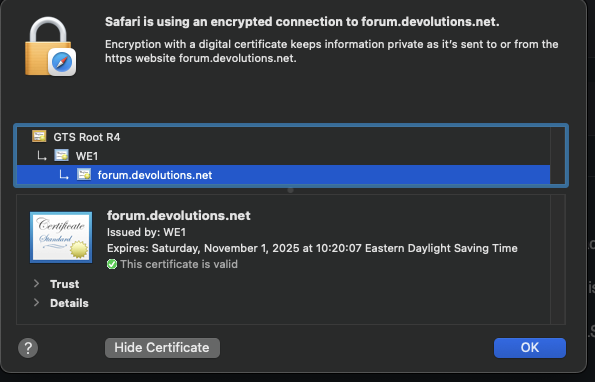
Thanks and kind regards,
Richard Markievicz
Screenshot 2025-09-02 at 09.33.22.png
I did find that the ATEN certificate for the KVM device was not trusted. After importing it and specifying to always trust, using the legacy engine no longer crashes RDM and I'm no longer getting timeouts when the session tab or RDM is in my background. Legacy engine solves my issue.
Hello
First, that's excellent news. I can't explain why the certificate error in a new tab is causing the system to ask us to terminate, and it would be hard to spend time on that since the underlying control (WebView) is deprecated by Apple for several versions.
I can't say if or when they'll remove it from the OS, but's still there for now and I'd consider this a good workaround.
If you're interested in troubleshooting the issue with the modern WebView, or if this workaround becomes problematic in the future, don't hesitate to post back once 2025.2.14 is available.
Thanks and kind regards,
Richard Markievicz
I am seeing some other issues now. Every once in a while, RDM crashes for no reason. I've only seen this happen when I'm not actively using it. I'll have RDM on one monitor while I'm doing something else on another monitor. The web sessions are still able to run in the background for hours with no timeouts or crashes, this seems to be something new as a result from using the legacy engine fix from the previous issue because I've been using RDM for probably 2 years now and it's never crashed like this for no reason. When I say no reason I mean I'm not doing anything with it. It's open, and I have remote sessions i'm logged into, but doing something else on a different app/window and RDM will just close. It seems random because sometimes I'll have it open for several hours and it just closes, other times it's about an hour. No patterns I can see. No crash reports. In the RDM application logs, I see these error messages at the time RDM closes.
Arg_NullReferenceException
FailedProvisionalLoad - Error code: -999, Error description: The operation couldn’t be completed. (NSURLErrorDomain error -999.)
This issue is much more manageable than the previous issue, but if you have any thoughts or suggestions to try, let me know.
Thanks.
Hello
It's hard to say, although I note that the circumstances are very similar to before, just occurring intermittently instead of when the tab is opening. I wonder if the page can be making some kind of request to a host that's serving a (different) untrusted certificate? Just a thought.
Let's try this:
- Close RDM
- Open Terminal.app enter the following command (pressing "Enter" afterwards to run it)
defaults write com.devolutions.remotedesktopmanager WebKitDeveloperExtras -bool true
- Reopen RDM
- Open your KVM site and the remote console that you are using
- Now, switch to Safari
- In Settings > Advanced, "Show features for web developers" needs to be enabled
- In the "Develop" menu, you should now see Remote Desktop Manager and your open tabs inside it
- You can select the tab with the remote console to bring up the dev tools for that page
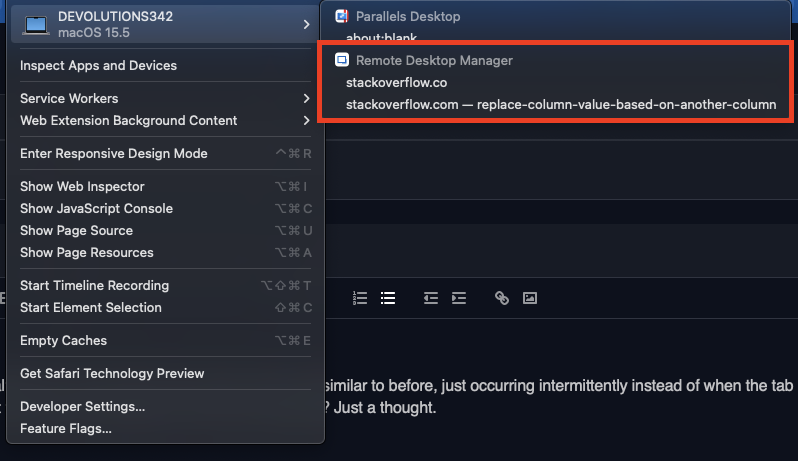
Leave the dev tools open, and wait for the problem to happen again. We're interested in any relevant output from the console and network tabs.
Note that this is a bit uncertain: since RDM is terminating when the problem happens, I'm not sure if the dev tools are as well. You will just have to try it.
Please, let me know if something isn't clear or you have further questions
Kind regards,
Richard Markievicz
Screenshot 2025-09-05 at 15.57.50.png
Hello
Note that if the dev tools don't persist once RDM is closed, you could try the experiment in vanilla Safari. Just open the console in Safari and bring up the dev tools; then let it run for a few hours. Check the network tab for irregular requests to hosts where the certificate is not trusted, or for anything relevant in the console tab.
Thanks and kind regards,
Richard Markievicz
Issue resolved. Thank you.
Hello
Can you share what the remaining issue was? Was there a further request to a host with an untrusted certificate?
Thanks and kind regards,
Richard Markievicz
I'm currently at v2025.3.6.9, is it possible to troubleshoot the issue with the modern WebView? I've found that holding the 'delete' key down while using an Apple Magic Keyboard causes the session to stop while in legacy mode. Thanks.
Hello
Yes, with a recent version of RDM Mac it should be possible.
- Close RDM
- Navigate to ~/Library/Application Support/com.devolutions.remotedesktopmanager
- Edit the RemoteDesktopManager.cfg file
You want to add a new option, before the closing </Option> tag at the end of the file. The option you'll add is <InspectableWebViews>true</InspectableWebViews>. Make sure you save the file, and if you're at all uncertain please make a backup of that file first. Please check my screenshot below.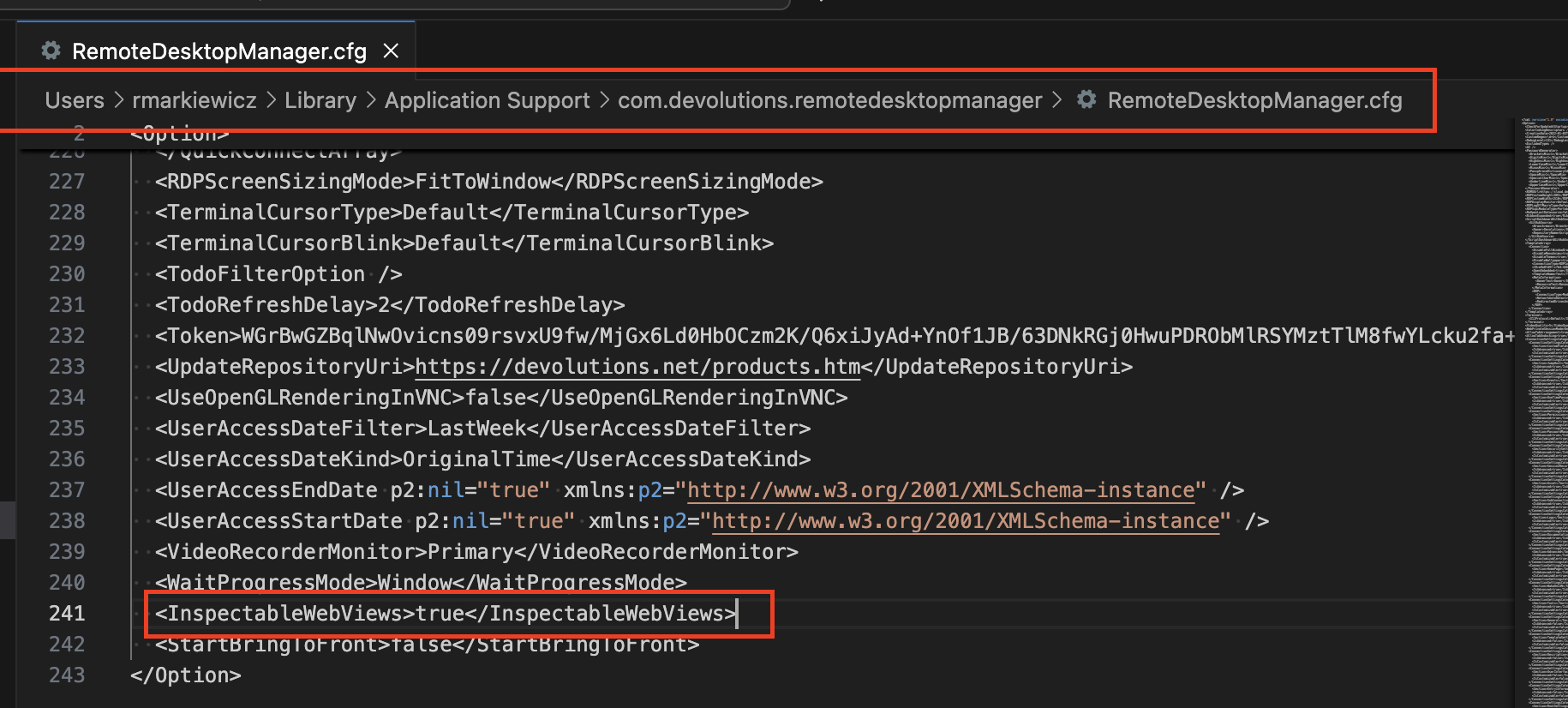
Now launch RDM again, ensure you have the legacy web view disabled and start your web application. If you switch to Safari, you should be able to locate your RDM tab in the Develop menu. To get that menu, I believe you need to enable "Show feature for web developers" in the Advanced tab of Safari preferences.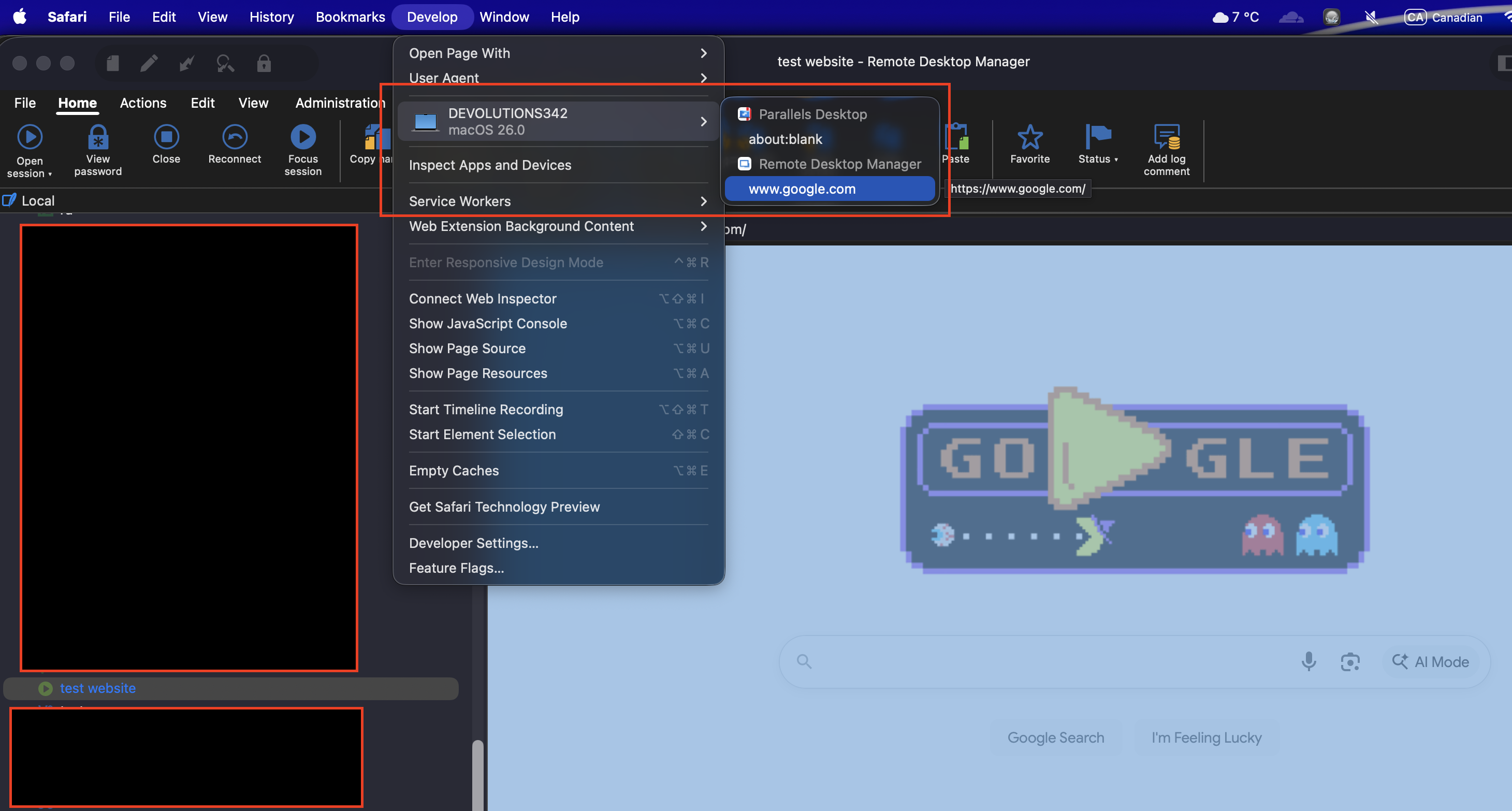
Now you can leave the Safari dev tools open and recreate the problem. I don't know your level of comfort with these tools but we're looking for any kind of error or something that might indicate what's going on, probably either in the network or console tabs. Let me know if you have some questions.
Thanks and kind regards,
Richard Markievicz
Screenshot 2025-10-30 at 20.43.51.png
Screenshot 2025-10-30 at 20.43.13.png