Batch Edit - Local specific settings does not apply

Hello All,
I have 15 RDP sessions, that is created as using .csv import.
I further want to edit these sessions and I am using Batch edit to modify the "Override hard drive" to None, "Override printers" to Unchecked, "Override remote sound" to "Do not play"
Once, saved, these changes does not reflect when I go to the properties of the selected session.
Is this a known issue?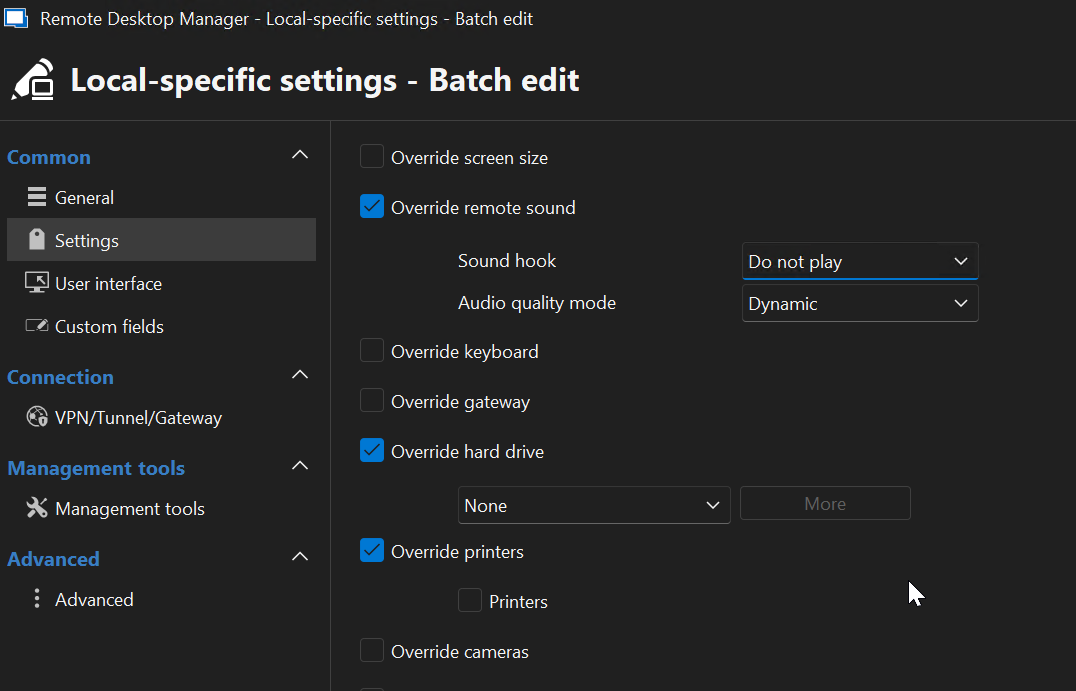
0016.png
All Comments (5)
Hello,
Thank you for reaching out to us regarding this,
Could you please specify the version of RDM you are currently using?
What type of data source are you using?
Let me know,
Best regards,
Samuel Dery
Hi,
version: 2025.2.27.0
Data Source: .xml
Hello,
Thank you for your reply,
I see, from your screenshot, that it looks like you are editing the local-specific setting and not the entry Properties directly, which explains why the changes are not reflected.
If you wish to edit the entry directly, you can select them from the Navigation Pane and perform a "Right-click" -> "Edit" -> "Batch Edit" -> "Edit entries (Session type settings)"
Let me know if this works as expected.
Best regards,
Samuel Dery
Thanks Samuel, for pointing in the right direction.
Changes are applied to each session now.
Hello,
Thank you for your reply,
No problem, I'm glad to hear that it is now working as expected!
Best regards,
Samuel Dery