Desktop background switched to black with RDM

I don't know since when, but every time I connect to newer 2022 or 2025 Windows servers through RDM, the background colour is changed to black. I do set the colour to anything and when I reconnect it goes back to black. Using RDP client from WIndows I do not see this behaviour. Is there a setting I'm missing that causes this?
All Comments (7)
Hello,
In which RDM version do you see this behaviour? Could you please verify the Experience tab from one of the affected RDP sessions?
Regards,
Min
Version is 2025.2.26.0
This is what I have, but know that this did not change, at least done by me, since I have RDM years ago. This also happens with Windows Server 2022 and 2025 so far, not with previous versions.
Could be a change of behaviour of RDM?
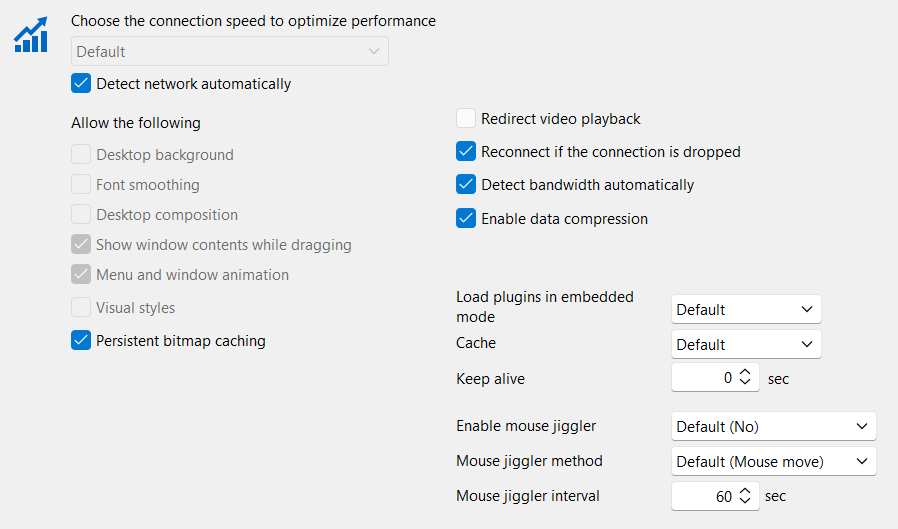
background.png
Hello
This could be a change in both the RDP protocol and RDM itself.
If you uncheck "Detect network automatically" and explicitly check "Desktop background", does it work as expected?
Thanks and kind regards,
Richard Markievicz
Sorry the late reply. Was testing the changes but it seems it does not resolve the issue. Still testing, as I'm not 100% sure (background might have been removed from a previous connection).
Hello
The options in the experience tab control the desktop background. If you check "detect network automatically", the protocol will look at the connection speed and configure these settings itself (possibly disabling the desktop background). If you uncheck that feature, you can control it directly yourself. But please note that there are other reasons the desktop background might not be displayed even if you explicitly enable it: for example, there is a GPO that forces removal of the background in all RDP sessions.
You should try and isolate if this is a problem with RDP in general, outside of RDM. The easiest way to do that is to connect directly using Microsoft Remote Desktop Connection (mstsc.exe), choosing a high connection speed in the "Experience" tab or otherwise customizing the settings to allow the desktop background. What are the results?
Thanks and kind regards,
Richard Markievicz
Windows RDP client does not show that behaviour, that's why I'm asking here. RDM until some time ago either. Could be a recent update (last months) on RDM or, as you say, some Windows recent change under the hood for Server 2022/2025.
There is no GPO for handling that on the servers, and this happens in all servers of that version with RDM.
Remember, we don't have desktop background (wallpaper) but solid colours. What we see is that the grey colour is turned to black. I do not know if that is the behaviour for low speed connections.
I tried low bandwidth, high and auto-detect with RDP Client and in all cases the proper desktop background colour is shown (grey).
Will continue testing configurations in RDM regarding experience.
Hello
Ok, I understand. As a next step: what about when you open the connection using mstsc, but from RDM? So - right-click, "Open with parameters" > "Open (external)". Do you get the grey background in this case?
Thanks and kind regards,
Richard Markievicz