SSH Display Issue with Docker compose Output

Hello,
I recently updated Remote Desktop Manager from version 2025.1.41.0 64-bit (JIT) to the latest available version on your website: 2025.2.26.0 64-bit (PreJIT).
After the update, I encountered an issue with the SSH console output when running the command . Specifically, the informational logs that normally appear during container startup are no longer displayed—they’re replaced by empty lines.
My docker-compose.yml
services:
  web:
    image          : jocxfin/pwgen:latest
    container_name : pwgen
    hostname       : pwgen

    restart: unless-stopped

    ports:
      - 9596:5069

    environment:
     TZ : Europe/Paris

    volumes:
      - /etc/localtime:/etc/localtime
      - /etc/timezone:/etc/timezone

    networks:
      web:

networks:
  web:
    external : true
    name     : web
Here’s a comparison of the output:
✅ With version 2025.1.41.0 (JIT)
The console correctly displays detailed logs such as:
$ docker compose up
[+] Running 10/10
 ✔ web Pulled5.8s
   ✔ d25f557d7f31 Pull complete0.5s
   ✔ d2c04aca259c Pull complete0.6s
   ✔ 17b8b3e271e5 Pull complete1.0s
   ✔ e66f59b5a57d Pull complete1.0s
   ✔ c552f0e9d771 Pull complete1.2s
   ✔ 18625d3a4bfc Pull complete1.3s
   ✔ b7382b6c39aa Pull complete1.3s
   ✔ ac1a0bb2617d Pull complete4.2s
   ✔ a35c7e189e95 Pull complete4.3s
[+] Running 1/1
 ✔ Container pwgen  Created0.4s
Attaching to pwgen
pwgen  | [2025-08-19 14:03:12 +0200] [1] [INFO] Starting gunicorn 23.0.0
pwgen  | [2025-08-19 14:03:12 +0200] [1] [INFO] Listening at: http://0.0.0.0:5069 (1)
pwgen  | [2025-08-19 14:03:12 +0200] [1] [INFO] Using worker: uvicorn.workers.UvicornWorker
pwgen  | [2025-08-19 14:03:12 +0200] [7] [INFO] Booting worker with pid: 7
pwgen  | [2025-08-19 14:03:12 +0200] [8] [INFO] Booting worker with pid: 8
pwgen  | [2025-08-19 14:03:12 +0200] [7] [INFO] Started server process [7]
pwgen  | [2025-08-19 14:03:12 +0200] [7] [INFO] Waiting for application startup.
pwgen  | [2025-08-19 14:03:12 +0200] [7] [INFO] ASGI 'lifespan' protocol appears unsupported.
pwgen  | [2025-08-19 14:03:12 +0200] [7] [INFO] Application startup complete.
pwgen  | [2025-08-19 14:03:12 +0200] [8] [INFO] Started server process [8]
pwgen  | [2025-08-19 14:03:12 +0200] [8] [INFO] Waiting for application startup.
pwgen  | [2025-08-19 14:03:12 +0200] [8] [INFO] ASGI 'lifespan' protocol appears unsupported.
pwgen  | [2025-08-19 14:03:12 +0200] [8] [INFO] Application startup complete.


w Enable Watch
❌ With version 2025.2.26.0 (PreJIT)
The same command results in blank lines where the logs should appear.
$ docker compose up

 ✔ web Pulled5.9s
   ✔ d25f557d7f31 Pull complete0.5s
   ✔ d2c04aca259c Pull complete0.6s
   ✔ 17b8b3e271e5 Pull complete1.0s
   ✔ e66f59b5a57d Pull complete1.0s
   ✔ c552f0e9d771 Pull complete1.2s
   ✔ 18625d3a4bfc Pull complete1.2s
   ✔ b7382b6c39aa Pull complete1.3s
   ✔ ac1a0bb2617d Pull complete4.0s
   ✔ a35c7e189e95 Pull complete4.1s

 ✔ Container pwgen  Created0.4s
Attaching to pwgen


w Enable Watch
To troubleshoot, I tested on a clean VM with no prior configuration and a fresh install of RDM, but the issue persists.
🖥️ I'm running Windows 11 version 24H2.
Is there a new SSH session setting or configuration change required to restore proper Docker log output in the console?
Thank you in advance for your help!
Best regards,
All Comments (9)
Hello,
Thank you for reaching out on this matter.
I verified on my side, and I currently do not have this set up in my lab. I will ask our lab team to configure it, and once I’ve had the chance to test it, I will follow up with you to either confirm the issue or provide further assistance.
Thank you for your understanding and patience.
Best regards,
Jacob Lafrenière
Hello,
Thank you for your patience.
I have a Docker setup on my side running on a virtual Windows 11 machine. I also created an SSH entry in RDM 2025.2.26.0 to connect to the Docker instance. I tested it, and I am able to see the pwgen stack on my side.
Could you please share what you have configured under the Entry Properties of your SSH entry? I’m particularly interested in any non-default settings. Screenshots would also be very helpful.
In addition, could you provide more details about your Docker setup?
I look forward to your reply.
Best regards,
Jacob Lafrenière
Hello,
Thank you for taking the time to look into the issue with Docker.
My operating system is Windows 11 Pro, French version 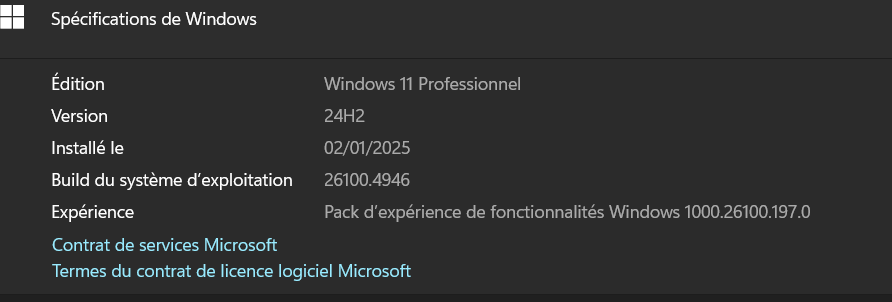
The Docker server is hosted on an up-to-date Debian 12 Linux VM. Here is the output of the uname -a command:
Linux kvmdck2 6.1.0-30-amd64 #1 SMP PREEMPT_DYNAMIC Debian 6.1.124-1 (2025-01-12) x86_64 GNU/Linux
Docker version output:
docker --version --> Docker version 28.3.3, build 980b856
Contents of /etc/docker/daemon.json:
{
  "data-root": "/mnt/dockersys/",
  "ipv6": false,
  "icc": false,
  "iptables": true,
  "live-restore": true,
  "no-new-privileges": true,
  "userland-proxy": false
}
The Docker installation on this Linux virtual machine was carried out according to the official instructions available at: https://docs.docker.com/engine/install/debian/
As for the RDM configuration, I haven’t made any changes. Below is a CSV export of the SSH configuration (note: I’ve renamed the VM and user for this export)
ConnectionType,ConnectionSubType,SubMode,Name,Group,Description,Keywords,Expiration,Parent,Host,Port,CredentialUserName,CredentialDomain,CredentialPassword,WebUrl
Terminal SSH,,0,MyDockerServer,,,,,,MyDockerServer,,MySSHUser,,,rdm://open?DataSource=f5b54f3d-e4b8-4651-9b9b-d5c82097be4f&Session=883c0e78-89a5-4b22-8c61-575c911c8fe9
Changes for ssh login for authentication :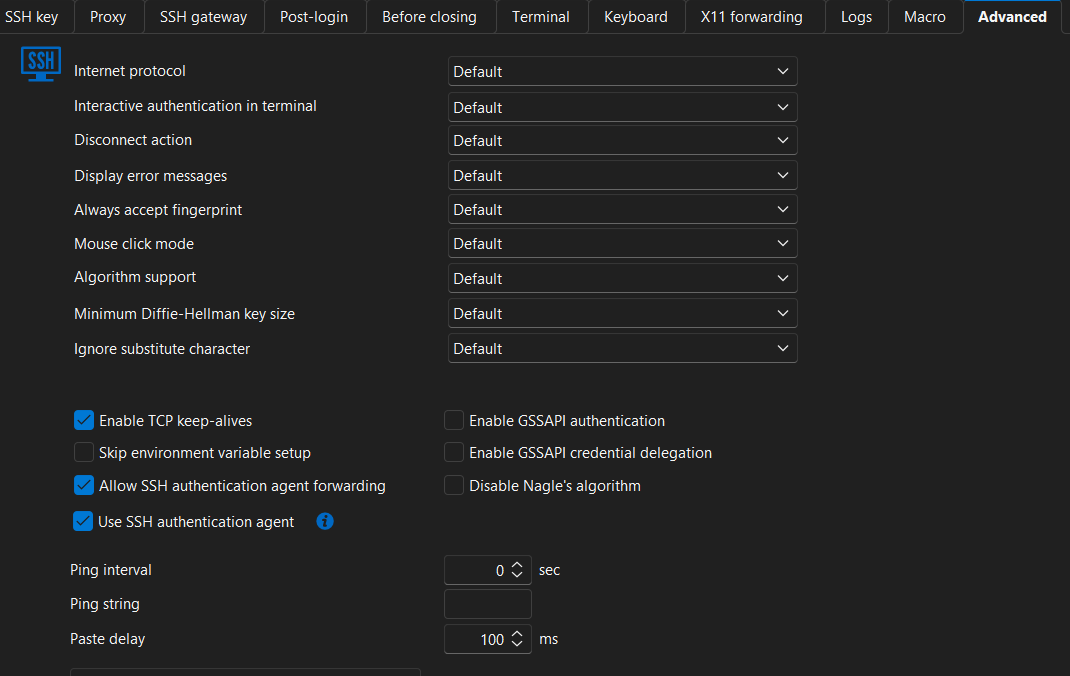
No other changes made to the ssh connection configuration. All other settings are the defaults (See provided RDM file)
The ssh version given by the banner
SSH version banner: SSH-2.0-OpenSSH_9.2p1 Debian-2+deb12u7
For your information, using the same RDM file for the SSH connection, I tried to identify from which version the issue begins by testing the versions available at: https://devolutions.net/remote-desktop-manager/home/previousversions/
- Devolutions.RemoteDesktopManager.Bin.2025.2.14.0: OK, no issue
- Devolutions.RemoteDesktopManager.Bin.2025.2.13.1: OK, no issue
- Devolutions.RemoteDesktopManager.Bin.2025.2.14.0: OK, no issue
- Devolutions.RemoteDesktopManager.Bin.2025.2.16.0: KO, display issues
- Devolutions.RemoteDesktopManager.Bin.2025.2.17.0: KO, display issues
- (…)
So the issue appears starting from version Devolutions.RemoteDesktopManager.Bin.2025.2.16.0 and onwards.
I hope this information is helpful.
Please don’t hesitate to reach out if you need any additional details.
Best regards,
Didier
6fc9fab5-a476-4eca-a3df-afac0797ab9a.png
kvmdck2.rdm
75e17edb-7aa0-487a-bd31-46307db59de6.png
I believe I’ve identified the issue. I ran a test using a minimal Alpine Linux container with the following Dockerfile
FROM alpine:latest

  RUN apk update && apk --no-cache --update --upgrade add  \
  bash bash-completion

ENTRYPOINT [ "/scripts/entrypoint.sh" ]
Here is the associated docker-compose.yml file
services:
  Test-Display:
    image          : testdisplay
    container_name : testdisplay
    hostname       : testdisplay
    build          : ./

    volumes :
      - ./rootfs/scripts:/scripts
The entrypoint.sh script is as follows:
#!/bin/bash

echo 'Display by echo...'
printf 'Simple printf...\n'
echo -e "\033[1;33m $0\033[0m"
printf "\033[1;33m $0\033[0m\n"
Behavior Observed:
- With version 2025.2.14.0 (64-bit JIT):
$ echo y | docker system prune -a; docker compose up
echo y | docker system prune -a; docker compose up
WARNING! This will remove:
  - all stopped containers
  - all networks not used by at least one container
  - all images without at least one container associated to them
  - all build cache

Are you sure you want to continue? [y/N] Deleted Containers:
0be864e084249c78a1eed655a23b48874e7b74e77e9cd2852b349a4f60e9bb08

Deleted Networks:
testdisplay_default

Deleted Images:
untagged: testdisplay:latest
deleted: sha256:ac072bb55c7abaab6db08e636eb056b445bb5ee214a3ad64584ed15a519998f4

Deleted build cache objects:
p9u0pdo8ojjfzbc0zp900xc5o
mtljwgj09uqopk6qff44clehu
j2gnhyh02hnt1fsudhuat81eb
xqsdtjr3j5ffmf3zdnldg6bv6

Total reclaimed space: 6.551MB
[+] Running 1/1
 ! Test-Display Warning pull access denied for testdisplay, repository does not exist or may require 'docker login': denie...1.1s
#1 [internal] load local bake definitions
#1 reading from stdin 530B done
#1 DONE 0.0s

#2 [internal] load build definition from Dockerfile
#2 transferring dockerfile: 184B done
#2 DONE 0.0s

#3 [internal] load metadata for docker.io/library/alpine:latest
#3 DONE 1.3s

#4 [internal] load .dockerignore
#4 transferring context: 77B done
#4 DONE 0.0s

#5 [1/2] FROM docker.io/library/alpine:latest@sha256:4bcff63911fcb4448bd4fdacec207030997caf25e9bea4045fa6c8c44de311d1
#5 resolve docker.io/library/alpine:latest@sha256:4bcff63911fcb4448bd4fdacec207030997caf25e9bea4045fa6c8c44de311d1 0.0s done
#5 sha256:4bcff63911fcb4448bd4fdacec207030997caf25e9bea4045fa6c8c44de311d1 9.22kB / 9.22kB done
#5 sha256:eafc1edb577d2e9b458664a15f23ea1c370214193226069eb22921169fc7e43f 1.02kB / 1.02kB done
#5 sha256:9234e8fb04c47cfe0f49931e4ac7eb76fa904e33b7f8576aec0501c085f02516 581B / 581B done
#5 DONE 0.0s

#6 [2/2] RUN apk update && apk --no-cache --update --upgrade add    bash bash-completion
#6 0.205 fetch https://dl-cdn.alpinelinux.org/alpine/v3.22/main/x86_64/APKINDEX.tar.gz
#6 0.326 fetch https://dl-cdn.alpinelinux.org/alpine/v3.22/community/x86_64/APKINDEX.tar.gz
#6 0.690 v3.22.1-268-g784e7bfcee8 [https://dl-cdn.alpinelinux.org/alpine/v3.22/main]
#6 0.690 v3.22.1-260-g65eb55918c1 [https://dl-cdn.alpinelinux.org/alpine/v3.22/community]
#6 0.690 OK: 26322 distinct packages available
#6 0.759 fetch https://dl-cdn.alpinelinux.org/alpine/v3.22/main/x86_64/APKINDEX.tar.gz
#6 0.834 fetch https://dl-cdn.alpinelinux.org/alpine/v3.22/community/x86_64/APKINDEX.tar.gz
#6 1.112 (1/8) Upgrading busybox (1.37.0-r18 -> 1.37.0-r19)
#6 1.129 Executing busybox-1.37.0-r19.post-upgrade
#6 1.157 (2/8) Upgrading busybox-binsh (1.37.0-r18 -> 1.37.0-r19)
#6 1.163 (3/8) Upgrading ssl_client (1.37.0-r18 -> 1.37.0-r19)
#6 1.168 (4/8) Installing ncurses-terminfo-base (6.5_p20250503-r0)
#6 1.176 (5/8) Installing libncursesw (6.5_p20250503-r0)
#6 1.186 (6/8) Installing readline (8.2.13-r1)
#6 1.196 (7/8) Installing bash (5.2.37-r0)
#6 1.213 Executing bash-5.2.37-r0.post-install
#6 1.215 (8/8) Installing bash-completion (2.16.0-r0)
#6 1.277 Executing busybox-1.37.0-r19.trigger
#6 1.280 OK: 10 MiB in 21 packages
#6 DONE 1.4s

#7 exporting to image
#7 exporting layers 0.1s done
#7 writing image sha256:46665d90cab34dbe708e42044f63e769554ba448274a4ba665862ae146dd1c43 done
#7 naming to docker.io/library/testdisplay done
#7 DONE 0.1s

#8 resolving provenance for metadata file
#8 DONE 0.0s
[+] Running 3/3
 ✔ testdisplay                  Built0.0s
 ✔ Network testdisplay_default  Created0.0s
 ✔ Container testdisplay        Created0.0s
Attaching to testdisplay
testdisplay  | Display by echo...
testdisplay  | Simple printf...
testdisplay  |  /scripts/entrypoint.sh
testdisplay  |  /scripts/entrypoint.sh
testdisplay exited with code 0
- With version 2025.2.16.0 (64-bit JIT):
$  echo y | docker system prune -a; docker compose up
WARNING! This will remove:
  - all stopped containers
  - all networks not used by at least one container
  - all images without at least one container associated to them
  - all build cache

Are you sure you want to continue? [y/N] Deleted Containers:
78dae1e89d0de57a36cb7a1cd6c8f1b86636c55e063a53c978023b039be1471b

Deleted Networks:
testdisplay_default

Deleted Images:
untagged: testdisplay:latest
deleted: sha256:46665d90cab34dbe708e42044f63e769554ba448274a4ba665862ae146dd1c43

Deleted build cache objects:
smv2xbygy9neli8ehus278z8y
epl37aka3yd7ouwpm4f8zop65
1v91arabfwa4ltjxreaudi49a
xq8063oygg1rykicpzbyylgwc

Total reclaimed space: 6.551MB

 ! Test-Display Warning pull access denied for testdisplay, repository does not exist or m...1.1s
#1 [internal] load local bake definitions
#1 reading from stdin 530B done
#1 DONE 0.0s

#2 [internal] load build definition from Dockerfile
#2 transferring dockerfile: 184B done
#2 DONE 0.0s

#3 [internal] load metadata for docker.io/library/alpine:latest
#3 DONE 6.5s

#4 [internal] load .dockerignore
#4 transferring context: 77B done
#4 DONE 0.0s

#5 [1/2] FROM docker.io/library/alpine:latest@sha256:4bcff63911fcb4448bd4fdacec207030997caf25e9bea4045fa6c8c44de311d1
#5 resolve docker.io/library/alpine:latest@sha256:4bcff63911fcb4448bd4fdacec207030997caf25e9bea4045fa6c8c44de311d1 0.0s done
#5 sha256:4bcff63911fcb4448bd4fdacec207030997caf25e9bea4045fa6c8c44de311d1 9.22kB / 9.22kB done
#5 sha256:eafc1edb577d2e9b458664a15f23ea1c370214193226069eb22921169fc7e43f 1.02kB / 1.02kB done
#5 sha256:9234e8fb04c47cfe0f49931e4ac7eb76fa904e33b7f8576aec0501c085f02516 581B / 581B done
#5 DONE 0.0s

#6 [2/2] RUN apk update && apk --no-cache --update --upgrade add    bash bash-completion
#6 0.209 fetch https://dl-cdn.alpinelinux.org/alpine/v3.22/main/x86_64/APKINDEX.tar.gz
#6 0.303 fetch https://dl-cdn.alpinelinux.org/alpine/v3.22/community/x86_64/APKINDEX.tar.gz
#6 0.605 v3.22.1-268-g784e7bfcee8 [https://dl-cdn.alpinelinux.org/alpine/v3.22/main]
#6 0.605 v3.22.1-260-g65eb55918c1 [https://dl-cdn.alpinelinux.org/alpine/v3.22/community]
#6 0.605 OK: 26322 distinct packages available
#6 0.675 fetch https://dl-cdn.alpinelinux.org/alpine/v3.22/main/x86_64/APKINDEX.tar.gz
#6 0.753 fetch https://dl-cdn.alpinelinux.org/alpine/v3.22/community/x86_64/APKINDEX.tar.gz
#6 1.033 (1/8) Upgrading busybox (1.37.0-r18 -> 1.37.0-r19)
#6 1.048 Executing busybox-1.37.0-r19.post-upgrade
#6 1.073 (2/8) Upgrading busybox-binsh (1.37.0-r18 -> 1.37.0-r19)
#6 1.079 (3/8) Upgrading ssl_client (1.37.0-r18 -> 1.37.0-r19)
#6 1.084 (4/8) Installing ncurses-terminfo-base (6.5_p20250503-r0)
#6 1.092 (5/8) Installing libncursesw (6.5_p20250503-r0)
#6 1.102 (6/8) Installing readline (8.2.13-r1)
#6 1.111 (7/8) Installing bash (5.2.37-r0)
#6 1.128 Executing bash-5.2.37-r0.post-install
#6 1.130 (8/8) Installing bash-completion (2.16.0-r0)
#6 1.194 Executing busybox-1.37.0-r19.trigger
#6 1.197 OK: 10 MiB in 21 packages
#6 DONE 1.3s

#7 exporting to image
#7 exporting layers
#7 exporting layers 0.1s done
#7 writing image sha256:59624447336a059206124a5eb15c0ff7bae730c94076bb6d2387446f3710adb7 done
#7 naming to docker.io/library/testdisplay done
#7 DONE 0.1s

#8 resolving provenance for metadata file
#8 DONE 0.0s

 ✔ testdisplay                  Built0.0s
 ✔ Network testdisplay_default  Created0.0s
 ✔ Container testdisplay        Created0.0s
Attaching to testdisplay


testdisplay exited with code 0
Additional Observations (Following Unexpected Behavior):
After noticing that the container did not behave as expected with the initial configuration (see previous details), I modified the docker-compose.yml file in an attempt to troubleshoot and better understand the issue:
services:
  Test-Display:
    image          : testdisplay
    container_name : testdisplay
    hostname       : testdisplay
    build          : ./

    command: /bin/bash /scripts/entrypoint.sh

    volumes :
      - ./rootfs/scripts:/scripts
After applying this change and running docker compose up, I observed the following output:
$ docker compose up
w Enable Watch
 ✔ Container testdisplay  Recreated0.0s
Attaching to testdisplay


testdisplay exited with code 0

testdisplay  | Simple printf...
testdisplay  |  /scripts/entrypoint.sh
testdisplay  |  /scripts/entrypoint.sh
The container exits with code 0, but the output appears after termination, which is not the expected behavior. This issue was not present in version 2025.2.14.0, where logs were displayed in real time during execution.
After applying a modification to the docker-compose.yml file, I deleted the container and relaunched it using the command:
docker compose up
However, the issue persists: there is no output displayed.
What I’ve observed is that when either the docker-compose.yml or the Dockerfile is modified, the display reappears—but only after the script has finished executing.
Regardless of the changes made, the following line:
echo 'Display by echo...'
never appears in the output.
I’m unsure why this behavior occurs and would appreciate your assistance in understanding and resolving it.
Hello,
Thank you for the follow-up and for all the information and testing you provided on your side.
I will review this with the development team tomorrow and get back to you with further guidance as soon as possible.
Best regards,
Jacob Lafrenière
Hello,
Thank you again for your continued patience.
Our development team has not been able to directly identify the issue. To assist further, they’ve requested a Terminal Recording Playback (TRP) file that captures the behavior. This will help them investigate the problem more effectively.
You can follow the steps in the link below to record the session:
https://docs.devolutions.net/rdm/kb/how-to-articles/record-ssh-session-terminal-playback/
Once the recording is complete, you can share the file with me. I will send you a private message shortly with a secure link to upload the recording.
Please let me know if you have any questions or run into any issues during the process.
Best regards,
Jacob Lafrenière
Hello,
I am currently using the free version of RDM, but I do not see any option or feature that allows taking a screenshot. Could you please clarify whether this functionality is available in this version?
Thank you.
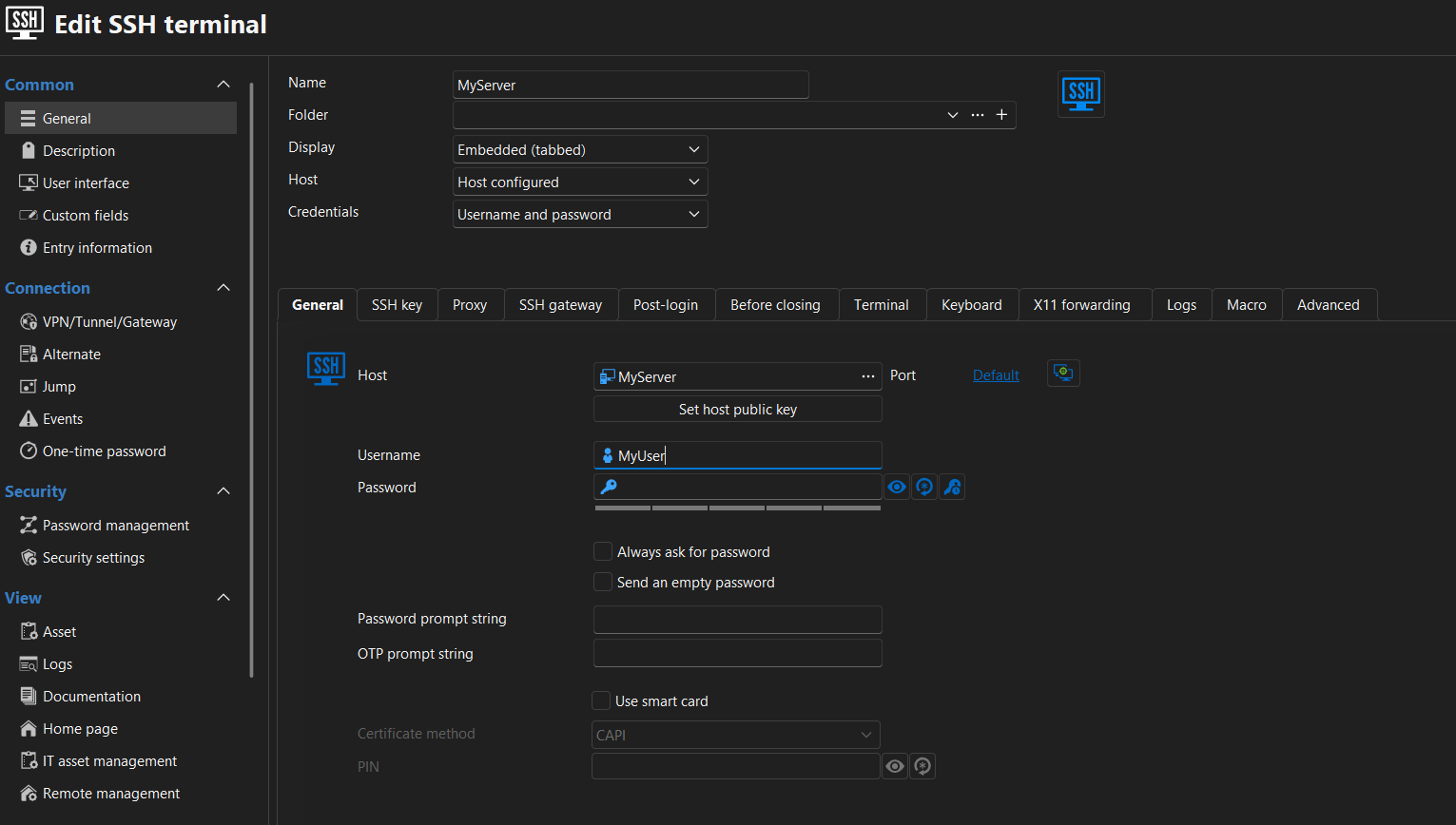
I
I only have this in the Help menu: local recording.
This is what you want ?
e1908a9e-c025-4fa8-8e3c-2cec6109fbb0.png
d8216c49-d0cc-4a88-a6e9-4d815447be1b.png
bd91a243-6ffc-449c-9de8-f356248bf705.png
Hello,
Thank you for your follow-up.
I’ve reviewed the situation, and unfortunately, it won’t be possible for the .TRP at this time. The good news is that our development team has identified the issue and a fix will be included in the next RDM release (2025.2.28.0).
Unfortunately, it didn’t make it into today’s release (2025.2.27.0), so we’ll need to wait for the next one.
Once you’ve updated to the new version, please test again and let me know if the issue persists.
Best regards,
Jacob Lafrenière
Hello,
Thank you for your response. I’ll get back to you once I’ve installed the next version.
Best regards,
Didier