PowerShell Script Parameter not working with RDM Variable $VPN_HOST$
PowerShell Script Parameter not working with RDM Variable $VPN_HOST$

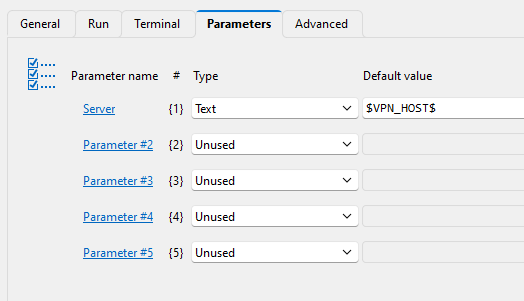
We are attempting to use a parameter to pass the $VPN_HOST$ RDM variable value to an embedded PowerShell script entry. The PowerShell script entry is set for local execution. The script entry was added as a Before Opening event of a NetExtender VPN connection. The $VPN_HOST$ RDM variable value is not passed to the script.
If I put a fixed text into the parameter tab for the server parameter, the text is passed to the script.
we want to pass the value as a parameter so that the PowerShell script can be digitally signed.
We are using RDM 2025.2.23.0. Is there another method we should be using?
param(
    [string]$Server
)
Write-Host "server: " $Server

# Define base path and the exact server value to match
$baseKey = "HKLM:\SOFTWARE\SonicWall\SSL-VPN NetExtender\Standalone\Profiles"

# Loop through each subkey under Profiles
Get-ChildItem -Path $baseKey | ForEach-Object {
    $serverValue = Get-ItemProperty -Path $_.PSPath -Name server -ErrorAction SilentlyContinue

    if ($serverValue.server -eq $server) {
        Write-Host "Deleting key: $($_.Name)" -ForegroundColor Yellow
        Remove-Item -Path $_.PsPath -Recurse -Force
    }
}