Navigation window jumps around when used in jumpstation

We run Remote Desktop Manager through jumpstations on RDP environment with multiple users
When making selection in the navigation pane to open a server the navigation selection window tends to jump around to other location, can this be turned off so the selection stays in the location where i clicked ?
Now if i need to open two servers i click on one server to connect to, the navigation window jumps away and i need to search the other server to open that one link. Ps we have some around 500 servers in the navigation pane, so this is really annoying
We use version 2025.2.16.0 with SQL server as datasource
The jumping does not happen everytime, but is super annoying if it does
Recommended Answer
Hello,
Thank you for reaching out and describing the issue in detail.
The behavior you're experiencing can be adjusted to better suit your workflow. Here's what you can do:
- Right-click anywhere on the tab bar at the top.
- From the context menu, you’ll find an option to change how RDM behaves when switching tabs or opening sessions.
- You can modify it so that the navigation pane doesn’t jump or shift unexpectedly when you open a new session.
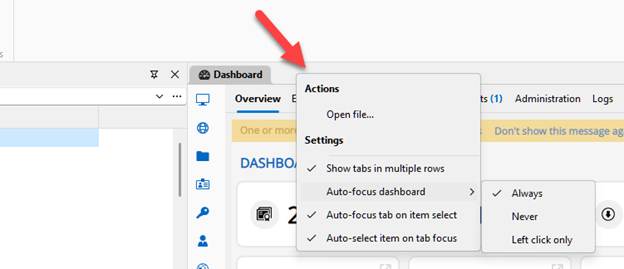
Please give this a try and let me know if it helps improve your experience. If the issue still persists or behaves inconsistently, we’ll be happy to investigate further.
Best regards,
Stephan
aa4ca502-7d58-4e0b-9d32-7298189a4889.png
All Comments (1)
Hello,
Thank you for reaching out and describing the issue in detail.
The behavior you're experiencing can be adjusted to better suit your workflow. Here's what you can do:
- Right-click anywhere on the tab bar at the top.
- From the context menu, you’ll find an option to change how RDM behaves when switching tabs or opening sessions.
- You can modify it so that the navigation pane doesn’t jump or shift unexpectedly when you open a new session.
Please give this a try and let me know if it helps improve your experience. If the issue still persists or behaves inconsistently, we’ll be happy to investigate further.
Best regards,
Stephan
aa4ca502-7d58-4e0b-9d32-7298189a4889.png