Unable to connect. Please try connecting via the web client.

When try to connect to my datasource (Devolutions Password Hub Personal)
i am redirected to default browser and login success.
but when back in app i got "Unable to connect. Please try connecting via the web client."
any idea??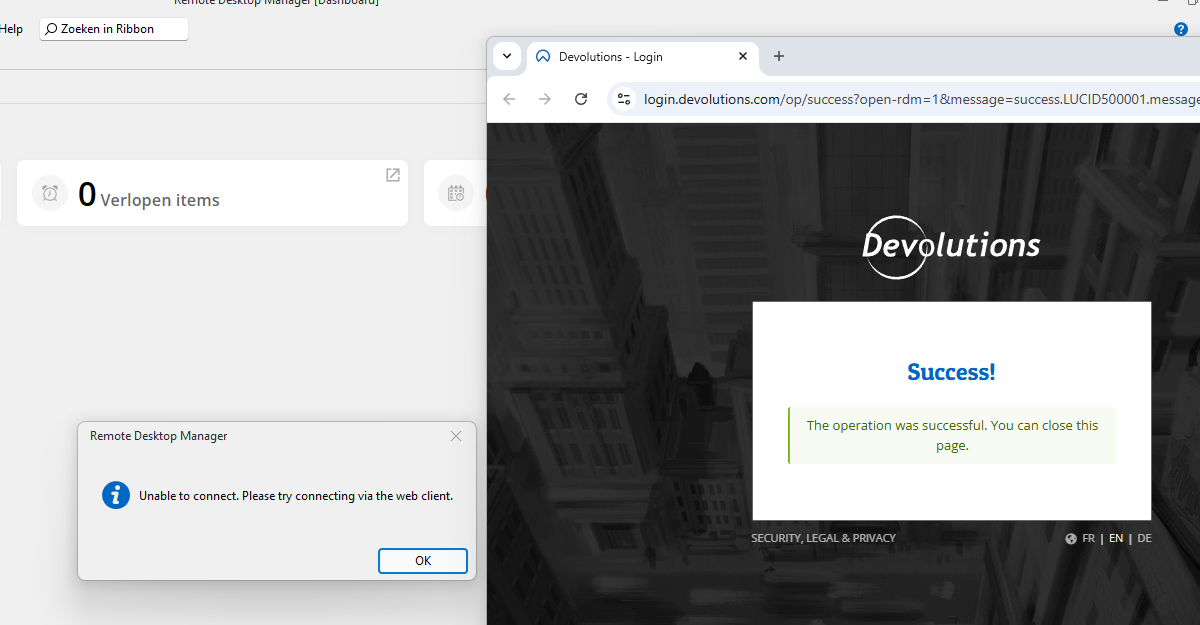
Schermafbeelding 2025-08-18 095116.png
Recommended Answer
Hello,
Thank you for reaching out!
To better assist you, could you please let us know which version of Remote Desktop Manager you're currently using?
Also, are you able to successfully log in to the web interface of your Hub Personal account? You can access it through the Devolutions Portal here:
https://portal.devolutions.com/home
If you're able to log in via the web and you're using the latest version of RDM, we suggest recreating the Devolutions Hub data source to ensure everything is properly configured. You can follow the steps in this article:
https://docs.devolutions.net/hub/kb/how-to-articles/integrate-hub-personal-rdm/
Let us know how it goes or if you continue to experience issues — we're here to help!
Best regards,
Stephan
@Stephan Haupt
Hi Stephan
Found how to resolve :-)
i logged in to the portal and navigated to "My Hub Personal", i got error "access denied" and asked for my Emergency code Version 1; After filling in the connection from remote desktop manger is also ok :-)
thanks.
All Comments (2)
Hello,
Thank you for reaching out!
To better assist you, could you please let us know which version of Remote Desktop Manager you're currently using?
Also, are you able to successfully log in to the web interface of your Hub Personal account? You can access it through the Devolutions Portal here:
https://portal.devolutions.com/home
If you're able to log in via the web and you're using the latest version of RDM, we suggest recreating the Devolutions Hub data source to ensure everything is properly configured. You can follow the steps in this article:
https://docs.devolutions.net/hub/kb/how-to-articles/integrate-hub-personal-rdm/
Let us know how it goes or if you continue to experience issues — we're here to help!
Best regards,
Stephan
Hello,
Thank you for reaching out!
To better assist you, could you please let us know which version of Remote Desktop Manager you're currently using?
Also, are you able to successfully log in to the web interface of your Hub Personal account? You can access it through the Devolutions Portal here:
https://portal.devolutions.com/home
If you're able to log in via the web and you're using the latest version of RDM, we suggest recreating the Devolutions Hub data source to ensure everything is properly configured. You can follow the steps in this article:
https://docs.devolutions.net/hub/kb/how-to-articles/integrate-hub-personal-rdm/
Let us know how it goes or if you continue to experience issues — we're here to help!
Best regards,
Stephan
@Stephan Haupt
Hi Stephan
Found how to resolve :-)
i logged in to the portal and navigated to "My Hub Personal", i got error "access denied" and asked for my Emergency code Version 1; After filling in the connection from remote desktop manger is also ok :-)
thanks.