Regarding SFTP upload file overrides

I open SFTP while using an SSH session and if the uploaded directory or file exists, there will be a prompt if it needs to be overwritten or not, which is fine. The problem is that this prompt is not at the front, but behind the RDM, but the entire RDM interface is locked, only when it is closed on the windows taskbar, when you see the window closed, behind it is the overridden prompt window.
Is it possible to provide a full coverage option in the override prompt window? Also, when deleting a file, please don't be prompted, is it okay?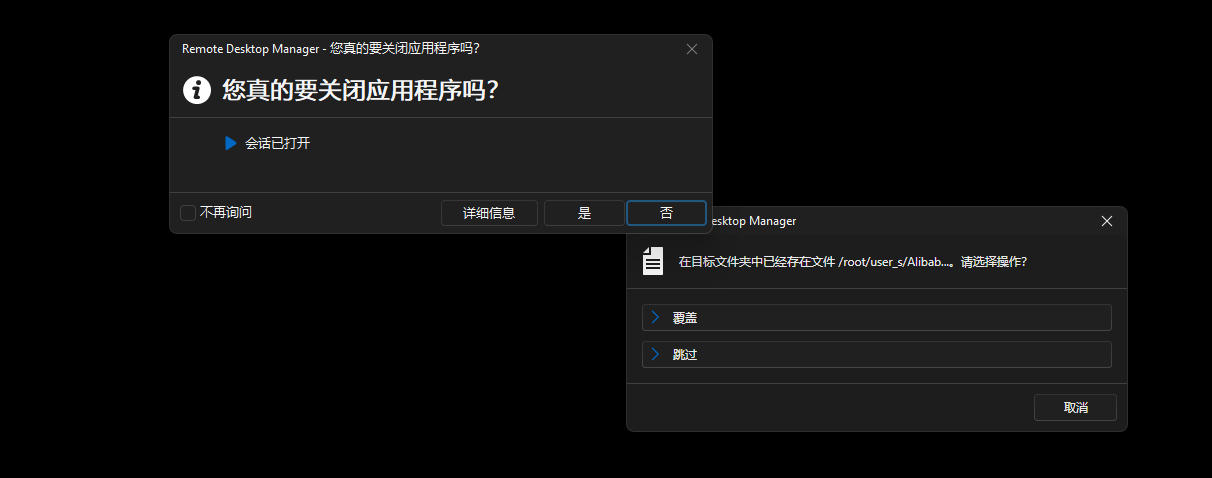
1.jpg
All Comments (3)
Hello,
Thank you for reaching out regarding this matter.
I’ve tested the scenario on my end but was unable to reproduce the issue.
Could you please confirm the version of RDM you’re using, along with the data source type and its version?
As for the deletion confirmation prompt, there is currently no setting available to disable it. I recommend posting a request in our Feature Request section on the forum for consideration in future updates.
I look forward to your response.
Best regards,
Jacob Lafrenière
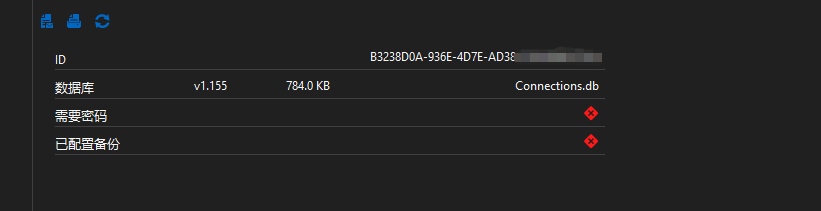
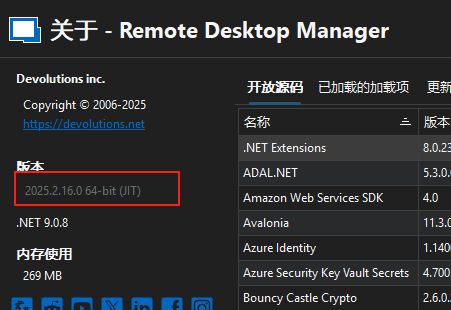
I used the PSR tool to make a screen recording, see the attachment. However, the message is in Chinese, you can translate it.
2025-08-13 15-39-15.mkv
psr.zip
60c37457-c702-42b8-a3b4-14cdd9e7f317.png
e2d07060-c9d7-4ac9-a976-b4e9dc50faf1.png
Hello,
Thank you for the follow-up.
Could you please update RDM and test the behavior again? I believe there were some window handling improvements in the latest updates.
Best regards,
Jacob Lafrenière