PowerShell Input Issue via RDM on macOS – Possibly Related to PSReadLine
PowerShell Input Issue via RDM on macOS – Possibly Related to PSReadLine

Hi team,
I'm using Remote Desktop Manager (RDM) on macOS to connect to a Windows Server via RDP. The RDP session itself works fine, but I'm encountering a strange issue with PowerShell.
Whenever I launch PowerShell in the remote session, it becomes unresponsive or behaves incorrectly — input doesn't register at all. After some trial and error, I discovered that uninstalling the PSReadLine module resolves the issue, and PowerShell starts working normally again.
This leads me to believe there may be a conflict between RDM's keyboard/input handling and PSReadLine, which enhances PowerShell with syntax highlighting and improved input features.
Has anyone else experienced this? Is there a known workaround or setting in RDM that could help resolve this without needing to uninstall PSReadLine?
Any insights or suggestions would be appreciated!
Thanks,
All Comments (6)
Hello
Yes, this is actually an issue generally depending on the RDP client used and the settings you have; for example see here.
The simplest would be to experiment with the "Send input as unicode" option in the RDP session settings (on the "Local resources" tab). I can't remember if unicode or scancode is the one that has the problem, but basically toggle it from whatever setting you have currently. This might not be acceptable however if you're using an international keyboard layout and depending on your workflow.
This is a server-side issue so there's not much we can do to address it directly, but I have some other suggestions:
- Did you try updating PSReadLine to the latest version instead of uninstalling it? I have a feeling that this is a bug on their side that they've since fixed.
- Can you try switching to Windows Terminal on the remote machine, which I believe doesn't have this issue?
Let me know how you get on, we've had a few forum posts about this with different suggestions and I should be able to track those down. But I don't think there's a concrete solution from our side.
Thanks and kind regards,
Richard Markievicz
Hello Richard,
Thank you for the update.
I’ve already tested with the “Send input as Unicode” option enabled, but unfortunately, it didn’t resolve the issue: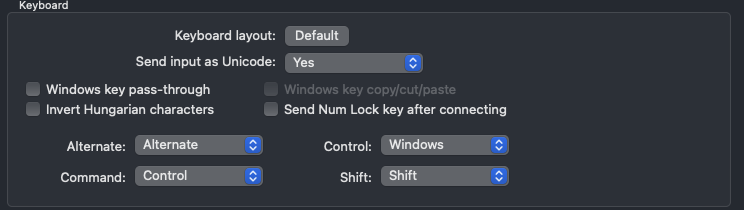
While updating PSReadLine might help, we’re dealing with a large number of servers, so manually updating each one would be quite time-consuming.
Interestingly, the Microsoft Remote Desktop client for macOS works perfectly fine with PowerShell on the remote servers — no input issues observed there.
Thanks again for your support.
5523631a-6de3-4a0a-b7ea-3e564d154803.png
Hello
Just to confirm: did you try with "Send input as unicode" set to No? Because my understanding is, this isn't an issue with scancode inputs. You can evaluate the same thing in the Microsoft RDP client - in the session, go to the "Connections" menu and check the keyboard mode setting,
Thanks and kind regards,
Richard Markievicz
Hello again
I found the old thread I was looking for and I'd encourage you to take a look. Specifically, towards the end of the thread, a user has exactly the same problem with MS RDP ("Windows App") when using Unicode input, but scancode input has associated downsides when using international keyboard layouts for example.
I believe this is exactly the same issue and it's on the PSReadLine side. There's very little we can do from our side I'm afraid.
Thanks and kind regards,
Richard Markievicz
Regarding the Microsoft Remote Desktop client:
- Keyboard Mode is set to Scancode.
- No issues observed when using PowerShell on remote servers.

Regarding the RDM (Remote Desktop Manager) client:
- Changing the "Send input as Unicode" setting to "No" resolved the input issue.
- Interestingly, I was fairly sure I had tested this setting before, but it’s possible the change wasn’t applied correctly at the time.
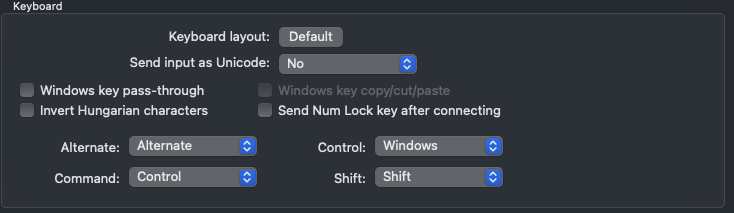
I can now type correctly in PowerShell.
Thank you!
227fe513-ec05-4616-9a16-a1cd93ac7eb8.png
c319e5f1-1b91-4924-b448-f43d5b806c50.png
Hello
Excellent news! So; if you disable "Send input as unicode", that means "send scan codes". This directly correlates to the MS RDP option of unicode or scancode input. I'm confident if you switched MS RDP to "unicode" you'd hit the same issue.
Like I wrote, you might hit other issues in that mode depending on your workflow and keyboard layout. The advantage MS RDP has here is that they allow you to switch the keyboard mode without reconnecting, and I think RDM should allow the same thing.
For other users encountering this: the "official" fix is to ensure your PSReadLine on the server is at least 2.2.6. Earlier versions (starting with 2.0.2) have this bug, which is caused by incorrectly handling the input stream.
I'll mark the topic resolved, but please don't hesitate with further questions or comments
Kind regards,
Richard Markievicz