"Generate" option in entry properties produces weak passwords
"Generate" option in entry properties produces weak passwords

[RDM 2025.2.22.0] When using Password generator from Tools menu, my "Default" template is set for 16-character passwords and quite good complexity. I am happy with these passwords. See the screenshot below.
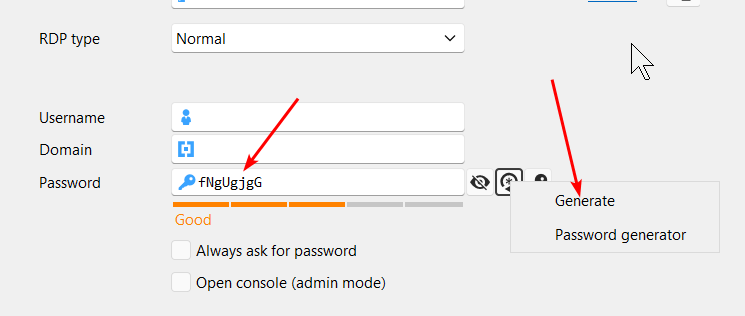
But when using the "Generate" option next to the password field in an entry, it produces mediocre passwords, apparently not using this profile.
I checked Options, but was unable to find any setting related to that. Maybe I'm missing something.
I would like this "Generate" option to leverage what's set in Tools - Password generator. Maybe use the template that is chosen there.
Thank you.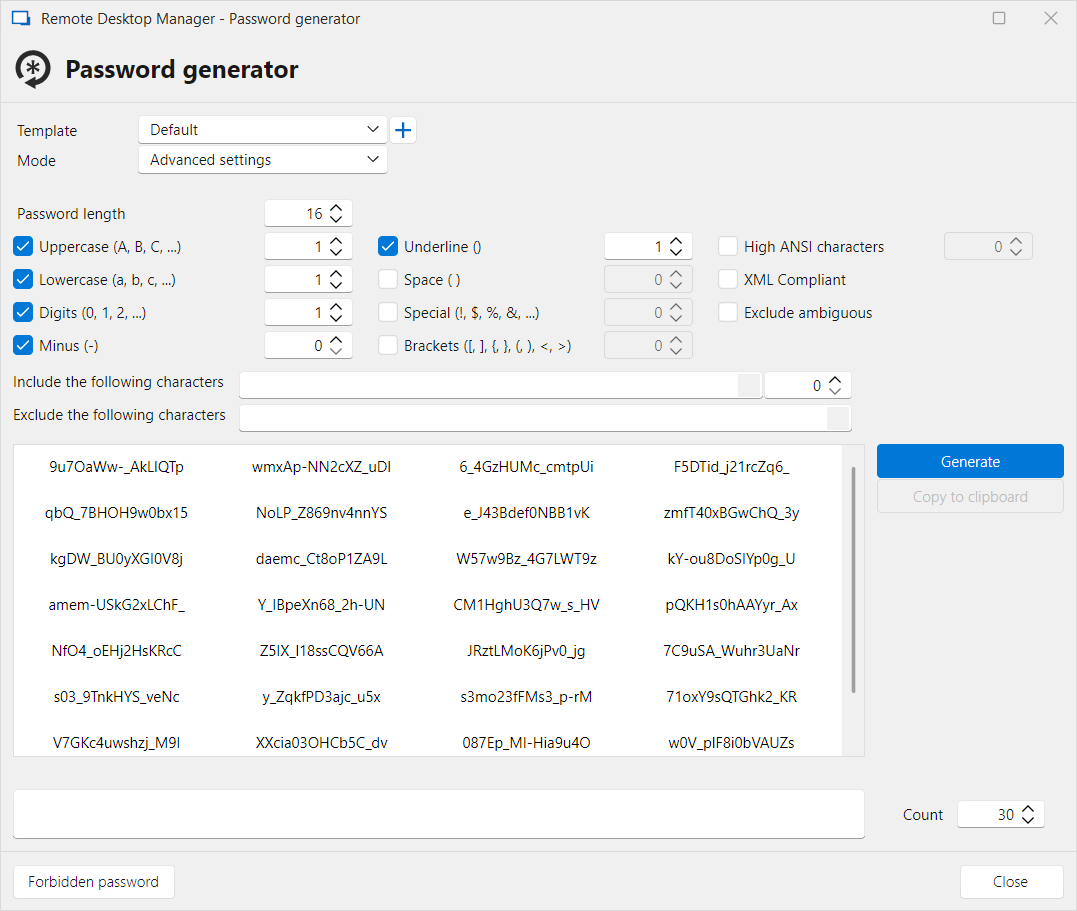
c7b16846-8dd7-4e6d-ab21-a80af8952ef0.png
058caaec-fa99-4e43-ba7b-b09b2cd12ea0.png
All Comments (20)
Hello,
Thank you for reaching out to us regarding this,
What type of data source are you using?
You can use the "+" Button beside the "Template" field to create a template, Once it is created, selected, if you go into your entry Properties and use the "Generate" button is the template used as expected?
Let me know,
Best regards,
Samuel Dery
Thank you. I am using Local data source for this issue.
- I defined a template "My 17 chars" so that I can distinguish from the default. I selected it and clicked Close.
- Then I proceeded to creating a new SSH entry. When I clicked the "Generate" button next to the Password field in the SSH entry, it created the same mediocre 8-character password I shown in the initial post.
- Then I again clicked the icon next to the Password field and selected "Password generator". It shown me a window with the Default profile selected.
- Note that the Default profile is 16-character password of great complexity (e.g. including underscore character) and the "Generate" button in the entry window produces 8-characters passwords - I tried many times and there was no underscore character at all.
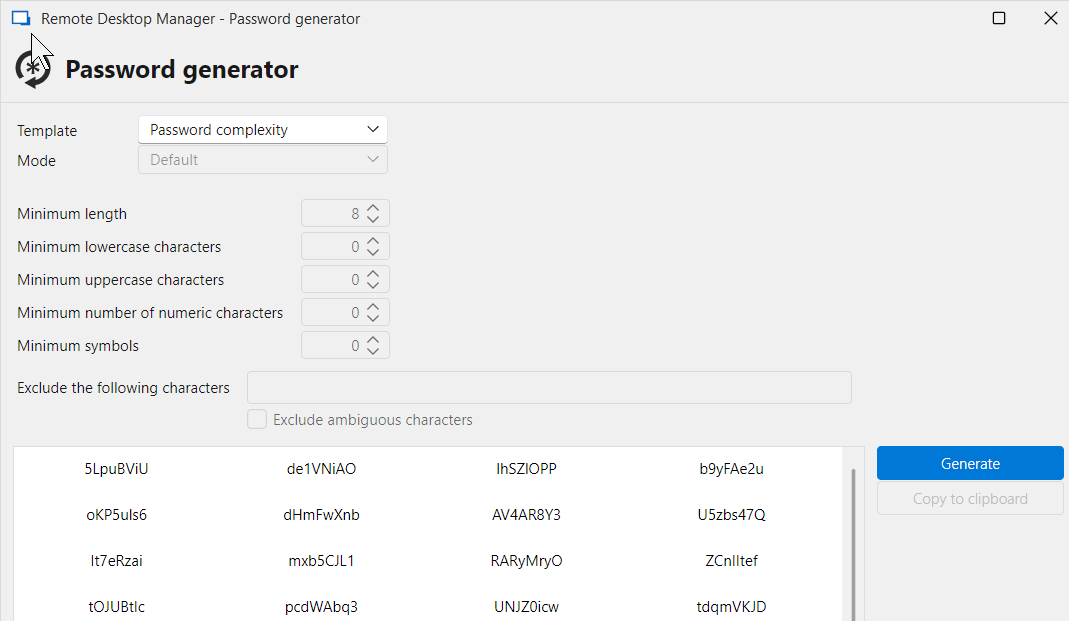
- I just discovered the "Password complexity" profile which matches the mediocre quality of generated passwords, and I can't edit it - everything's disabled. The question also would be - why it has different settings than Default profile, or a user-generated profile? I think it should be entirely removed, and the generator in a new entry/edit entry should use whatever was selected here the last time.
Which points us to another issue with Password generator profiles. If you save the profile, as in the screenshot below, it is impossible to edit it, for example to add "Include" and "Exclude" classes. You need to start over by going to Default and defining stuff from scratch. For example you need to re-type the "Include" and "Exclude" characters, you can't even copy them to clipboard. Please make it possible to edit the profile, and add a second icon "Save" besides the delete icon.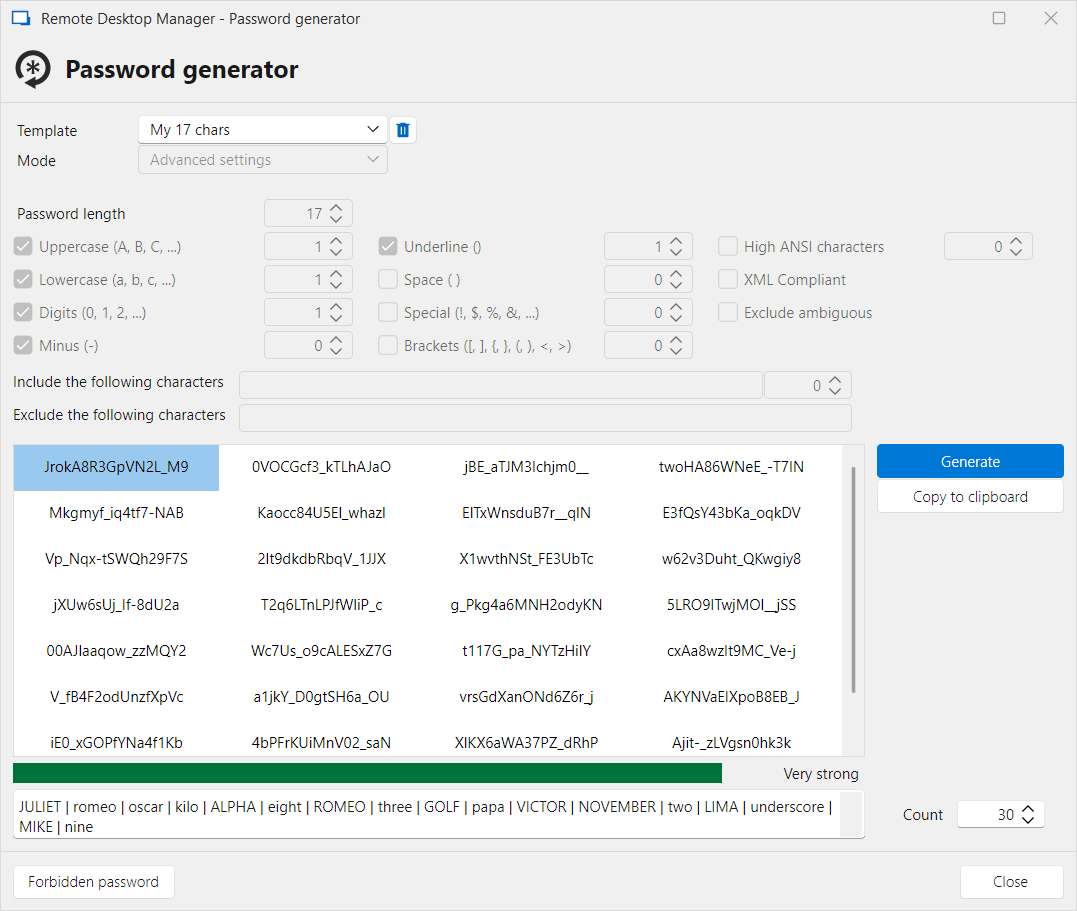
And another issue occurs when you try to save the profile and give a name of an existing profile. You're then greeted with an error: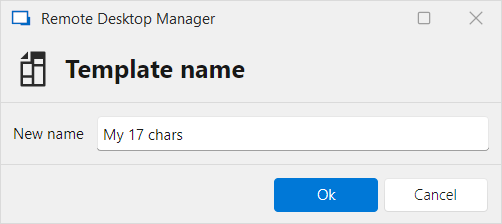
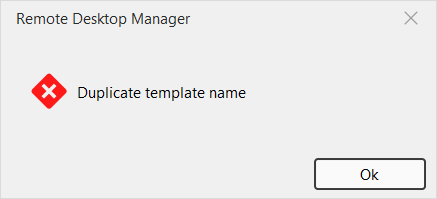
RDM should ask to overwrite the profile. Before that, in the "Template name" dialog it should show the combo with all profile names for my reference (autocompletion or similar), because I might have forgotten if I used "My 17 chars" or "My 17-char profile".
And the last thing - if you select multiple generated passwords and use "Copy to clipboard", then in the clipboard you get a comma-separated string with all these passwords. It would be much better if the string was newline-separated. It would be then easy to paste it into a spreadsheet (for example for creating new accounts in bulk) or into a text editor document, having each password on a new line. I would then be able to use multiple cursor editing, or vertical block, to enter a TAB or space character and paste user names.
Please fix those issues. Thank you.
a4a0e93d-6e62-4a41-a068-bbf6782c9dd2.png
065c6812-a765-400a-83de-37be60fce162.png
7afc6bc9-6d8b-4b7d-94ab-623ab427d842.png
29956b02-6cc1-4232-8891-6164b17d9cf1.png
Hello,
Thank you for your reply,
That is correct, this template would have been created by you, If you want to modify or delete an existing template, you need to go under "File" -> "Templates" -> "Password Templates" from this menu you can select your existing Templates and use the "Edit" (Pencil) button to make changes.
Regarding your other points, I can indeed see how that would be useful. My recommendation would be that you create feature requests for each; these are done from another section of our forum.
This allows our community to submit/share ideas with our development, service desk, and management teams. It’s also an opportunity for our community to demonstrate an interest in your idea. We use this interest to prioritize the features we implement.
Kindly post your idea on our forum at
https://forum.devolutions.net/forums/17/remote-desktop-manager--feature-request
Best regards,
Samuel Dery
Thank you, will do later.
The "Password templates" is what I was looking for, although the File menu is totally unexpected place to look for them. It should be discoverable and accessible from Password generator window, such as "Manage password templates" or something.
But it doesn't solve the issue of mediocre passwords generated for entries. The 8-character template is not here.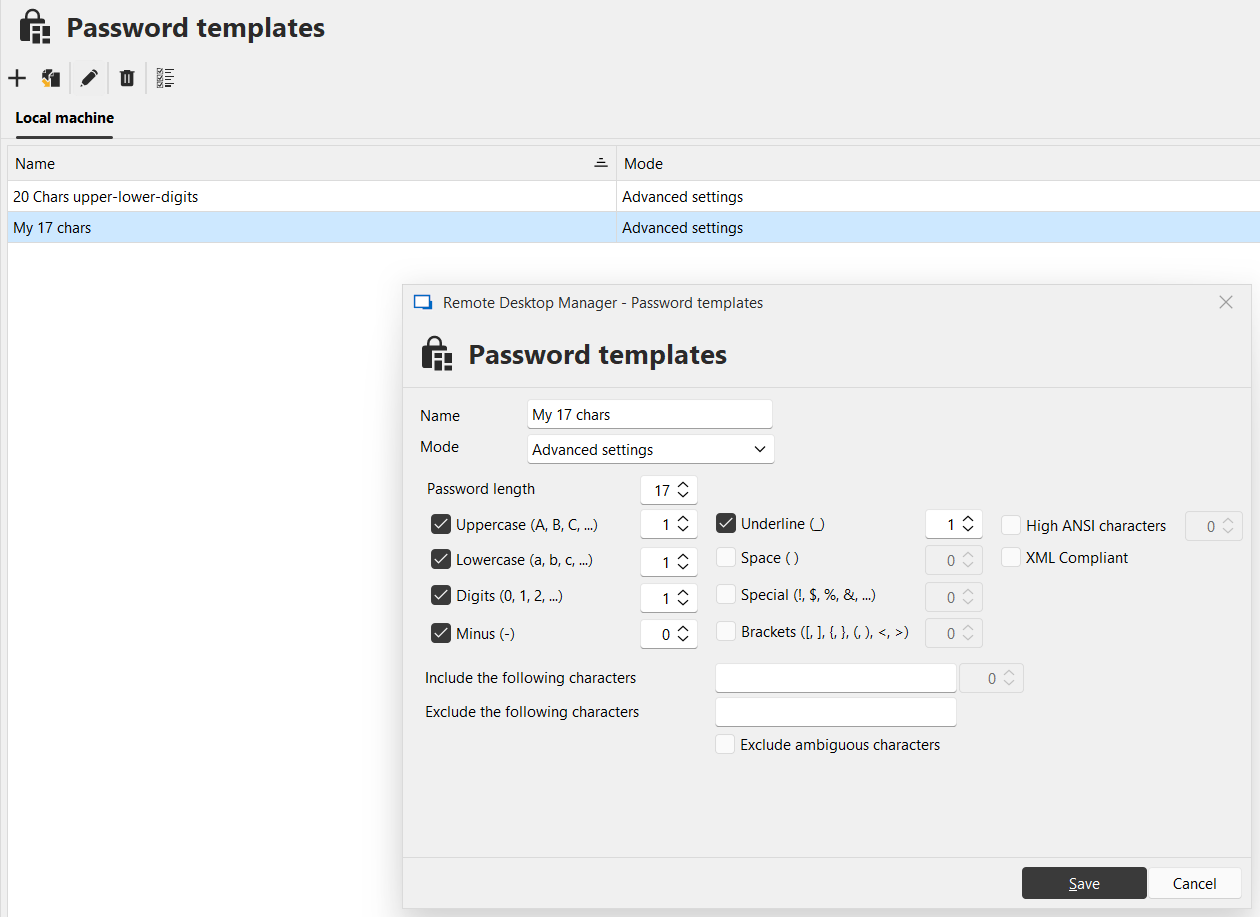
a36087a4-e3fc-46e2-b934-bf56e805b0e5.png
Hello,
Thank you for your reply,
That is good news, my recommendation for this would be to go under "Administration" -> "Vault Settings" -> "Password Management" and use the "List" option to link to one of your existing "Templates", unfortunately there is currently an issue with this for which I have opened a case with our development team.
Once the Template has been set on the "Root" under the "Properties" of your entries in the "Password Management" section you can use the "Inherited" option and when generating the password it will use the Template assigned on the Root.
That being said, as mentioned, I will keep you updated with any news I receive regarding this issue being resolved.
Best regards,
Samuel Dery
Hello,
I wanted to update our users following this topic regarding the requests made in this thread.
As I mentioned in a different topic, we will have the following changes available with 2025.3:
- We're changing the default value for the password template on entries to be inherited by default. This means that by simply setting the template at the root-level, every entry you create will refer to this template, and the "generate" button is based on that template whenever one is configured.
- We will add support for "shared password templates" in SQLite. This is the reason why the dropdown is currently empty for this feature in SQLite. We don't support (and don't want to support) local password templates to be configured in entries. This would require you to recreate your current (local) templates to be shared ones.
These two changes will make it easier for administrators to leverage the password templates (renamed to password policies in 2025.3) to generate secure passwords for their entries.
Additionally we'll also be investigating what we can do to have a feature to remember the last used password template when generating them. This will not work with the "generate" button which is aimed to work with the configured policy on the entry, but the password generator window itself would benefit from this feature.
Regards,
Hubert Mireault
Hello,
Version 2025.3 of our products has been released, and it contains the changes I've mentioned above, including a feature to remember the last used password generation template.
Let us know if you have any feedback after trying out this version.
Regards,
Hubert Mireault
Hi!
Thank you for remembering me. I've tried version 2025.3 it and here's my feedback.
- I really like how Password generator remembers the last used settings, even if they were not associated with a saved profile, even if you click Cancel.
- Here is my test policy, I will refer to it in the following points. Note the password length, underline and minus.
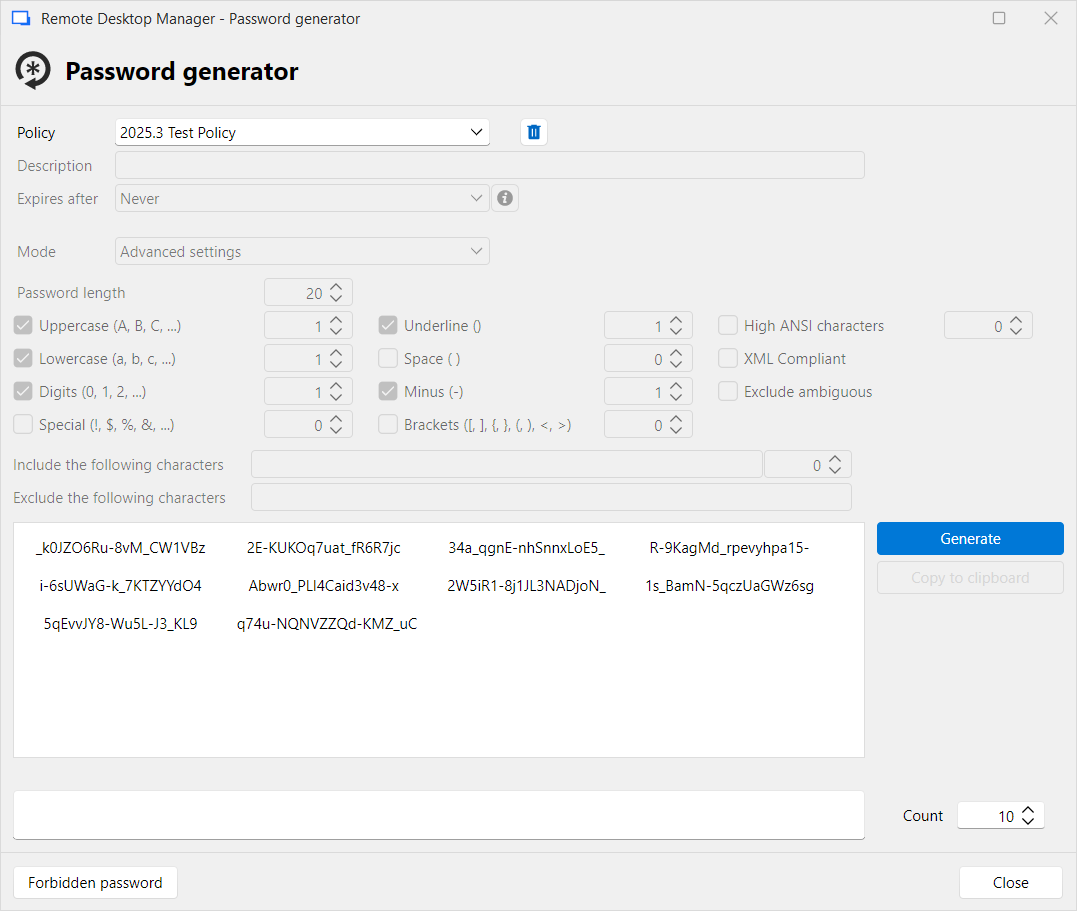 I don't like that when I select a saved policy, all settings are read only. This window should allow editing and saving edited profile (overwrite or save under a new name), without the need to go to Administration - Password policies. It is intuitive and what users expect. It has all the necessary controls and it already can do editing (in the Default profile), therefore it should not be very hard to implement.
- When I select a data source of Devolutions Hub Business, when going to Administration - Password policies and selecting "Local machine" I see the following. Note the details pane lacks the "Underline", "Space", "Minus", "Brackets" and other controls that are present in the above window. I also cannot shrink the empty Description column.
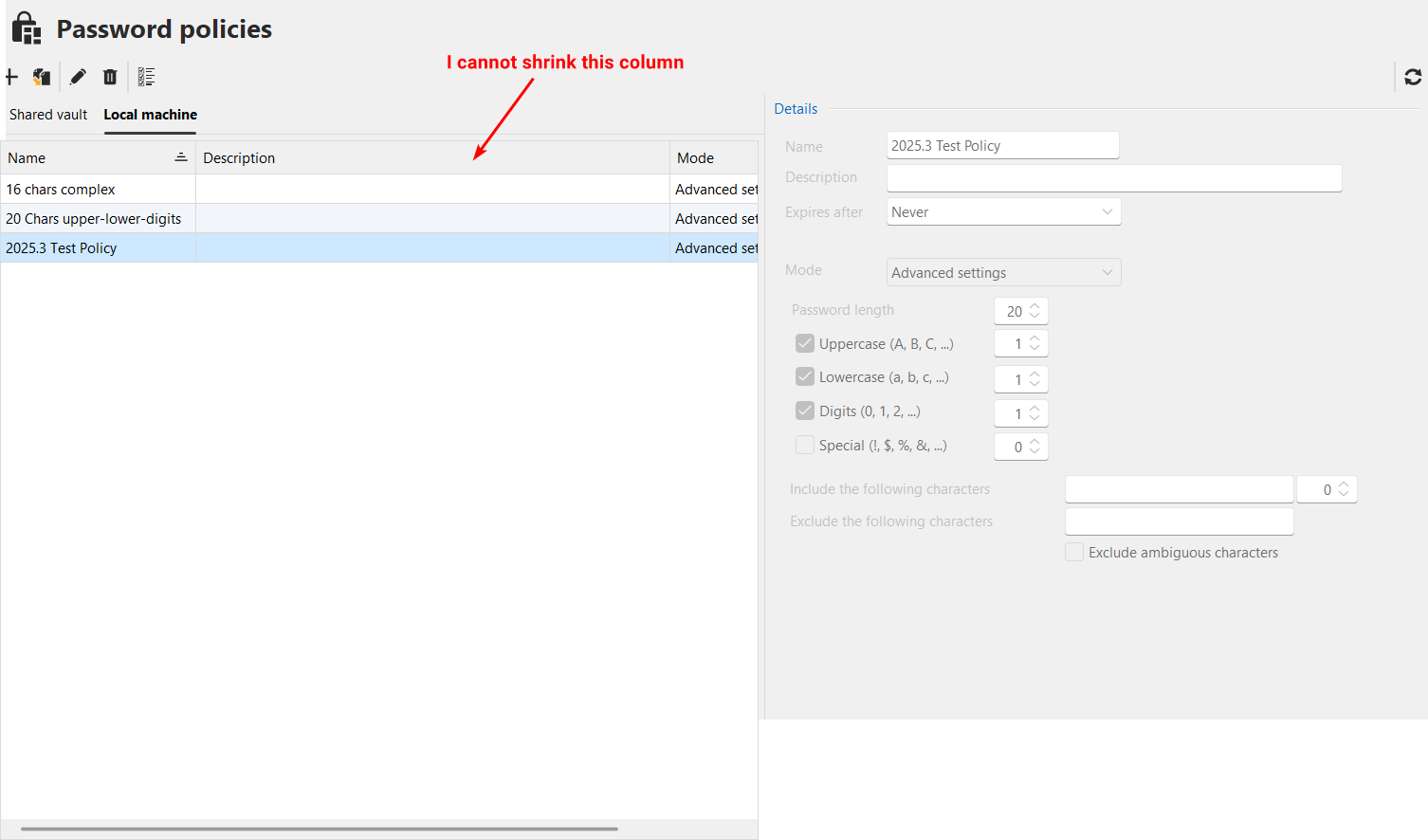 Now when I click the pencil icon (Edit) on this 20-char long, quite complex profile, I see completely different settings. It forgot "Advanced settings", and it doesn't have the necessary controls. Minimum length is 1:
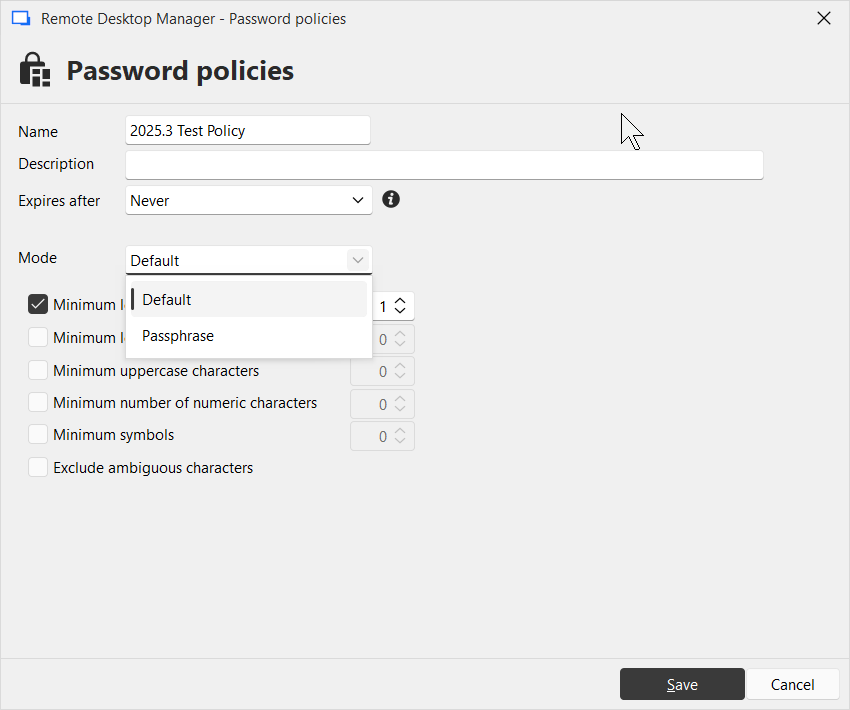
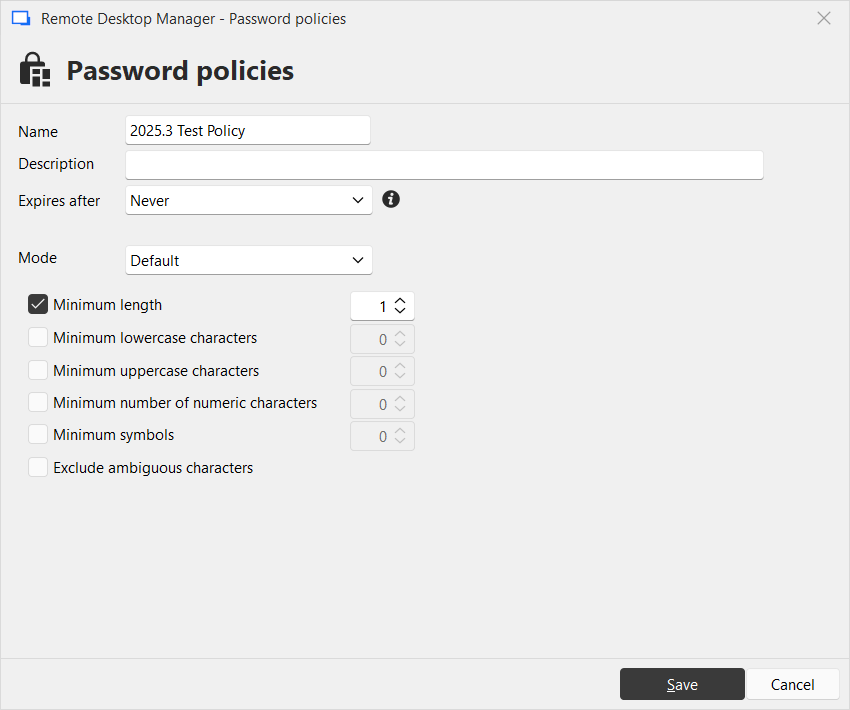 The only available options for Mode are Default and Passphrase. Note the information icon next to "Expires after" combo:
 But when I switch to Hub personal or local data source, and then go to Administration - Password policies, the window is different - it has all controls I expect:
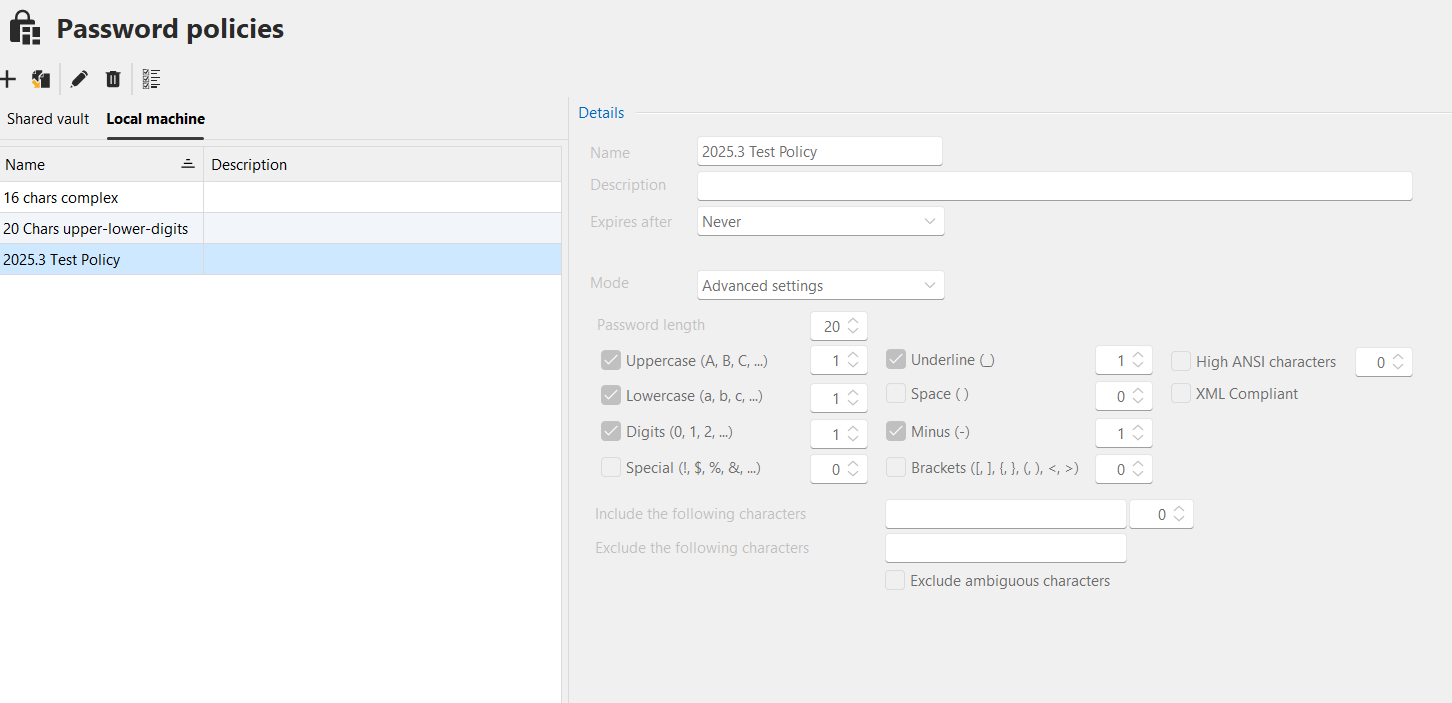 And now when clicking Edit, I see a different window. Note the settings are correct, mode is correct. Note there's no information icon next to Expires after combo: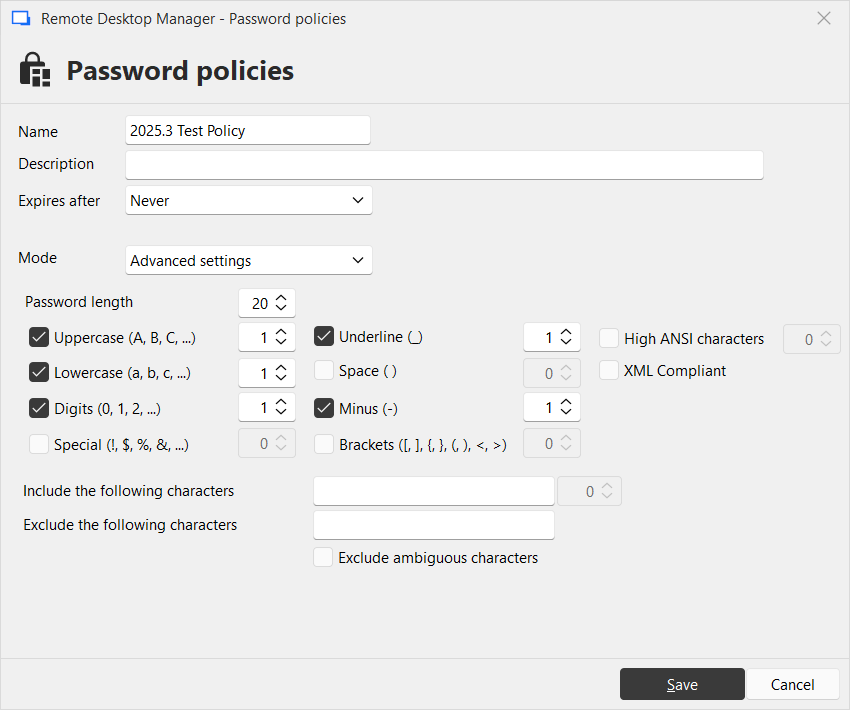
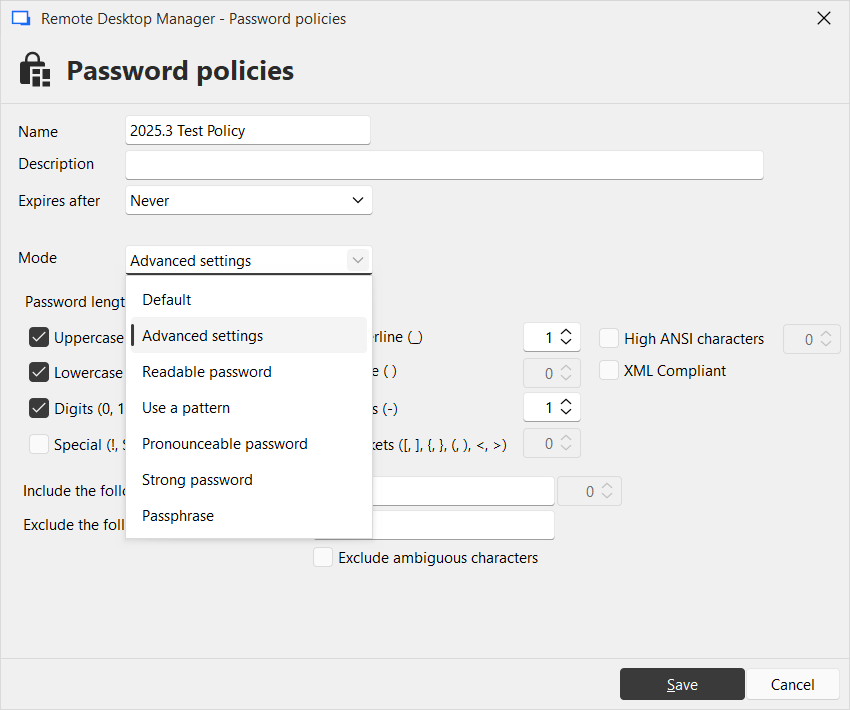 With the Password policies tab open, when I switch data source using Navigation pane, it just disables all controls and presents outdated data. I need to close the tab, then go to Administration - Password policies and open it again to get correct content. When data source is changed, this tab should reload all data from new data source and be ready for further interaction. This is the lowest priority, but please keep it on the list.
That is for now. We'll see where it goes next.
Thanks!
446a7333-84e3-4baa-970d-3c3ab55d1c41.png
2af325ef-e55f-4d7d-9cc0-544a150c765d.png
589e9388-528d-42e5-9b83-a74178ead2ec.png
e79daf61-e634-47ff-acaf-19916f6265fe.png
a9789460-3cea-4230-a247-90da7b023859.png
7f405c88-5686-478f-a942-4c7d8292174b.png
1f6e8d92-20aa-4659-9a00-98dcebbaed8e.png
Hello,
First, thank you for the detailed feedback. You bring up really good points. I'll go over the three core points/issues I've identified from your feedback:
I don't like that when I select a saved policy, all settings are read only. This window should allow editing and saving edited profile (overwrite or save under a new name), without the need to go to Administration - Password policies. It is intuitive and what users expect. It has all the necessary controls and it already can do editing (in the Default profile), therefore it should not be very hard to implement.
This is a good point and we'll open a ticket to see how we could address this. I'm not sure why we never supported it before, as it seems like an obvious workflow improvement.
When I select a data source of Devolutions Hub Business, when going to Administration - Password policies and selecting "Local machine" I see the following. Note the details pane lacks the "Underline", "Space", "Minus", "Brackets" and other controls that are present in the above window. I also cannot shrink the empty Description column.
On my end, all of the values are visible, so there seems to be something weird going on. From what I can tell with your other points, RDM might erroneously load it as a "Default" type rather than "Advanced", making the UI appear this way. We'll open a ticket for this as it looks like a bug rather than an intended behavior.
With the Password policies tab open, when I switch data source using Navigation pane, it just disables all controls and presents outdated data. I need to close the tab, then go to Administration - Password policies and open it again to get correct content. When data source is changed, this tab should reload all data from new data source and be ready for further interaction. This is the lowest priority, but please keep it on the list.
This makes sense as well and I will open a ticket for this.
Let me know if I missed something.
Regards,
Hubert Mireault
You captured the gist of the issues. Thanks for making it awesome!
Hello,
We've improved the Password Policies window to correctly update when changing datasources. This will reach live with the upcoming 2025.3.17 version.
Regards,
Jafran Majeau
Thank you. Yes, I can see in 2025.3.17 that the window is updating during changing of the data source, and it became more consistent. The details pane is however still missing some advanced properties of the password.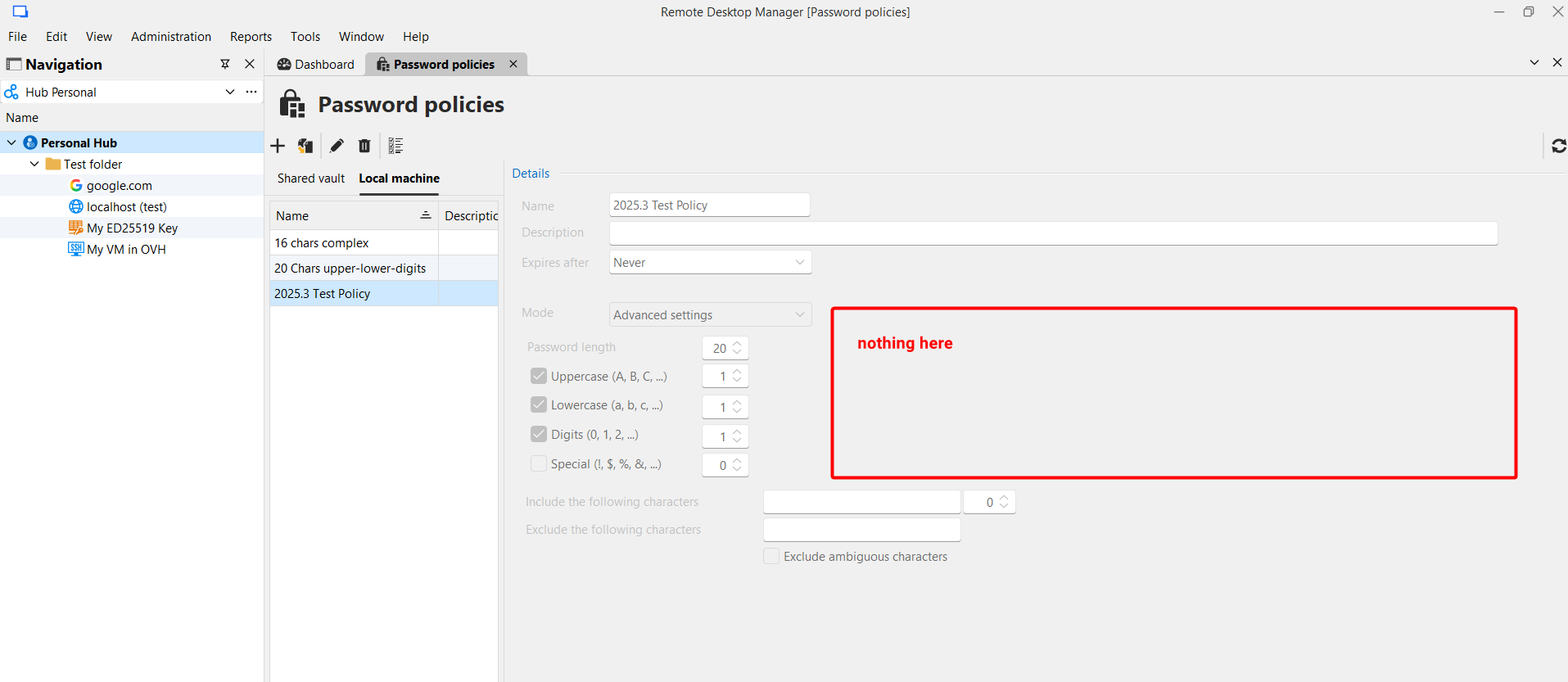
When you compare that to the "Edit" window, you'll see what I'm taking about: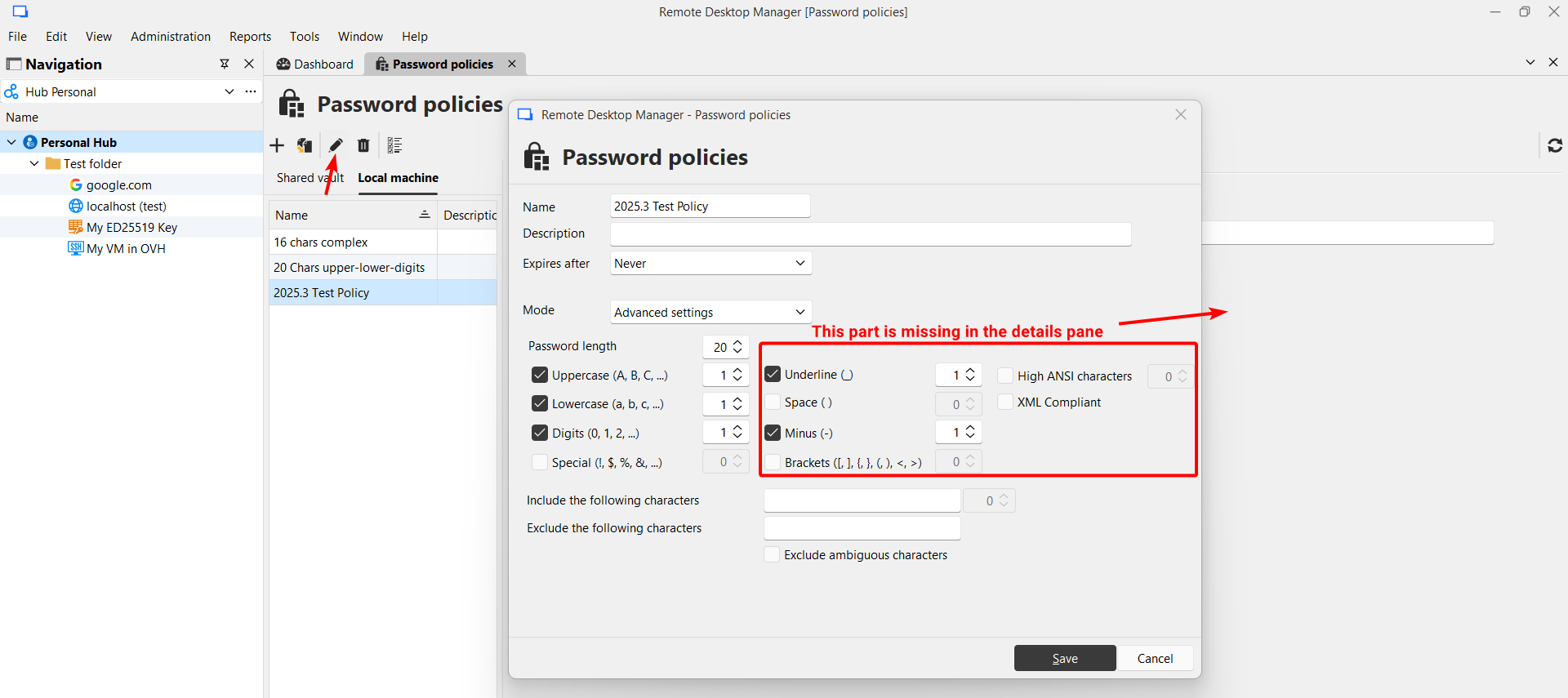
Thanks!
81d2b16f-2c94-436f-81c5-f4543fd627fb.png
29cb1c96-06b8-4191-811d-355bccd3e461.png
Hello,
That is odd, I am not getting your issue. The full information is displayed properly.
I will investigate and come back to you.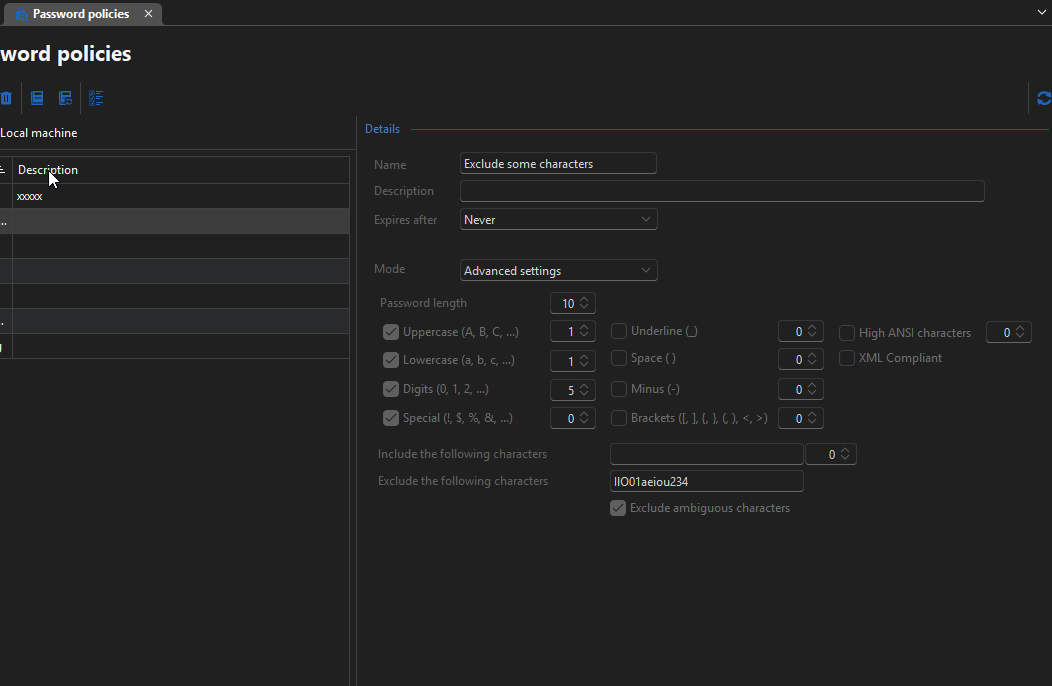
Regards,
Jafran Majeau
0adcd9d8-8e0d-431a-87b4-d653dfcf4d98.png
Hello,
I've investigated the issue of the missing details section, and I'd like for you to test this again next version, and let me know if you are still experiencing the issue. As far as I can tell there should be no problem.
As an added note, I've also added the possibility the modify the password policies directly in the Password Generator window (there will be an Edit button visible, assuming the current user has the necessary rights to edit said policy). I've also fixed issues where Hub Business interacted incorrectly with Local password policies.
You can expect these changes to take effect with the upcoming 2025.3.18 version.
Regards,
Jafran Majeau
Thank you, it all looks so much better now! The ability to edit the profile in password generator is great, and the fixes made it all consistent and usable. I've got two tiny further feedbacks regarding this, and then I think we'll be able to close it all for good.
1) Make it possible to launch password generator from within Administration - Password profiles. I mean when I edit a profile this way, then I might want to immediately generate passwords using that profile. It is tedious to close Password profile manager, then separately open Password generator.
2) There's a grid refresh issue. When I select e.g. a third profile, and edit it, and then Save, then the grid is refreshed and have 2 items selected - the first, and this one I used previously, and details are shown for the first one. See attached screencast for details.
2025-10-24_17-05-34_RemoteDesktopManager.mp4
Hello,
I've fixed the selection issue when editing a policy, and we've added a Password Generator button to the toolbar in the policies. You can expect this to take effect with the upcoming 2025.3.21 version.
Regards,
Jafran Majeau
Thanks! It's going to be a very useful cornerstone of password management and better security! I use it almost on a daily basis already.
Now, when your time permits, please add the Generate password icon, similar to what's in the "New entry" window, to the places where you ask users to enter a password:
- SSH key generator
- Certificate generator (also add "Reveal password" icon)
- Devolutions Send
- and others, which I maybe missed.
By the way I think that in the SSH key generator the "Confirm passphrase" is redundant. There is the Reveal password button, and in other places where you ask for password, there's no "Confirm" input box. Please consider removing it.
Thank you in advance!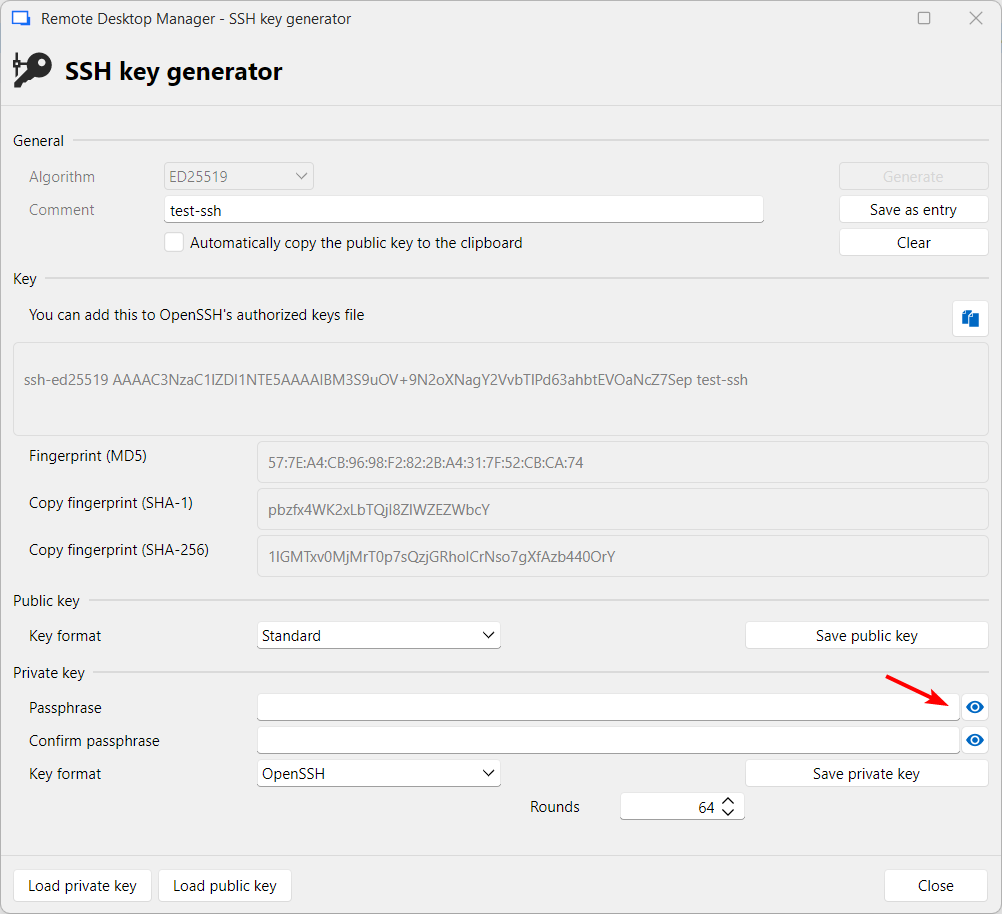
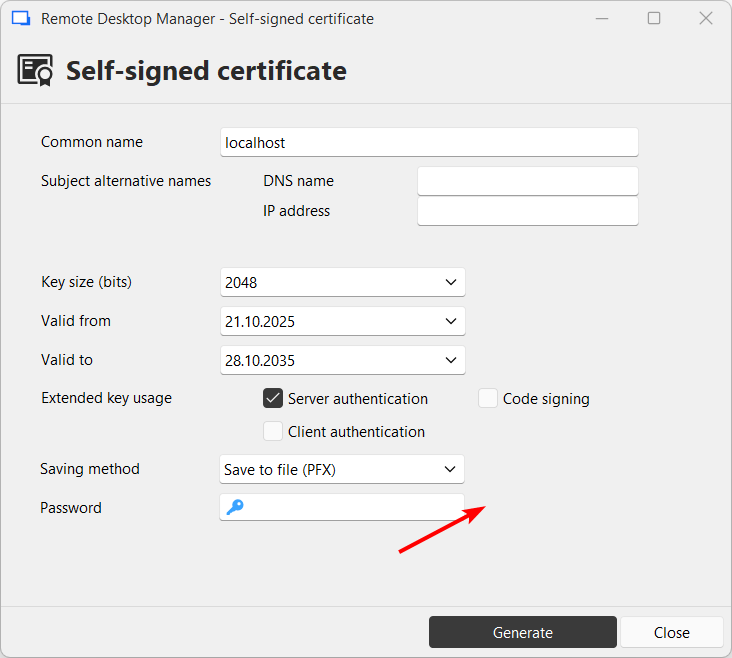
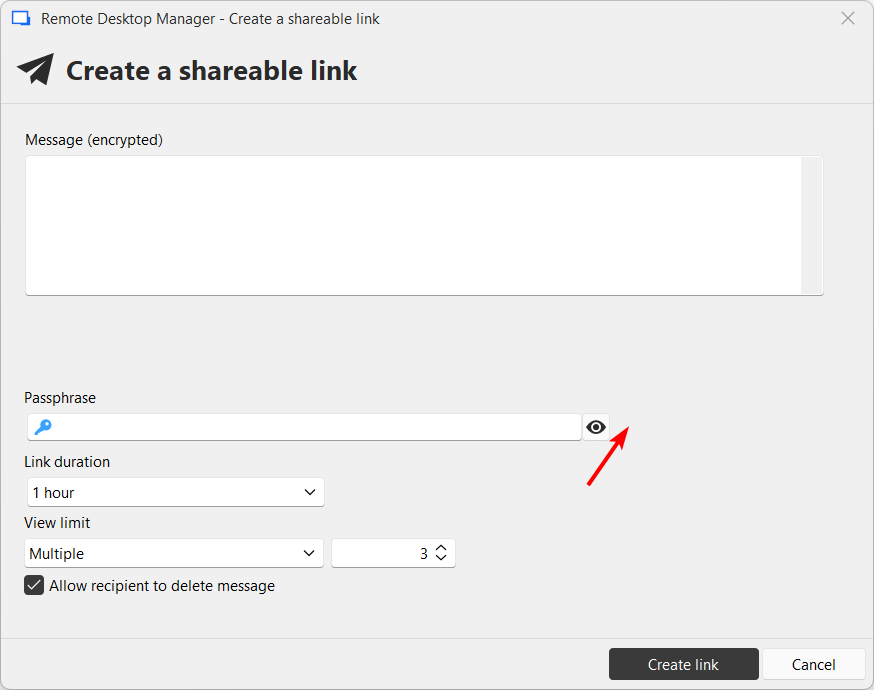
260c3f19-fadc-430d-bc7a-942bc9b9a921.png
c444e8b1-7d2e-4be0-a4d4-c36e186dfbef.png
f4e37126-b96b-4c93-80ac-cc761a291f53.png
Hello,
We will investigate this and come back to you.
Regards,
Jafran Majeau
Hello,
We've added the Password Generator to the layouts you've specified and we've also removed the confirm passphrase field. You can expect this to take effect with the upcoming 2025.3.23
Regards,
Jafran Majeau
Thank you! Having a password generator at hand yields more secure passwords. It will materially improve security for many RDM users over coming years.