Change behaviour of right-click on an item in the navigation tree
Change behaviour of right-click on an item in the navigation tree

Hi team,
My scenario:
- An RDP session (or AnyDesk, RustDesk or similar) open to a remote machine
- I am launching a software on a remote machine that prompts me to enter some user name and password (different from my Windows username/password)
- I have that information saved in a credential entry (username and password) in RDM. I want to use it.
Under the above conditions I am right-clicking on the credential entry in Navigation pane to use "Copy username" context menu item.
The issue happens now. The mere right click switches the view from the RDP tab to Dashboard to helpfully show me details about the credential entry. I am selecting "Copy username" from the right-click context menu, and then I need to find the RDP entry I was working with (among many others open at the same time) to paste the contents of the clipboard to. I then again right-click on the credential entry in Navigation to use "Copy password" and again it switches the view to the dashboard. So I again search my server tab, activate it and paste the password in the appropriate textbox.
The request is: please disable switching to dashboard when an entry in Navigation is right-clicked. Or if you don't want to do that in a hard way, then please add an option in settings that will do that - "Disable switching to Dashboard on right-clicking an entry in Navigation pane".
RDM 2025.2.20.0 64-bit (JIT) on Windows 10, but I'd like to have that also on Linux.
Thank you in advance.
All Comments (13)
Hello RDMTinkerer,
We already have an option to keep the focus on your active session.
We also have multiple behaviours, such as only on left click.
You can find this one under File -> Settings -> Dashboard -> Auto-focus dashboard.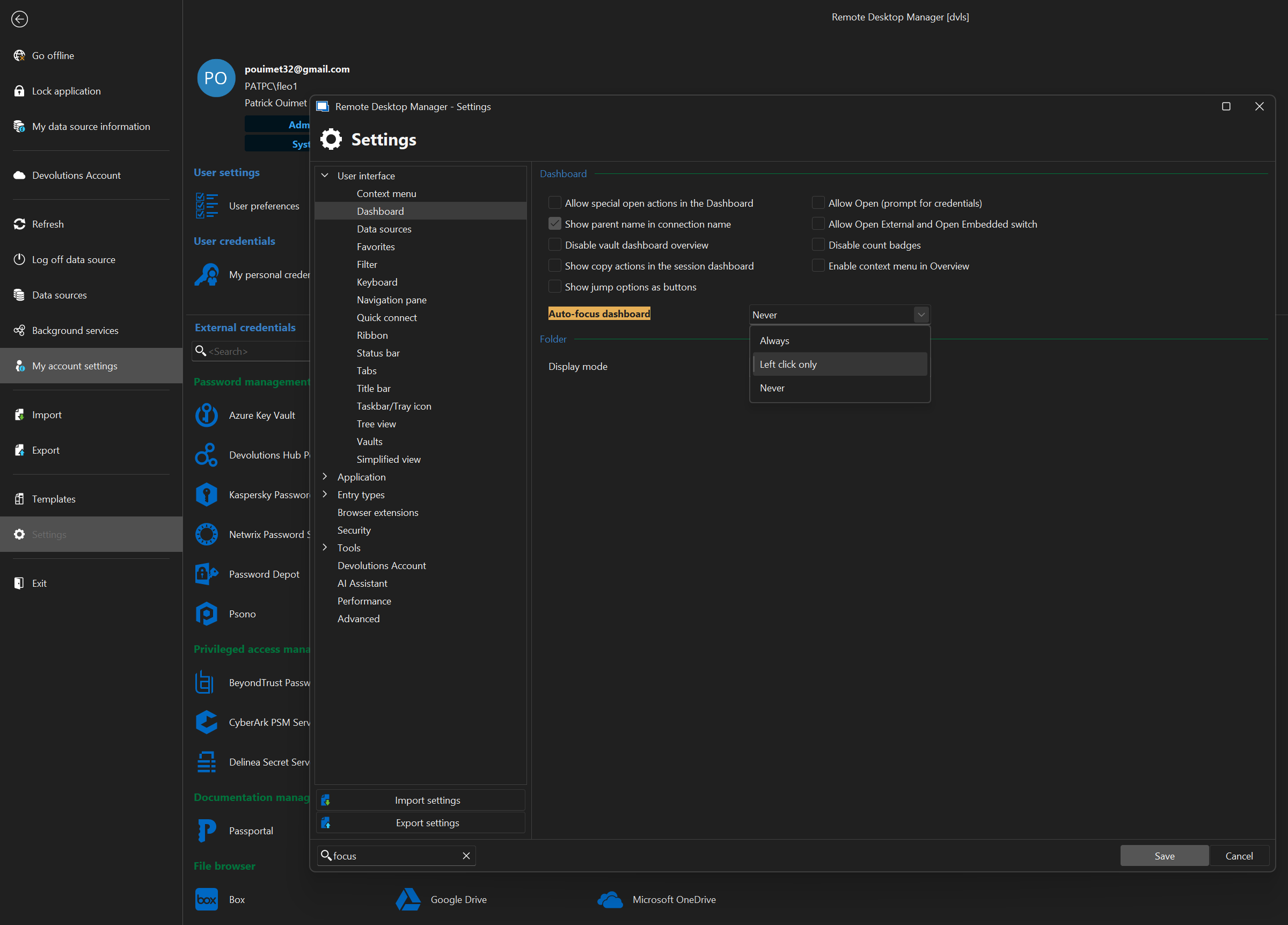
Let us know if this is what you were looking for.
Best regards,
Patrick Ouimet
Screenshot 2025-07-11 172018.png
Oh, my! Somehow I missed this setting. Thank you, this is what I was looking for.
You can close this FR.
I have to revisit this topic, because the actual RDM behavior turns out to be inconsistent.
- My setting "Auto-focus dashboard" is set to "Left click only".
- If I right-click on an entry in Navigation and the entry is not open (not active) then it works fine (the right-click menu opens and nothing else happens).
- If I right-click on an active/open entry in Navigation, then it focuses the open session, which is an unexpected behavior.
This is RDM 2025.2.22.0 on Windows 10.
Please make active sessions respect the "Auto-focus dashboard" setting or add a new setting "Auto-focus session" with the same options.
EDIT: This is more nuanced than that. I can't pinpoint the different scenarios where it doesn't work as expected, but I'm encountering them continuously. For example now I needed to copy password from an inactive session to a Web session (Dell iDRAC) and it did focus the dashboard of the inactive session despite me only right-clicking it, not left-clicking.
Please investigate and fix.
Thank you.
Hello,
We have a ticket opened to rework these options to be more intuitive (from this thread), and we've added your feedback to our ticket so we can investigate this inconsistent behavior.
Regards,
Hubert Mireault
Hello,
I've investigated this behavior, and I think that you are seeing the results of other settings, such as Auto-focus tab on item select (which automatically focuses any opened tab as soon as the tree view selection is set to its item, and vice versa with Auto focus item on tab focus). These settings act independently from Auto focus dashboard, which specifically focuses the dashboard tab.
That said, we are currently implementing it so both of these feature will have the option to only work when using the left click, same as auto focus dashboard (and it will be the new default). This should provide the behaviours you've been expecting to get.
I will provide a follow up update when I have more information.
Regards,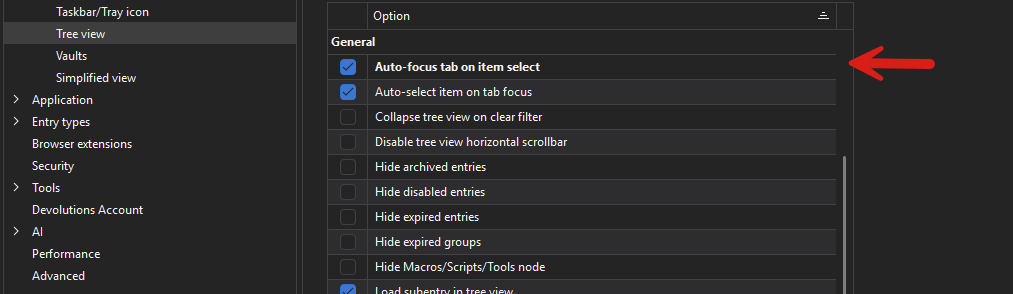
Jafran Majeau
488984bd-235b-4f0c-a41a-2187fe97b8e5.png
Thank you very much for the update. Fingers crossed for the fix.
This need to copy username and/or password from a session entry or a credential entry is quite common in some scenarios.
For example, Dell iDRAC has its own way of passing clipboard content to the virtual console within it, and it is the only way I can enter a password for the Windows account. Passwords are now from the password generator - it's impossible to remember or type them in a password box. Therefore I need to copy the password from a credentials entry and paste here, then click "Send". RDM cannot autofill that. Normal Remote Desktop session is not an issue. But when a server's networking fail, this is the only option left for me.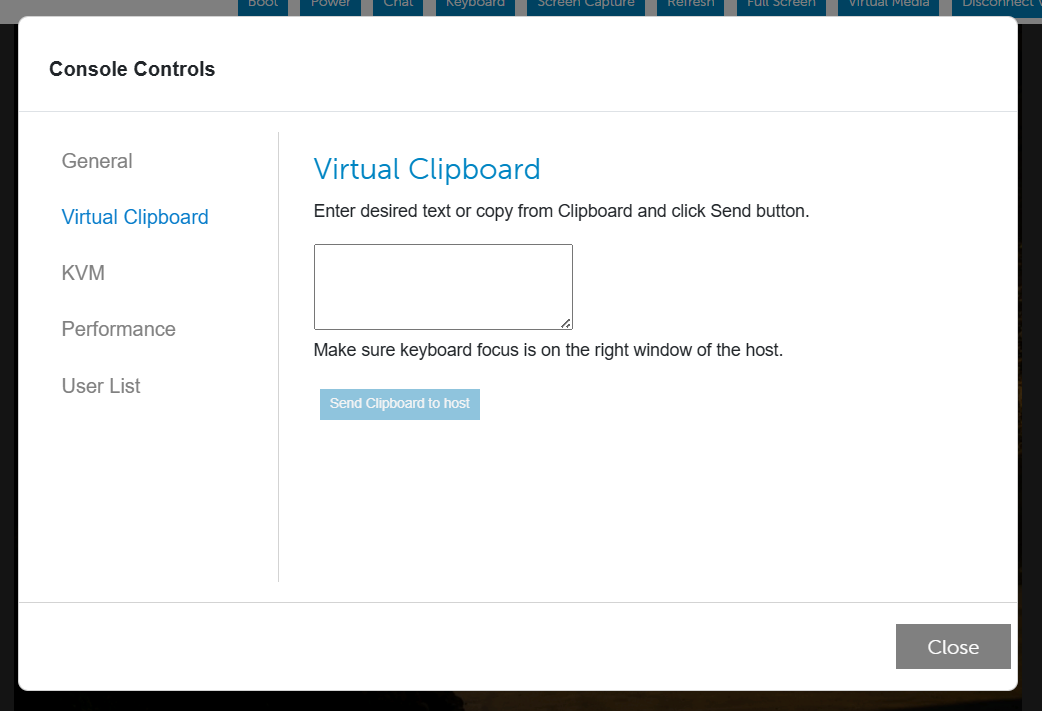
8de386d3-1a1b-4421-911d-d81f3ffe4baa.png
Hello,
All 3 auto-focus related options have been moved to the Tree View section of the Settings. The Auto-focus tab on item select will now be set to Left click only by default. Which should solve the issues you've been experiencing. This should be available with the upcoming 2025.3 version to be released this fall.
Regards,
Jafran Majeau
Thank you! Can't wait for it, it's going to be a great release!
Hello,
Thank you for being so patient!
I'm pleased to inform you that a new version of RDM Mac (2026.2.1.2) has been released, featuring the requested feature.
Latest Version: Download RDM
Please let us know if this works or if you encounter any issues.
Best regards,
Maxim Robert
Hi,
Thank you for the information. Unfortunately the behavior is not 100% fixed and not 100% consistent. I am using RDM on Windows 2026.2.8.0. Here's one scenario that still exhibits the bug:
- Create a website entry that points to a website that surely doesn't exist. I used http://10.11.12.13/ defined in the Devolutions Business Hub.
- Have another entry next to it (for the right-click). It can be credential entry, SSH, RDP, website, whatever. You can just duplicate the above. Doesn't matter.
- Restart RDM. The issue doesn't always show when RDM is already running. For best result, restart it.
- Open the session http://10.11.12.13/ by double-clicking or using "Open session" button in the Actions vertical toolbar. You're going to see black screen until the browser eventually times out and displays the error. You don't have to wait for the timeout, you can immediately proceed to the next step.
- Right-click on the other entry.
- Observe the issue. Dashboard of the other entry steals the screen.
It seems that when I right-click in the above scenario, RDM displays some context menu, but it then in a blink of an eye changes it for another one, and then the issue occurs. This is what I saw. I have no idea if it's specific to the Devolutions Business Hub data source, didn't have time to test other combinations.
Please fix it.
Hello,
Thank you for your response!
Our QA Team has reproduced the issue, and a ticket has been opened with our development team to resolve it.
We will let you know as soon as a fix is available. In the meantime, if you have any further questions, please don't hesitate to let us know.
Best regards,
Maxim Robert
Hello,
Thank you for being so patient!
I'm pleased to inform you that a new version of RDM (2026.2.12.0) has been released, featuring the fix for your issue.
Latest Version: Download RDM
Please let us know if this works or if you encounter any issues.
Best regards,
Maxim Robert
Hi!
Yes I can confirm that it works well (so far) in 2026.2.12. If I find any other edge case when it misbehaves, I'll let you know here.
Thanks a lot for the fix.