Delinea integration license "invalid" when connecting via Azure Virtual Desktop
Delinea integration license "invalid" when connecting via Azure Virtual Desktop

Hello,
we are testing Azure Virtual Desktop at the moment and I noticed a strange problem with the Delinea Integration License.
When I am on my normal domain joined PC, RDM and the Delinea Integration are working. No license issue.
But when I start RDM on an Azure Virtual Desktop (which is also joined to the same domain), RDM starts normal and is licensed, but as soon as I try to access something that connects to Delinea Secret Server, I get this error message: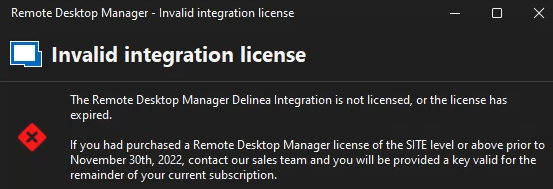
I am sure that the license is OK and valid, as on our "normal" Windows clients everything is OK. It just happens on AVD...
Could it be because of the login method? On our normal clients we login locally to our Active Directory, but AVD uses SSO and Entra ID.
Configure single sign-on for Azure Virtual Desktop using Microsoft Entra ID | Microsoft Learn
Brgds Andreas
ed4549ed-2930-4d11-8170-cfe42eddf238.png
All Comments (2)
Hello,
whatever it caused, we were able to resolve it by deleting the AVD fslogix profile and create a new one...
Brgds Andreas
Hello Deas,
Thank you for contacting us on this matter!
I'm glad that you were able to find the solution! If the problem ever comes back, please do not hesitate to contact us again.
Have a nice day!
Best regards,
Maxim Robert