No sessions will launch

Morning,
This morning any session I open results in: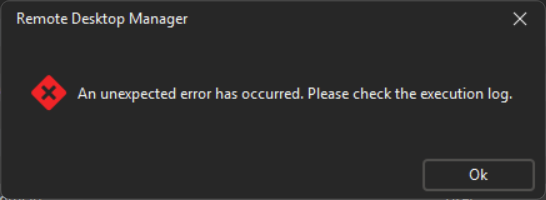
I did update to .20 and rolled back to .17 and I am still seeing the errors.
Can't locate an execution log. Check the application log shows errors connecting to the SQL database, but that's likely due to the VPN taking its time to connect.
Check with other users and .17 and .20 working fine for them.
Launching any of the session out side of RDM works.
Using quick connect for RDP works.
Could I please get the location of the execution log so I can troubleshoot further?
Thanks
Thanks
Iain
Version 2026.2.13.0 64-bit
Data Source SQL
569ce0b5-5bea-4731-a6b9-f4b3b6c55f0d.png
All Comments (7)
OK seem to be an issue with my current version and possibly proton pass integration.
I have installed the portable version of .20 and it works.
I launch a session and my OTP pops up for Proton, then the session launches with out issue.
Thanks
Iain
Version 2026.2.13.0 64-bit
Data Source SQL
Fixed the issue, by heading into the proton saved credential type and saving it again.
All session now appear to launch.
Would still like to know where that execution log lives though?
Thanks
Iain
Version 2026.2.13.0 64-bit
Data Source SQL
Hello,
In the case of ProtonPass this error seems to be logged in the "Debug" tab of the profiler. Go in Help -> Performance profiling -> Debug only and set the value to "1".
Once this is done try your protonpass again and see what error comes up in the profiler.
Sadly this type of debug information is not logged anywhere so if you can't reproduce it anymore you won't be able to know the error.
Best Regards,
Michaël Beaudin
Hi
I have the same error. Have tried different retype and resave but to no avail.
Windows 11 - RDM 2025.2.27.0 64-bit (JIT)
The error in the debug log is:
Silent: System.AggregateException: One or more errors occurred. (Failed to parse the response JSON)
 ---> PasswordManagerAccess.Common.InternalErrorException: Failed to parse the response JSON
 ---> System.Text.Json.JsonException: The JSON value could not be converted to System.Int32. Path: $.Shares[1].ContentKeyRotation | LineNumber: 0 | BytePositionInLine: 1468.
 ---> System.InvalidOperationException: Cannot get the value of a token type 'Null' as a number.
   at System.Text.Json.ThrowHelper.ThrowInvalidOperationException_ExpectedNumber(JsonTokenType tokenType)
   at System.Text.Json.Utf8JsonReader.TryGetInt32(Int32& value)
   at System.Text.Json.Utf8JsonReader.GetInt32()
   at System.Text.Json.Serialization.Metadata.JsonPropertyInfo`1.ReadJsonAndSetMember(Object obj, ReadStack& state, Utf8JsonReader& reader)
   at System.Text.Json.Serialization.Converters.ObjectDefaultConverter`1.OnTryRead(Utf8JsonReader& reader, Type typeToConvert, JsonSerializerOptions options, ReadStack& state, T& value)
   at System.Text.Json.Serialization.JsonConverter`1.TryRead(Utf8JsonReader& reader, Type typeToConvert, JsonSerializerOptions options, ReadStack& state, T& value, Boolean& isPopulatedValue)
   at System.Text.Json.Serialization.JsonCollectionConverter`2.OnTryRead(Utf8JsonReader& reader, Type typeToConvert, JsonSerializerOptions options, ReadStack& state, TCollection& value)
   at System.Text.Json.Serialization.JsonConverter`1.TryRead(Utf8JsonReader& reader, Type typeToConvert, JsonSerializerOptions options, ReadStack& state, T& value, Boolean& isPopulatedValue)
   at System.Text.Json.Serialization.Metadata.JsonPropertyInfo`1.ReadJsonAndSetMember(Object obj, ReadStack& state, Utf8JsonReader& reader)
   at System.Text.Json.Serialization.Converters.ObjectDefaultConverter`1.OnTryRead(Utf8JsonReader& reader, Type typeToConvert, JsonSerializerOptions options, ReadStack& state, T& value)
   at System.Text.Json.Serialization.JsonConverter`1.TryRead(Utf8JsonReader& reader, Type typeToConvert, JsonSerializerOptions options, ReadStack& state, T& value, Boolean& isPopulatedValue)
   at System.Text.Json.Serialization.JsonConverter`1.ReadCore(Utf8JsonReader& reader, T& value, JsonSerializerOptions options, ReadStack& state)
   --- End of inner exception stack trace ---
   at System.Text.Json.ThrowHelper.ReThrowWithPath(ReadStack& state, Utf8JsonReader& reader, Exception ex)
   at System.Text.Json.Serialization.JsonConverter`1.ReadCore(Utf8JsonReader& reader, T& value, JsonSerializerOptions options, ReadStack& state)
   at System.Text.Json.Serialization.Metadata.JsonTypeInfo`1.Deserialize(Utf8JsonReader& reader, ReadStack& state)
   at System.Text.Json.JsonSerializer.ReadFromSpan[TValue](ReadOnlySpan`1 utf8Json, JsonTypeInfo`1 jsonTypeInfo, Nullable`1 actualByteCount)
   at System.Text.Json.JsonSerializer.ReadFromSpan[TValue](ReadOnlySpan`1 json, JsonTypeInfo`1 jsonTypeInfo)
   at System.Text.Json.JsonSerializer.Deserialize[TValue](String json, JsonSerializerOptions options)
   at RestSharp.Serializers.Json.SystemTextJsonSerializer.Deserialize[T](RestResponse response)
   at RestSharp.Serializers.RestSerializers.DeserializeContent[T](RestResponse response)
   at RestSharp.Serializers.RestSerializers.Deserialize[T](RestRequest request, RestResponse raw, ReadOnlyRestClientOptions options, CancellationToken cancellationToken)
   --- End of inner exception stack trace ---
   at PasswordManagerAccess.ProtonPass.Client.RequestAllVaultShares(RestClient rest, CancellationToken cancellationToken)
   at PasswordManagerAccess.ProtonPass.Client.DownloadAllVaults(String password, RestClient rest, CancellationToken cancellationToken)
   at PasswordManagerAccess.ProtonPass.Client.OpenAll(String username, String password, IAsyncUi ui, IAsyncSecureStorage storage, Config config, CancellationToken cancellationToken)
   at PasswordManagerAccess.ProtonPass.Vault.OpenAll(String username, String password, IAsyncUi ui, IAsyncSecureStorage storage, Config config, CancellationToken cancellationToken)
   at PasswordManagerAccess.ProtonPass.Vault.OpenAll(String username, String password, IAsyncUi ui, IAsyncSecureStorage storage, CancellationToken cancellationToken)
   at Devolutions.RemoteDesktopManager.Managers.ProtonPassManager.GetVaults(ConnectionEngine engine, String username, String password, String extraPassword)
   --- End of inner exception stack trace ---
   at System.Threading.Tasks.Task.ThrowIfExceptional(Boolean includeTaskCanceledExceptions)
   at System.Threading.Tasks.Task`1.get_Result()
   at Devolutions.RemoteDesktopManager.Managers.ThreadManager.WaitForTask[T](Task`1 task, Int32 maxIteration)
   at Devolutions.RemoteDesktopManager.Business.CredentialProtonPassResolver.Execute(Connection credConnection, Connection owner, CredentialResolveParameters resolveParameters, OpenConnectionParameter openConnectionParameters, CredentialsResult credentialsResult)
For it happened just after I paid for the subscription, but I might also have upgraded RDM as well.
Regards Lars
Remote Desktop Manager connected with Devolutions Server running newest versions.
------------------------Signature------------------------
Sorry if any of above sounds harsh or provoking, it is NOT meant as such, but I have Asperger's and don't always know.
My intentions is always to be friendly.
-------------------------------------------------------------
Hello Lars,
Thank you for getting us the log. We'll open a ticket on our end and see with the developer who maintains the library if he can investigate this issue. It looks like the library isn't parsing the information from ProtonPass properly. If after analysis we have any additional questions for you, we'll post them here.
For now we'll assume it's the same issue as originally reported, but if Iain has additional logs, it could help us confirm this.
Regards,
Hubert Mireault
Hello,
We've made a fix for this issue with ProtonPass that will be available starting with our next minor version, which we are hoping to release within 1-2 weeks.
Regards,
Hubert Mireault
Hi
Awesome! - First class support as always!
/Lars
Remote Desktop Manager connected with Devolutions Server running newest versions.
------------------------Signature------------------------
Sorry if any of above sounds harsh or provoking, it is NOT meant as such, but I have Asperger's and don't always know.
My intentions is always to be friendly.
-------------------------------------------------------------