CyberArk PSM/PVWA connection

We primarily use CyberArk integration on Windows, but we have some Mac users that are trying to set up the integration. When they set up either through CyberArk Dashboard or through PVWA, they are not going through the PSM and are not getting audited when connecting. Using the PVWA method, they can log in to CyberArk, choose the credential and access an RDP server, but the connection goes direct and not through the PSM.
Is PSM connection not supported on the Mac version?
All Comments (13)
Hello,
Thank you for reaching out to us about this matter!
My name is William and your case has been assigned to me.
I just tested this on my side using the CyberArk dashboard and the connection correctly went through the PSM and was being recorded.
Could you verify that the RDP session is correctly configured to use the Dashboard on double click under the advanced properties of the entry?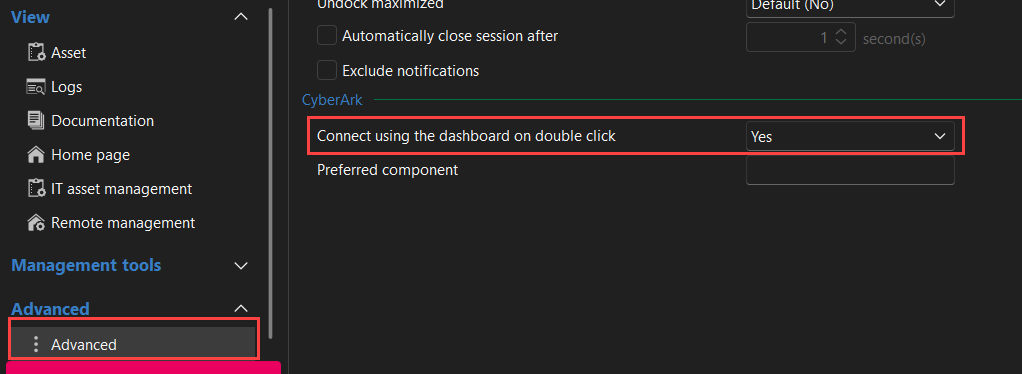
Also, with the PVWA credential, could you verify that the resolving mode is correctly set to PSM Connection?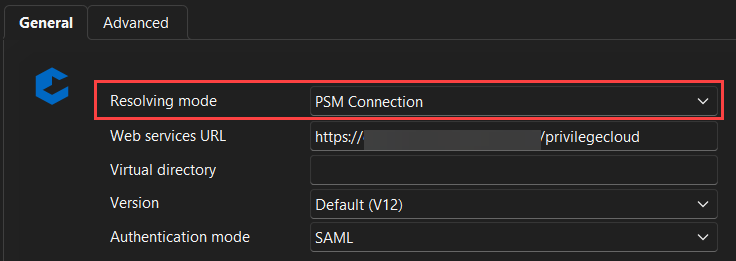
Feel free to reach out if you have any questions or need further clarification.
Best regards,
8a81569a-6033-4074-b649-109e9d7c086b.png
cc8e9288-dfe2-4ab0-bcef-9a40520e0fcd.png
Hello,
Our development team just confirmed that the PVWA credentials does not support the PSM on MAC yet. But the connection using the Dashboard should work correctly.
Best regards,
Hi William, I was able to get with the user and reconfigure his setup to use the Dashboard, it is working properly now. Thank you!
Hello,
You are welcome.
Feel free to reach out if you have any other questions.
I will mark this thread as resolved.
Best regards,
@William Alphonso Hi William, the user today contacted me and is not able to connect using the dashboard again. I verified the settings were the same and even deleted the dashboard and set it back up. The user can sign into Cyberark and his safe is loaded along with his accounts. When you right click on an account, the only menu option is to add to favorites. There were additional options there yesterday where I was able to type in a target server name and connect to it. Also, saved sessions were configured to connect using dashboard on double-click. That option is still set, but when you double-click, it tries to connect directly to the server instead of contacting the PSM first. We fully closed and re-opened the application multiple times, signed back in, but still have the same issue. We were running the latest version, no updates available.
Hello Michael,
Thanks for the feedback.
Are we still talking about RDM Mac?
Usually, these features are made available by the restAPI calls towards CyberArk; is it possible that something changed on CyberArk's side?
You can confirm by setting up the dashboard on RDM Windows, if possible.
Please keep us posted.
Best regards,
Alex Belisle
Hello, this is RDM on Mac. I tested a new instance of RDM on Windows and set up the CyberArk dashboard. I can confirm that this is not working on Windows either now. The same behavior exists. I can sign in to the CyberArk dashboard and see my safes. Upon selecting a credential and right clicking, there are no options to enter in a server name. A saved RDP session in the sidebar configured to connect using dashboard on double-click will try and connect to the server directly and not use the dashboard or PSM.
Hello,
In this case, it looks like something changed on CyberArk's side...
Do you still have the "Connect" option when you select an account in a CyberArk safe?
Thanks for letting us know.
Best regards,
Alex Belisle
No, the Connect button is not showing up when I select an account in a safe.
Hello,
In this case, it looks like something changed on CyberArk's side...
Do you still have the "Connect" option when you select an account in a CyberArk safe?
Thanks for letting us know.
Best regards,
Alex Belisle
@Alexandre Bélisle Do you have an update on this issue?
Hello,
Not sure why my message was duplicated.
I meant to answer to:
No, the Connect button is not showing up when I select an account in a safe.
With: In that case, this is most likely the issue.
Since RDM takes its settings from Cyberark, I'm not surprised that the connect option doesn't show on RDM's side.
You still can leverage the PVWA Credentials with the "Injection" Resolving Method, but this will bypass your PSM server.
I hope this helps.
Best regards,
Alex Belisle
Ok, we do not want to bypass PSM. Is there a fix in the works?