VMRC Session NumLock setting not preserved

I noticed that when connecting to VMRC (VMWare) session consoles, the NumLock state from the local PC is not preserved.
Once inside the session it is still possible to toggle NumLock, but then it is out of sync with the desktop os.
I don’t think that this is a limitation of VMRC itself, since VMWare’s own VMRC Sessions do not have this issue — if I have NumLock on when connecting with VMWare’s own VMRC client it stays on in the session. It is only with Devolutions where connecting to Devolutions VMRC sessions always has NumLock off.
Please fix this if you can.
All Comments (10)
Hello
I've taken an initial look at the code and I see that the VMWare VNC server sends a synchronization message at startup to communicate the state of the caps/num/scroll locks keys on the remote machine.
I am opening a ticket and looking into this. I'll need to investigate what VMWare's own client does internally - their extensions to the VNC protocol are proprietary (closed source and closed spec). So it will require some investigation, and I appreciate your patience. I'll update this thread once I know some more.
Kind regards,
Richard Markievicz
Hello
I wanted to let you know I've made a fix for this, and that should be available starting with 2025.2.21. After that's released and you upgrade, please let me know if you have any further problems or questions.
Kind regards,
Richard Markievicz
I just realized another issue: When you enable numlock, the arrow keys on the keyboard switch to acting like number pad numbers!
For example, pressing left arrow enters the number 4, down arrow enters the number 2, right arrow enters the number 6, up arrow enters the number 8.
Steps to reproduce:
- Enable NumLock
- Open Notepad or some other thing that lets you enter text
- Press left arrow - expected: cursor should move left - actual result: the number 4 appears
- Press down arrow - expected: cursor should move down - actual result: the number 2 appears
- Press right arrow - expected: cursor should move right - actual result: the number 6 appears
- Press up arrow - expected: cursor should move up - actual result: the number 8 appears
So while enabling Numlock does make the number pad work, it screws up the arrow keys.
Please also test that this issue is fixed.
Hello
Ok, thanks for the issue report.
Can you let me know what keyboard layout you have, both locally and on the server?
Thanks and kind regards,
Richard Markievicz
English (US) on both client and in the VMRC sessions is the layout on a 104-key keyboard
Hello
I did take a quick look at this, but I think it's the sync state that's messing things up. When you tested - you said "when you enable numlock" - but was numlock enabled on the server and/or the client?
The reasoning is this: VMRC is not like regular VNC in how it handles keyboard input. With VNC, the unicode symbol that results from your key(s) pressed is transmitted to the server, and then the server must translate that to the appropriate input events. Actual "physical" key presses are not sent.
However with VMRC it's different: the server expects VMWare proprietary key codes rather than unicode symbols. So, when you press a key (or keys) we translate that key press to its VMWare key code and send it to the server. What this means is: if you press the key marked "4" on your keypad; we send the server the key code for that physical key; we don't send a "4" or a "left arrow". The local numlock state is largely irrelevant here (except for setting expectation on the client side of what the result of the input should be). The server gets that key code and then interprets it based on the numlock state on the server.
Essentially, when I tested this without the lock key synchronization, it was easy to get weird behaviour if the lock key on the server was not in the expected state (which as you've noted, was easy to do). However when I tested it with the lock key synchronization, I was not able to find any problem.
So; please, once the 2025.2.21 is released you can re-evaluate this and do let me know if you notice any problems or have other questions.
Thanks and kind regards,
Richard Markievicz
Hi @Richard Markiewicz
Running 2026.1.12 and just discovered this same problem.
I connect to a VMRC session in RDM and press the left arrow key in the cluster of four arrow keys and it types a '4' into the remote session.
Also the [Delete] key above the arrows (by Insert/Delete/Home/End/PageUp/PageDn) doesn't work at all regardless of whether NumLock thinks it's active or inactive.
Standard 103/104 UK keyboard on my PC, the server is virtual but behaves correctly in normal VMRC.
Could you have another look?
Peter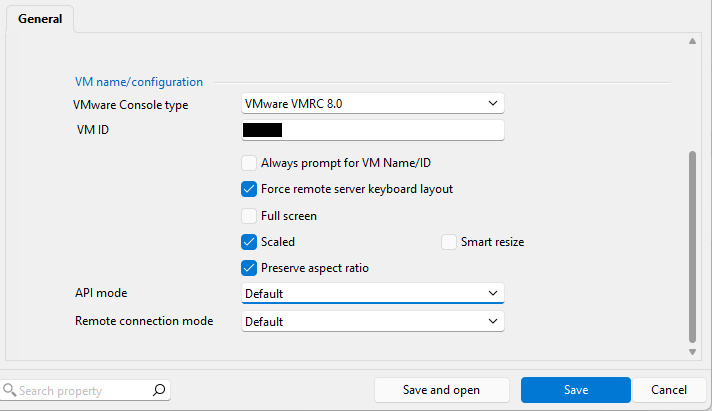
196c3ae0-5533-4e2d-8f06-d5d454668a05.png
Hello
I've looked at this, and we had some missing key mappings and cases where the extended key flag was not being respected. I think the fixes will solve all the problems you've stated. I'll post back here when that's available, but it should not be too long.
Thanks and kind regards,
Richard Markievicz
Thanks Richard.
Hello
I've made fixes here for 2026.3.15. Once that's available, please let me know if things are improved or you still have issues.
Thanks and kind regards,
Richard Markievicz