Linking Credential Entry into a template
1 vote

Hi Everyone,
Hier is my case:
I've created a template with several folders and pre defined entries I'd like to use for all my vaults.
What I'd like to be able, is to link a credential entry from the template within a folder entry or oder kind of entries.
For Example, I've
- An Entry type Username/Passwort "super user"
- An Entry type Folder (Or RDP, or whatever), "server", where credentials are linked to the "super user" entry
It's possible to link the entry once the template is imported into a vault, but it would be cool if all those "linking" could be prepared already within the template.
I wish you all a good day
All Comments (8)
Hello,
We already support linking credentials in a template entry directly. Entries created from that template will already be linked to the proper credential. The configuration looks like this : 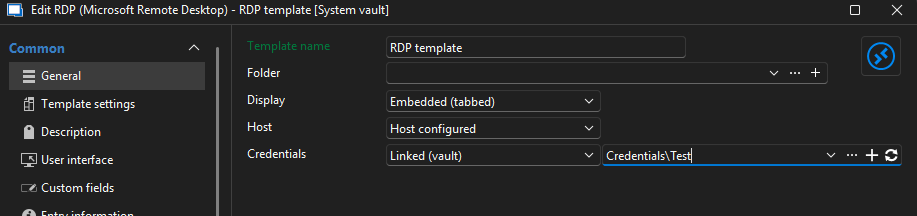
If you are using a SQL Server data source, you can even use the "Linked (external vault)" mode which will work across all vaults and not just the currently active vault in which you selected your credential. This setting should also be made available to DVLS and Hub data sources in the release 2025.3.0.0 of RDM.
The configuration is as follows : 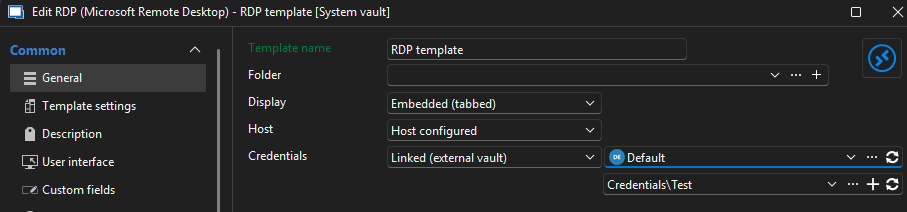
Here "Default" is the vault and "Credentials\Test" is your selected credential entry.
Let me know if I misunderstood the configuration you aimed for or if this is what you wanted.
Best Regards,
Michaël Beaudin
fd61f28f-97a3-42a9-95af-576961270f76.png
5df3fb0c-0d04-43b9-9e9a-31f601af5288.png
Hi,
Yes, I get that I can link a credential into the template, but the suggestion hier is to link it to an entry within the template.
The Idea would be, that when I import all the Template structure into a new Vault, all the entries are already linked.
For Example:
Screenshot 2025-06-24 073123.png
Hello,
Sadly this is not something that would be supported as our templates are not considered "real" entries. Linking a template to another template is not something we wish to support either.
I believe the 2nd option I mentioned "Linked (external vault)" would be your best bet. You could create your "User" credential in 1 vault, let's call that the "Credential vault" and your Server template could point to that through the "Linked (external vault)" credential mode. This way, even in a new vault, the credential will always be configured properly for your new Server entry.
This is currently already available in an SQL Server data source and should be made available in DVLS and Hub starting from the version 2025.3.0.0 which we should release around October.
Best Regards,
Michaël Beaudin
Hi Michaël,
Thanks for your answer.
Unfortunately linking to an external Vault doesn't cover this need at all.
The whole point is to make a pre-defined vault template that can be imported, where only username/credentials can be filled up when creating a new Vault (we use 1 Vault / customer). Their different credentials aren't shared between customer/vaults.
But okay, if you don't want/wish to do it, we can close the feature request.
Hello,
I just want to make sure I understand your case. If we put in steps what you wish to do it would be the following :
- Create a credential template "Super user" containing your credentials
- Create an RDP template "Server" that links to the "Super user"
- Create a new vault and add from template your Server
- It creates one entry that has a linked credential in the shared templates
The thing about this is that if you say you need to change the credential in every vault then I feel I might be misunderstanding your case. Is it possible that you actually didn't want to put the credentials in the "Super user" entry but rather you simply want an empty credential entry to already be linked to your RDP session? If so have you tried using the "Template Group" feature?
To do so, do the following :
- Go in any vault
- Create a credential entry "Super user"
- Create an RDP entry "Session" and link it to the credential "Super user"
- Select both entries, right click, go in the "Add" sub-menu and do the "Save as a template group" action
- Go in a new vault and add using that new template group. You should be able to add from the "Add from template" sub menu or in the "Template" section of the "New Entry" action.
- It should create both your RDP and credential entry already linked together
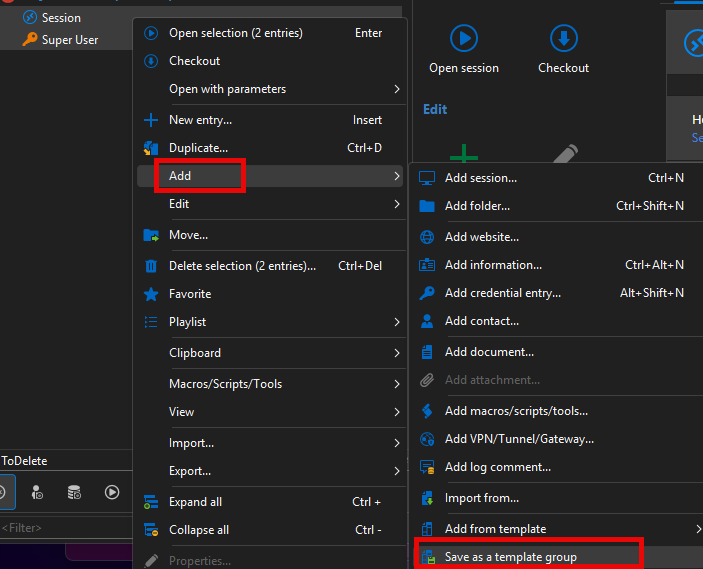
Please do let me know if that was more in line with what you had in mind.
Best Regards,
Michaël Beaudin
e3eb2fc7-86d4-4232-b132-05800fc8ec06.png
Hi Michaël,
Thanks for your answer.
I might reformulate, but the printscreen where I show the "Template Vault" Example is more accurate:
In each new Vault I import the template group "template Vault" with all the stucture, different basic connection entry, credentials entry, all what's common or at least should look same.
In this template group, I'd like to link some sub group/entries between them, so, when I import the whole template group, the structure and the links between the different entries (within this same new vault, no linking to existing entries from other vaults) are already done.
Your advide about adding existing liked entries to the template work, entil you need to edit the entry where the linking is configured, then you get a message that the credential part is going to be lost.
I honestly didn't tryied to import this template to see if the link stays then.
Hello,
I now see what you are talking about. At first I didn't think you were using template groups but rather multiple regular single templates, which confused me.
I can see how it would be useful to be able to link from one entry inside your template group towards another entry in your template group. I am unsure how difficult it would be to add this possibility but I think it is worth an investigation on our end. I will open a feature request ticket on our end and we will keep you updated on any progress.
For now as a workaround, I would recommend creating entries from your existing template group inside a vault, editing and linking as needed and creating a new template group from that group of entries. You can then delete the sample entries from your vault and keep the newly created template group for your purposes.
Best Regards,
Michaël Beaudin
Hi Michaël,
Thanks for your time.