SSH Port Forward seems to be broken in version 2025.2.16.0

I am having issue with SSH Port Forward in version 2025.2.16.0, when fallback to version 2025.1.41.0, the same config is working without issue.
Recommended Answer
@k526816 A fix has been made for the dynamic forwarding. It will be available in the next release.
Thanks for the details, they were quite helpful. Although I'm pretty sure the bug is fixed, I was unable to reproduce the same conditions in my lab, so let us know how it turns out for you.
Regards
Denis Vincent
All Comments (15)
Hello,
Thank you for reaching out!
To better understand the issue you're experiencing could you please share a few more details about your configuration and workflow?
The easiest way to share your session settings is to right-click the entry, select Clipboard, and choose Copy Entry. Please remember to any sensitive information before sharing.
Also, could you let us know which data source you're using?
We’ll be happy to look into this further with the additional details.
Best regards,
Stephan
Sure, i will try to explain.
Below is the port forwarding config in version 2025.1.41.0 and as you can see in the red box highlighted , there are two listening when the port forwarding is enable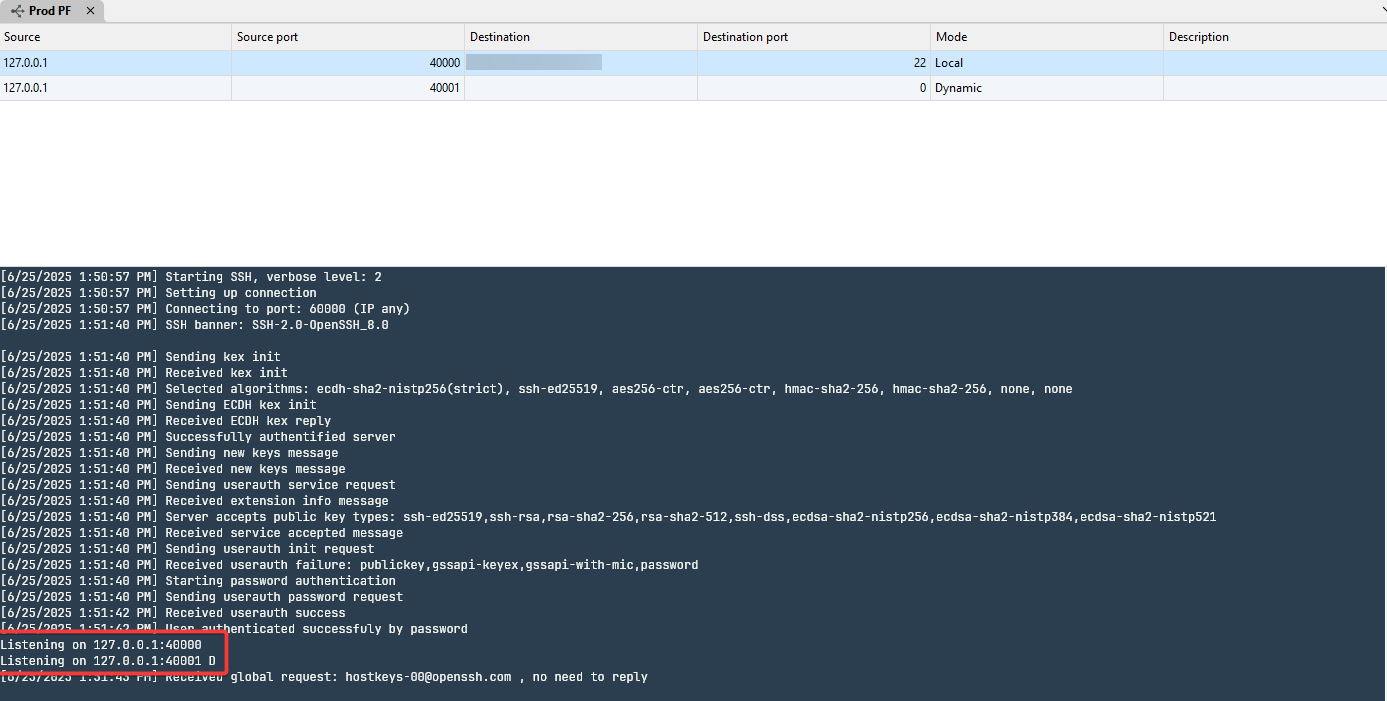
Below is the port forwarding config in version 2025.2.16.0 and as you can see in the red box highlighted , there are only one listening when the port forwarding is enable. The local port forwarding is missing and on top of that the dynamic port forwarding is actually not working as well.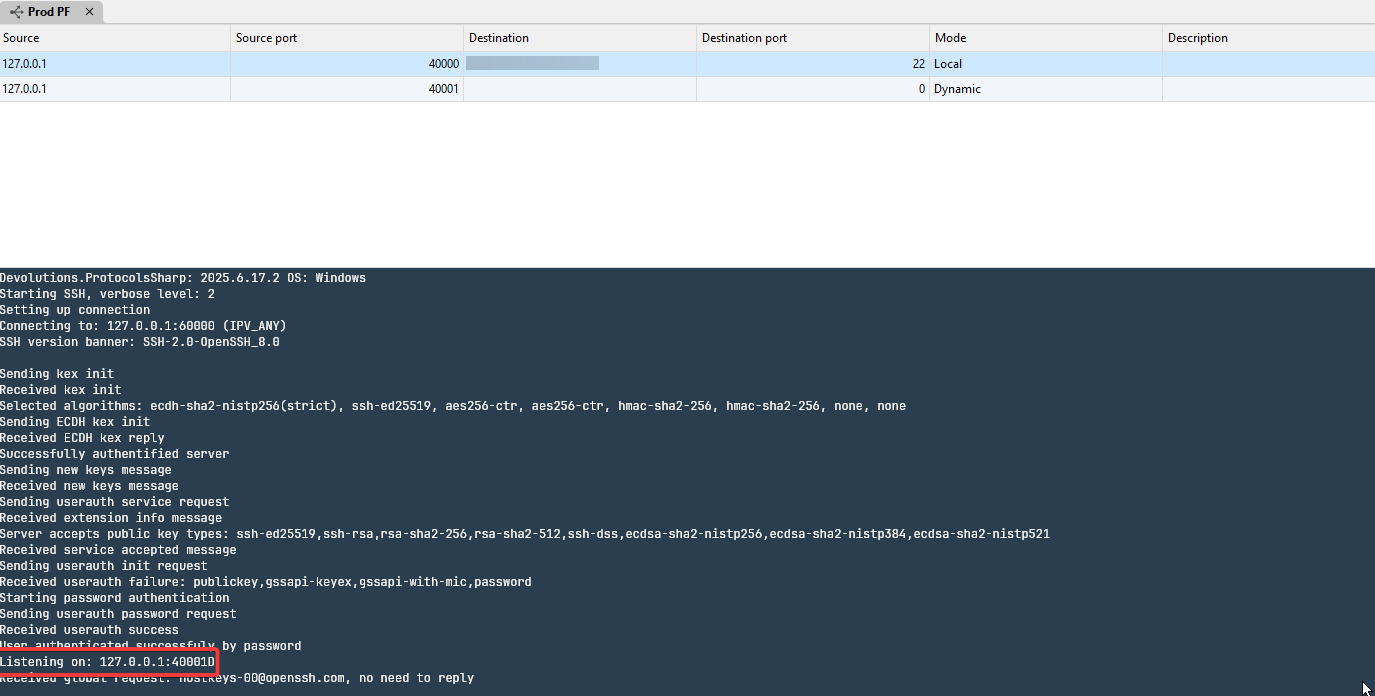
rdm-2025.2.16.0.png
rdm-2025.1.41.0.png
Hi @k526816
For the missing local port forwarding, I have found a possible cause for this bug and a fix has been made that will be available in the next release.
On the other hand, I've been unable to reproduce your problems, so I will need more details to fix the dynamic forwarding. What I understand is that no connection is successful going through the dynamic port forwarding, am I correct? If so, what is connecting to it? (another entry from RDM, an external application?) and what proxy protocol is it setup to use? (SOCKS4, SOCKS4a or SOCKS5?)
Regards
Denis Vincent
Hi,
>> For the missing local port forwarding, I have found a possible cause for this bug and a fix has been made that will be available in the next release.
For the record, the Local Port Forwarding, the is IPv6 that I am dealing with and it seems to not parse the IPv6 correctly.
>> What I understand is that no connection is successful going through the dynamic port forwarding, am I correct?
There are logs indicating connection open and closed but the page is not loading.
The xxx.yyy.local is a masked domain and it will be resolved to ipv6 address.
I have even try to use IP directly instead of hostname, still no luck.
Listening on: 127.0.0.1:50001D
Received global request: hostkeys-00@openssh.com, no need to reply
New connection on: 127.0.0.1:50001
Sending forward channel open request: 0|- xxx.yyy.local:443
Received channel open confirmation: 0~0 WS 200000|2097152 MPS 32000|32768
Successfully established connection 127.0.0.1:50001 -> xxx.yyy.local:443
New connection on: 127.0.0.1:50001
Sending forward channel open request: 1|- unitedstates.smartscreen.microsoft.com:443
Sending channel close request: 0|0
Received channel close request: 0|0
Closed tunnel: 127.0.0.1:50001|:0
Received channel open confirmation: 1~1 WS 200000|2097152 MPS 32000|32768
Successfully established connection 127.0.0.1:50001 -> unitedstates.smartscreen.microsoft.com:443
New connection on: 127.0.0.1:50001
Sending forward channel open request: 0|- config.edge.skype.com:443
>> If so, what is connecting to it? (another entry from RDM, an external application?)
Yes, another entry from RDM (edge browser entry) with --proxy-server="socks5://127.0.0.1:50001" settings
>> and what proxy protocol is it setup to use? (SOCKS4, SOCKS4a or SOCKS5?)
SOCKS5 only
Hey @k526816,
In addition to Denis’s questions, could you please confirm whether there are any special characters used in the Host of your Port Forward entry?
Also, if possible, an export of your session (without including your credentials) would be very helpful for further troubleshooting.
Thanks in advance!
Hi @Stephan Haupt ,
>>In addition to Denis’s questions, could you please confirm whether there are any special characters used in the Host of your Port Forward entry?
No special character.
>> Also, if possible, an export of your session (without including your credentials) would be very helpful for further troubleshooting.
As attached but i masked some entry and removed the credential entry.
support.zip
Hi @k526816
I can confirm IPv6 adresses were overlooked and the cause for the local forwarding port not being listened to.
For the problems with dynamic port forwarding, I have not been able to reproduce, using an Edge Browser. I have nonetheless made some modifications that could help. And I will make additional tests to figure out what could be the problem.
These fixes will be available in our next release.
Regards
Denis Vincent
Hi @Denis Vincent ,
I have tried 2025.2.17.0, the dynamic port forwarding issue still persist.
However, i am able to find out the issue.
There is this jumphost that for some reason would hang (without timeout) when a connection is established to "config.edge.skype.com". When this happen, the Port Forwarding no longer listen/process new incoming connections request on port 50001.
So in 2025.1.41.0, the same connection to "config.edge.skype.com" would hang (without timeout) but the Port Forwarding continue to be able to process new incoming connection request on the port 50001 without issue.
Hi,
Not sure if it's related in any way, but since V2025.2.13, I've been unable to connect using a SOCKS5 Proxy.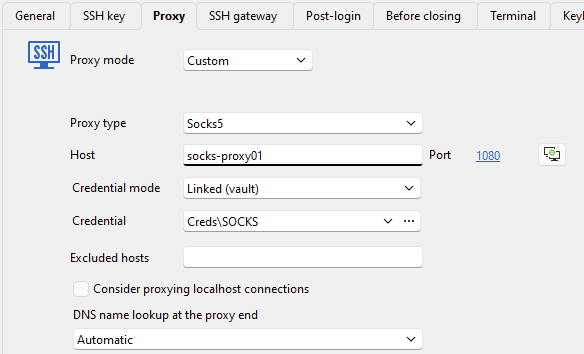
I get the following for all connections via the proxy:
The above failure is connecting to the Proxy, as I get the same response whether I remove the Proxy Creds, have them, or do the same for the remote server, which I can connect to via key or password.
Work around has been to use PuTTY/Kitty, where I've added the proxy settings, which works but .... not how it should, as I like using the Post-login feature.
Additionally, I have to recreate all my sessions which is timeconsuming.
Oh & no SSH Gateway is set or being used, just a proxy.
8c3d62fd-3a97-4f5e-8376-44b4a3350365.png
Screenshot 2025-06-30 095201.png
@k526816
Thanks for the info! That narrows it down. I will work on a solution as soon as possible.
Regards
Denis Vincent
Hi @marcogaminara
Your problem is different, but I will look into it as soon as possible. It's probably the SOCKS credentials that are incorrectly sent to the proxy.
Regards
Denis Vincent
@marcogaminara
A fix has been made for your problem, it will be available in the next release.
Regards
Denis Vincent
@k526816 A fix has been made for the dynamic forwarding. It will be available in the next release.
Thanks for the details, they were quite helpful. Although I'm pretty sure the bug is fixed, I was unable to reproduce the same conditions in my lab, so let us know how it turns out for you.
Regards
Denis Vincent
@marcogaminara
A fix has been made for your problem, it will be available in the next release.
Regards
Thank you very much @Denis Vincent
I'll let you know how I get on with the proxy issue after testing the next release.
Regards
Marco
@marcogaminara
A fix has been made for your problem, it will be available in the next release.
Regards
Thank you very much @Denis Vincent
I'll let you know how I get on with the proxy issue after testing the next release.
Regards
Marco
@Denis Vincent
I can confirm SOCKS credentials are being passed correctly & I am now able to connect successfully using the original method and configuration.
Thanks again.