Console based sessions don't open maximed

Hi,
all console (conhost/"Command Line") based sessions I run do not open maximized in embedded/tabbed mode. That means they open with the same size as when I run them standalone outside of Remote Desktop Manager. See screenshot...
command shell in RDM.png
All Comments (15)
Hi,
You need to edit the command line settings directly to increase the buffer
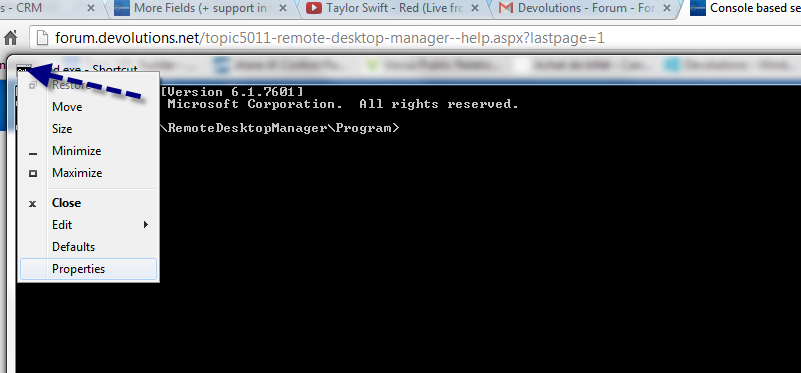
David Hervieux
6-23-2013 9-03-58 PM.png
So what you're saying is that RDM cannot dynamically resize/maximize console-based apps?
Okay, I just tested it on a bigger monitor: RDM maximizes the screen vertically but not horizontally. That sounds like a clear bug to me.
Screenshot shows an embedded Take Command TCC window which is maximized vertically but has the same horizontal size as the directly started TCC.
console app.png
RDM can't interact with the cmd.exe buffer size. It needs to be increase to allow RDM to increase the width of the window
David Hervieux
6-24-2013 9-31-58 AM.png
So RDM does increase the height but cannot increase the width (see screenshot)? I have problems believing that...
Open a Cmd in Windows and see by yourself
David Hervieux
I have already done this and my second screenshot (http://forum.devolutions.net/getattachment.ashx?fileid=2884) showed it:
- Cmd in Windows: 87x40
- Cmd tabbed (embedded) in RDM: 87x52
So RDM adjusts (maximizes) the height but not the width. Quod erat demonstrandum.
edited by thorsten on 6/24/2013
edited by thorsten on 6/24/2013
Hi,
I just reproduced the setup and by changing the buffer size, it works fine for me. However make sure to change the cmd.exe in 32bits because RDM is a 32 bits. If you change the 64 bits one, it does not work.
Use RDM to open it in external mode and change it.
David Hervieux
There should be no need to manually change the buffe size. RDM should automatically change it to maxmize it to the tabbed window. RDM does it already - but only for the height, not for the width ((http://forum.devolutions.net/getattachment.ashx?fileid=2884)). This is a bug.
Ok,
This is a bug that I will never be able to fix. Why, because I don't have the Windows source code to re-compile cmd.exe from Microsoft. I'm offering you a workaround, that's the best I can do.
Sorry about that.
David Hervieux
David Hervieux
When I start console based applications in RDM in tabbed mode the height is automatically increased from 40 to 51. But the width is not increased: 87x40 -> 87x51
Are you saying this is a bug in Windows console handling?
I'm runnig Take Command in Remote Desktop Manager now. Take Command doesn't have any problems maxmizing console based apps... See screenshot
take command in RDM.png
It's because Take Command is replacement of the Windows command prompt. RDM is not, we embed the one from Windows and we have to deal with the limitation.
However by integrating Take Command into RDM, you've found another work around
David Hervieux
Take Command is a terminal emulator. That means you can run any kind of console based application in it - JP Software's replacement for Cmd (TCC) or Cmd itself. See screenshot
cmd in RDM.png