8.3.1.0 - Embedded RDP connections fail

Hey Guys,
Using 8.3.1.0 all connections (RDP) using embedded will fail with the error below. If i change the connection to default (to use remote desktop connection) i can connect fine. This has essentially rendered the program useless for me.
Any help would be appreciated.
edited by TehMaster on 6/17/2013
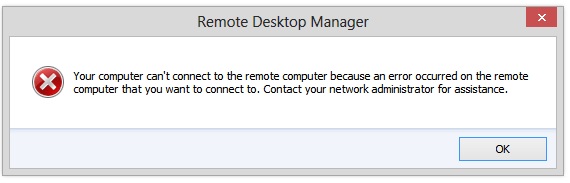
Error.jpg
All Comments (42)
Hi,
Take a look at the Network Level Authentication topic here:
http://help.remotedesktopmanager.com/troubleshooting_automaticlogon.htm
David Hervieux
Thanks David. I have tried with single sign on checked and unchecked. I receive the same error either way.
This is the error i receive when connecting to a server on our local domain:
Again, this is not going through a TS/gateway and i have tried with single sign on checked and unchecked. The server is pingable and i can connect using RDCMan and/or Remote desktop Connection.
edited by TehMaster on 6/17/2013
edited by TehMaster on 6/17/2013
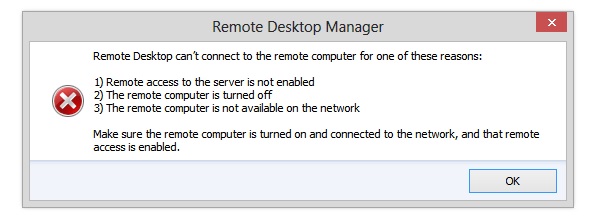
Error2.jpg
This is really strange since with use the same ActiveX. The only thing that could be is that we use the latest interface of MS. Do you have the RDP 8.0 update installed?
http://support.microsoft.com/kb/2592687
David Hervieux
Hi David,
Yes i have RDP 8.0. Unfortunately this error has made the software basically useless for me. :(
Just to confirm, does it work in external mode with RDM? If you create a new entry, does it work?
David Hervieux
HI David,
Yes, Everything will work in external mode. (Using RDM directly or configuring the server in RDM to use external/non-embedded).
Could you take a look in the application log Help->View Application Log
David Hervieux
Empty/Blank
And when you create a new entry with all the default settings but with the embedded mode.
David Hervieux
Upon creating a new entry i am still not seeing any log activity. Should there be?
This is the error log only. With the new entry, it still doesn't work?
David Hervieux
Is it all the rdp connection that does that or only to one specific server?
David Hervieux
This was working before, isn't it? I'm sure you already have rebooted the computer?
I really don't understand what could be the issue.
David Hervieux
This is the first time i have installed and used RDM. Have rebooted. Will uninstall, remove all settings, and try another fresh install with 8.3.2.0.
Try to install it in a different folder, for example C:\RDM and not in program files.
David Hervieux
8.3.2.0 works... cant explain why since i did not change anything. Maybe something went wrong during the original installation of 8.3.1.0.
Thanks for the troubleshooting.
Really strange but this is a good news.
David Hervieux
Hi,
I have the same problem. 8.3.2.0 worked, but I upgraded now to 9.0.4.0, and I have the same error message as on Error2.jpg.
Open session (External) works, but Embedded/Tabbed doesn't.
No matter if I use an existing connection, or I create a brand new one.
I use Windows 8.0 x64.
Thanks!
Adam
Could you verify the NLA (Network Level Authentication) setting?
http://help.remotedesktopmanager.com/troubleshooting_automaticlogon.htm
David Hervieux
Thank you, but I already tried that, it's enabled for the connection I tried.
The log is empty by the way.
Thanks
Adam
Uninstalled 9.0.4.0, and installed 7.6.3.0, the error is the same (although this version worked before!)
Then installed 9.0.5.0, the error is the same.
Please help!!
This must be related to the Windows RDP update. Could you try to install RDP 8.1 if you have a Windows 7?
http://blogs.msdn.com/b/rds/archive/2013/11/12/remote-desktop-protocol-8-1-update-for-windows-7-sp1-released-to-web.aspx
David Hervieux
Thanks, but I use Windows 8.0
Could you try RDCMan to see if you have the same error? We use the same Microsoft ActiveX?
http://www.microsoft.com/en-us/download/details.aspx?id=21101
David Hervieux
Tried it, ti works flawlessly.
Strange. Could you try to export you RDCMan connection and import it in RDM?
David Hervieux
RDCMan cannot export other format than .rdg, but RDM cannot import .rdg
RDM can import a .rdg file. Just go in File->Import and select Remote Desktop Connection Manager
David Hervieux
Ah, thanks, I imported it, but the error message is the same for this imported connection.
Is it for only one specific or any server?
David Hervieux
Any server. None of them works with Embedded/Tabbed session.
Could you export me one of your session without the password?
David Hervieux
Of course, here it is.
IX-SERVER03.rdm
Hi,
I remember a really strange bug. Could you try something?
Try to uncheck all the Local resources except the clipboard. Make sure to uncheck the Serial.
David Hervieux
You can also try select Don't wan me in the Authentication section
David Hervieux
Thanks David, but no luck:( I left checked only the Clipboard, then tried to uncheck that as well...
Don't warn me was already selected.
There is no error log we could check?
What about disabling the detect network connection and detect bandwidth detection?
David Hervieux
Detect network was already unchecked, but unchecking detect bandwith didn't help :(
Honestly I'm out of option. You can check the application log in Help->View Application Log but I have no idea. Could you try it on another machine? Perhaps you Windows firewall is blocking RDM.
David Hervieux
Strange, but previously there was nothing in the application log. Now it contains this:
[2013.11.13. 15:19]ERROR SILENT System.Net.WebException: Unable to connect to the remote server ---> System.Net.Sockets.SocketException: An attempt was made to access a socket in a way forbidden by its access permissions 157.56.28.125:80
at System.Net.Sockets.Socket.DoConnect(EndPoint endPointSnapshot, SocketAddress socketAddress)
at System.Net.Sockets.Socket.InternalConnect(EndPoint remoteEP)
at System.Net.ServicePoint.ConnectSocketInternal(Boolean connectFailure, Socket s4, Socket s6, Socket& socket, IPAddress& address, ConnectSocketState state, IAsyncResult asyncResult, Int32 timeout, Exception& exception)
--- End of inner exception stack trace ---
at System.Net.HttpWebRequest.GetResponse()
at Devolutions.Utils.StreamUtils.ReadFileContentFromWeb(String filenameUrl, Boolean useDefaultCredentials)
at Devolutions.RemoteDesktopManager.Business.BusinessHelper.GetXmlStringFromWeb(String url)
at Devolutions.RemoteDesktopManager.Business.BusinessHelper.GetArrayFromWeb[T](String url)
at Devolutions.RemoteDesktopManager.Managers.TrayNotifierManager.Core.FetchNotifierData()
at Devolutions.RemoteDesktopManager.Managers.ThreadManager.<>c__DisplayClass21.<Execute>b__20(Object param0)
[2013.11.13. 15:20]ERROR SILENT System.Net.WebException: Unable to connect to the remote server ---> System.Net.Sockets.SocketException: An attempt was made to access a socket in a way forbidden by its access permissions 157.56.28.125:80
at System.Net.Sockets.Socket.DoConnect(EndPoint endPointSnapshot, SocketAddress socketAddress)
at System.Net.Sockets.Socket.InternalConnect(EndPoint remoteEP)
at System.Net.ServicePoint.ConnectSocketInternal(Boolean connectFailure, Socket s4, Socket s6, Socket& socket, IPAddress& address, ConnectSocketState state, IAsyncResult asyncResult, Int32 timeout, Exception& exception)
--- End of inner exception stack trace ---
at System.Net.HttpWebRequest.GetResponse()
at Devolutions.Utils.StreamUtils.ReadFileContentFromWeb(String filenameUrl, Boolean useDefaultCredentials)
at Devolutions.RemoteDesktopManager.Business.BusinessHelper.GetXmlStringFromWeb(String url)
at Devolutions.RemoteDesktopManager.Business.BusinessHelper.GetArrayFromWeb[T](String url)
at Devolutions.RemoteDesktopManager.Managers.TrayNotifierManager.Core.FetchNotifierData()
at Devolutions.RemoteDesktopManager.Managers.ThreadManager.<>c__DisplayClass21.<Execute>b__20(Object param0)
I'm sure my firewall is not blocking RDM, because it's a LAN connection, but I wanted to make sure of it. When I browsed for the executable (to enable it), I realized that there is a RemoteDesktopManager64.exe as well, but nobody mentioned it before.
The fact it that this version WORKS!
I don't think that I used this 64 bit version before, but now it does not matter anymore.
Thank you!
Adam
This is really strange and this could be explained by the fact that remotedesktopmanage.exe is blocked somewhere.
David Hervieux