Macro/Scripts/Tools how to execute

Hi,
I created a few new Script Entries (Powershell Local/Remote).
Ho do i now get it executed to a Session?
e.g. i have a PS-local-Script doing a portscan on 3389 (Checking f RDP Port is open after a reboot, just like a continous ping). i want to execute this script for a server.
I tried the context menu of an rdp session and only find the builtin Tools, but not my script. How do i run this script with the $HOST$ as a parameter
The help doesn't ... well help me on this issue at least i found nothing.
Neither of the Macro/Scripts/Tools Windows (From View and Tools) does anything useful.
Thanks
Peter
All Comments (1)
You have two options:
If you only need it for a few sessions you could create them as child-session of the RDP session and use the $PARENT_HOST$ variable.
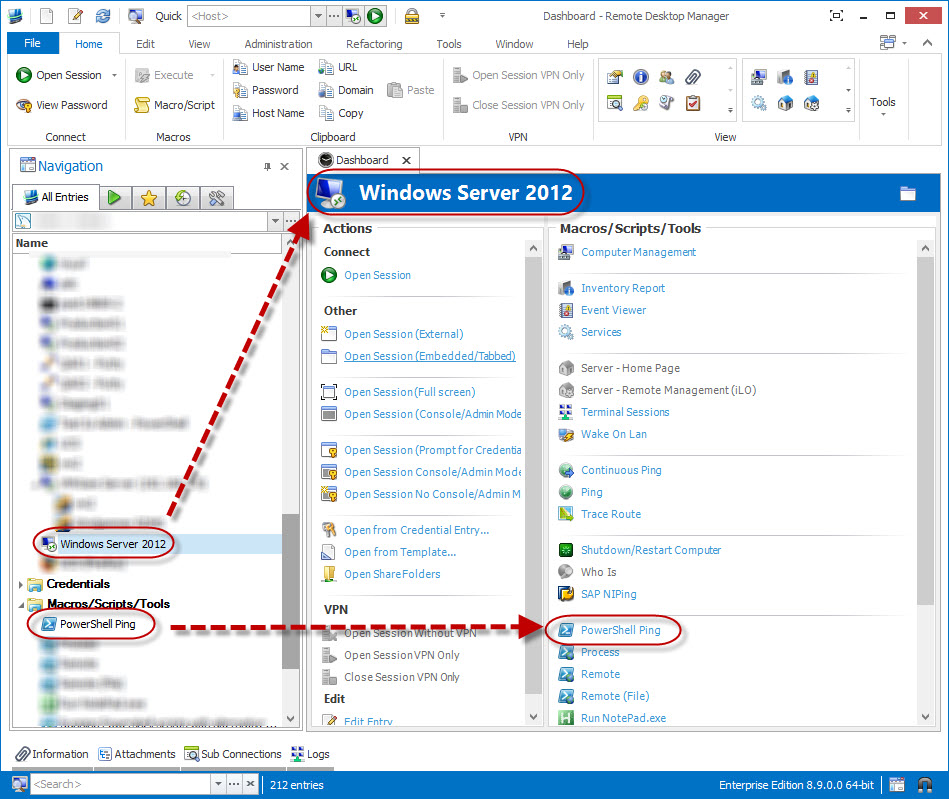
In your case, you might want to create a PowerShell session script and specify the $HOST$ variable. This script will now be accessible via the dashboard of all sessions. Note: the context menu only has the built in macro/script/tools listed.
Stéfane Lavergne
PowerShellScript.jpg