Use domain in vSphere Client session
0 vote

Hi!
I noticed an issue when you create a credential entry with username, domain and password, and you try to connect to a VMware vCenter Server (using a vSphere Client type session).
The vSphere Client session has fields for username and password, but not for domain. It expects the username in the for of "user@domain.local"
Though, when you select the credential entry, it only uses the username part, not including the domain. on a vCenter Server this does not work and you need to include the domain.
Of course I can work around this by either not using credentials entries or putting the domain part in the username firld... so no big deal at all.
But, I think a good way to handle this is to have an option in the vSphere Client session "Include domain name from credential entry" or something like that, that does exactly that.
Cheers!
Daniel
All Comments (7)
Hi,
Stefane will take care of this. This should not be hard to add.
David Hervieux
Daniel,
It's done and will be available in the next release.
So how does it work? The UI still only has 2 fields (username & password) but when you link it to a credential entry we will (re)build username with the domain if the domain has been supplied. (username + @ + domain)
Once the build is available please test and let me know how it goes. We don't have any VMWare infrastructure with domain authentication enabled to test on.
Kind regards,
Stéfane Lavergne
Hi,
I have patched the version 8.3.1 with this:
http://download.devolutions.net/Devolutions.RemoteDesktopManager.Bin.8.3.1.0.zip
Just overwrite your existing files
David Hervieux
You guys are so ridiculously fast
It's working well!
Thanks!
Good to here, thanks for the update.
Regards,
Stéfane Lavergne
Hi!
I just noticed the same thing with a Web-based login. (Exchange Server 2013)
You have to enter the Domain name within the User field (User@Domain or Domain\User)
I can put the credentials the way they have to be directly in the Web session, but if I use a credential entry that is used for other things, where I need User and Domain separated (RDP), it doesn't work in the Web-based login.
So, just like with vSphere, an option to combine User and Domain into the User field would be handy for Web sessions as well.
Thanks!
Daniel
Hi Daniel,
Have you try to change the username format in the Advanced settings?
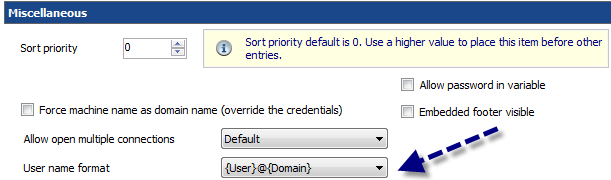
David Hervieux
Usernameformat.png