OneKlick - SSH-Portforwaring - RDP

Hi,
we're currently using Bitvise Tunnelier but want to switch to Remote Desktop Manager. It's realy great!
I'm trying to realize a "one-klick-solution" for the following:
1. use SSH to connect to a remote firewall
2. portforwarding for RDP
3. connect to different servers using RDP
Tunnelier does it all in one profile. Just klick an you are connected to the remote server.
In RDM I have to create two connections - one for the ssh-tunnel with portforwarding and a RDP-Connection for localhost.
Is it possible to combine these two steps? So that I get a single entry for every remote server?
All Comments (6)
Hi
Can you send me an export of your ssh-tunnel connection, I'd like to look at our options. use infos@devolutions.net
Maurice
Sure.
I think there's only an option missing to autostart another connection.
Hi
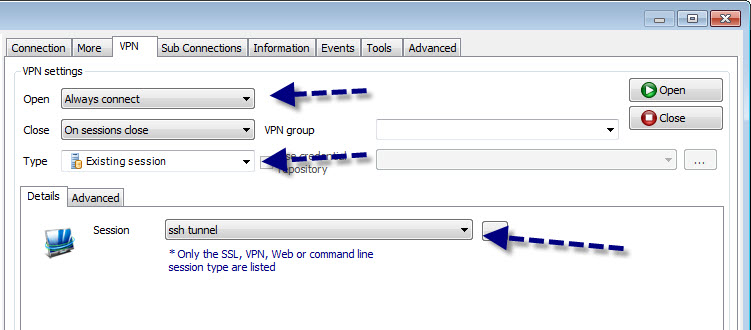
In your rdp connection, go to the vpn tab, choose "existing connection" in the drop down, then you should be able to select your ssh connection in the other list.
Maurice
there is no drop down where I could choose "existing connection"
Oh, I'm sorry! I found it!
Perfekt! Thanks a lot !!
Hi
You must choose an "active" setting for the Open option to enable the controls
Maurice
ssh.jpg