Batch edit & auto rule set for folder/entry image
1 vote

Hi,
A. I would love to be able to batch-edit the folder/entry image
B. I would also love being able to setup a rule that says something like "If entry is of type 'A' && has tag '1' then apply THIS image"
(Even just by type would be a start!)
Edit : For the love of whatever god you might believe in, I need this... I have ~2400 entries... Someone save me...
All Comments (2)
Hello,
For point A, it should already be possible. If you select multiple entries, right click > Edit > Batch edit > Edit entries (general settings), you will be able to check the image and override only the image for your entries.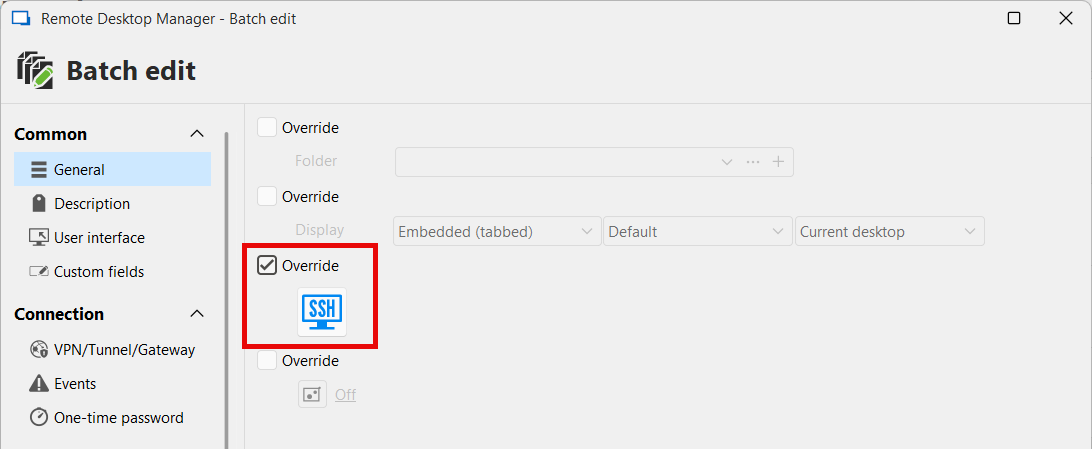
Please note that to select folders and not their content, you will need to use the Advanced Search (and then perform the same steps of batch editing them).
For point B, I would recommend leveraging either the Template feature or the Default settings feature, whichever you think might work best in your case.
https://docs.devolutions.net/rdm/commands/file/templates/creating-templates/
https://docs.devolutions.net/rdm/commands/file/templates/default-settings/
Let me know what you think about these solutions.
Regards,
Hubert Mireault
01d0b613-16a4-4d1b-9c96-919835a9bd12.png
Hi,
Thanks for info!
For point A. I was not aware of this option before, this works well! Thanks!
For point B. I have opted for templates. This also works well for my needs, again, thanks!