Search by multiple tags
1 vote

Hi,
When using the "simple"(?) search at the bottom of the navigator tree view, there is no quick and simple way that I could find to search for something that has both tags I'm searching for.
Example:
"Cust A" && "Linux"
I really don't want to go into the advanced search for something that simple...
(Well, simple, from user perspective, of course)
I would like some sort of syntax that will say, "the result MUST have this keyword in the searched fields" ,
Like with Google's use of quotation marks.
I wouldn't mind at all if this functionality was limited to tags though.
Perhaps tapping the magnifying glass could switch to a "tag search" mode in which tags can be entered with comma delimitation?
Or perhaps in a +tag / -tag format?
Example: (ignore quotation marks, it's just for writing the example)
"+CustA +Linux -Ubuntu" , would make it so only entries with tags "CustA" , "Linux" , and "Ubuntu", would be returned.
Bonus points for extra syntax for folder, mixed on, so tag search could be limited to results within a folder, example:
"/CustA +Linux -Ubuntu" .
Edit : It's also worth noting that, as I have now tried it, the advanced search is... Not really very advanced...
The confitiona are all always "OR"ed with eachother, instead of the user choosing if it's "OR" or "AND" ...
All Comments (2)
Hello,
It should already be possible to use the filter to search multiple tags by using conditional operators like you described. For example, if you want to search for TagA and TagB, you can write:
TagA&&TagB
The result should list entries that have both TagA and TagB found.
There are also settings in File > Settings > User interface > Filter to change the behavior for the space character, so you could configure it to treat spaces as "AND".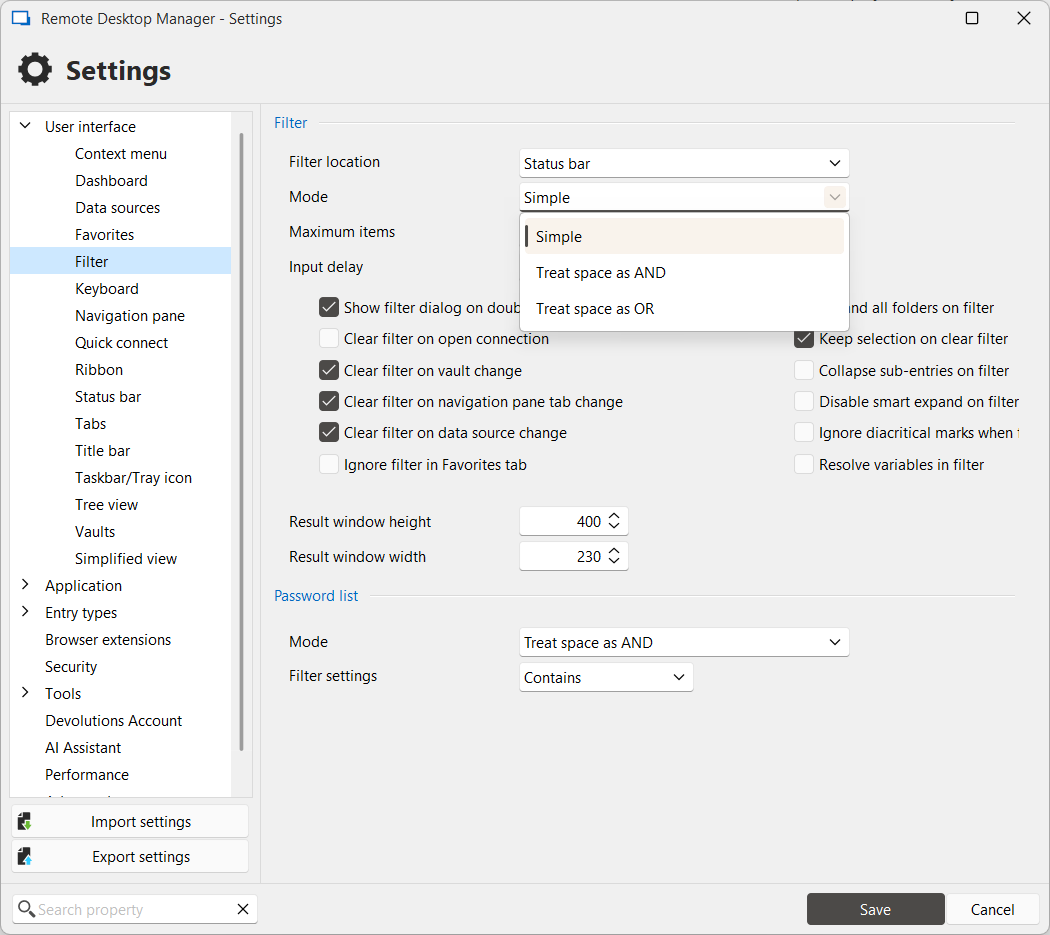
For the concept of “exact match”, I don't believe we have something like that currently. I will open a ticket and monitor this thread for additional feedback to help us prioritize this suggestion.
Regards,
Hubert Mireault
d3692137-fa06-4a4e-a1e4-73270c658531.png
I was not aware of this! Thanks a lot, this works well for me!