Unable to connect to host XXX Unknown error (0x0000001C)

I am currently evaluating RDM to replace what I am currently doing personally for Remote Desktop across Windows and Mac platforms and ultimately hoping to pitch it for use in my team as our RDP tool of choice, particularly as it syncs to the cloud (using Devolutions Hub), doesn't require any manual interactions when switching between the two. Basically whatever is setup on the one is available everywhere else... great stuff.
I have setup five sites set of connections so far, doing this as I'm going allowing as there another three dozen or so sites needing to be migrated from my current RDP solution. The problem I'm having is that I've hit a situation on two of the sites where when trying to RDP on Windows it works as expected, but connecting on Mac (with the very same connection details in RDM) I receive the following message: Unable to connect to host someserver.somedomain.localUnknown error (0x0000001C)
For comparison and as a check, on the same Mac when using another RDP tool for comparison (simply the Windows app) it connects without warning or issue.
I have put everything on one of the connections back to defaults, tried numerous things like without NLA, changed it Warn me in the event of an authentication issue, tried quick connect to forgo the properties that I may have customised, etc., but am not making any headway in getting it to successfully connect.
What could be the issue? How can I go about troubleshooting this?
I would appreciate any guidance and assistance I can get in respect of this.
All Comments (20)
Hello,
Thank you for your detailed message and for evaluating Remote Desktop Manager.
Regarding the issue you're experiencing when connecting via RDP on macOS, to better assist you, could you please confirm a few details?
- RDM Version on macOS – Which version of RDM are you currently using on your Mac?
- Connection Entry Settings – In the RDP entry settings, are you entering the full hostname (e.g., someserver.somedomain.local) in the "Host" field? If so, could you try separating the domain by placing only the server name in the "Host" field and the domain name in the dedicated Domain field under the "Credentials" section?
Looking forward to your reply!
Hi Stephan
Sure, here are the details:
- RDM version: 2025.2.6.8
- Connection entry settings: I had a FQDN entered, a practice I have generally followed as most sites I connect to (with VPN) have split tunneling and no domain suffix associated with the VPN tunnel, so without an FQDN the hostnames do not resolve. As it turns out for the two sites I mentioned I am having problems with, both of the connections to these sites have domain suffix(es) associated with the tunnel so hostnames (alone) are resolving. So I changed the RDP property to just have the hostname, unfortunately though I still receive the exact same error message. Below are screenshots of all the RDP settings for one such server giving problems.
Just to note that the machines I'm connecting to are varying in version, but the oldest one I'm currently experiencing issues connecting to is Windows Server 2012 and the newest is Windows Server 2022.
General tab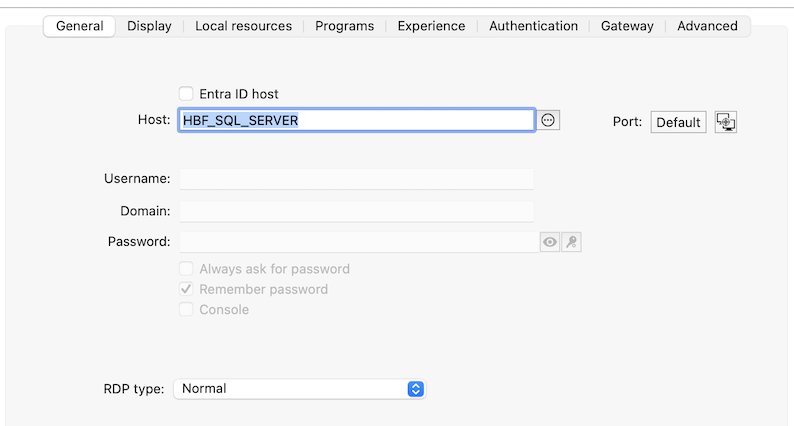
Display tab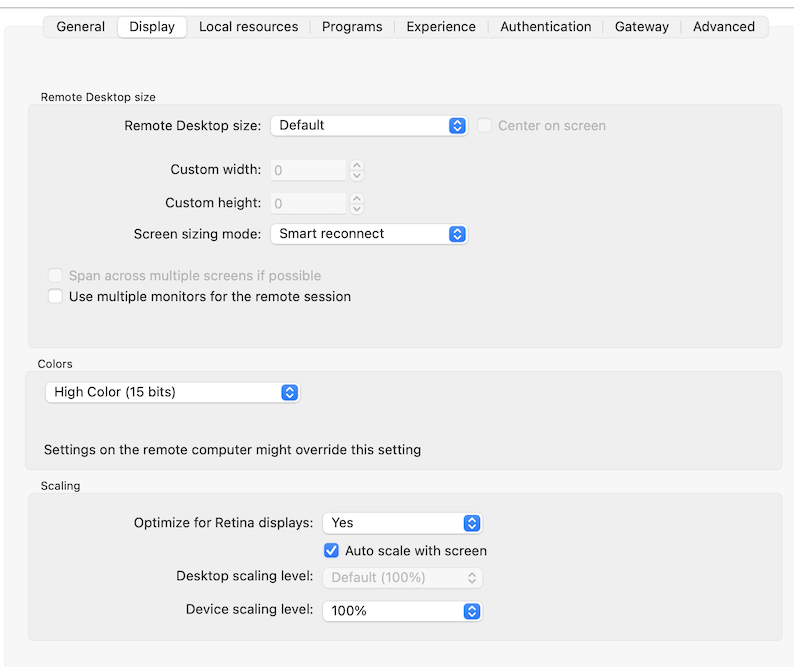
Local resources tab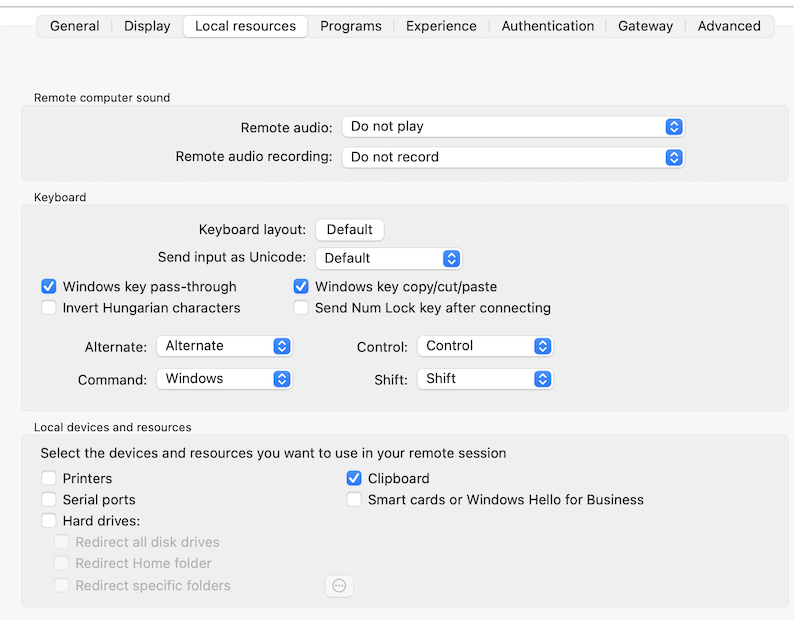 Programs tab - no screenshot, nothing is selected here
Experience tab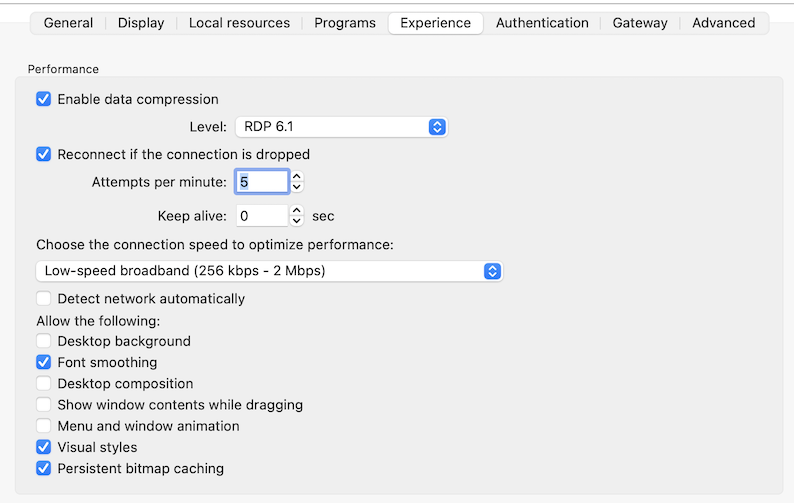
Authentication tab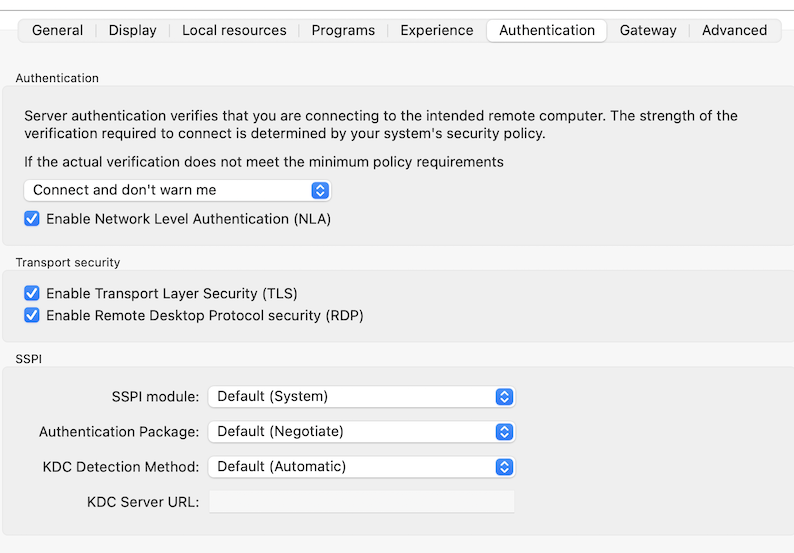
Gateway tab - no screenshot, this is set to Do not use the RD gateway server
Advanced tab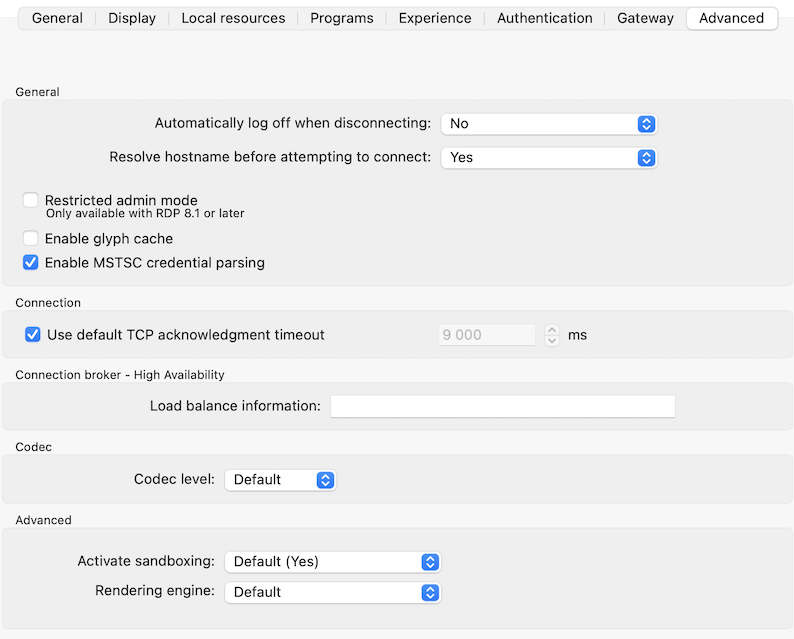
486ea507-aa91-4c44-9db8-ade09a29b375.png
e7564d6e-77a0-4bc6-a46b-4f79812bc859.png
c331a3cf-b8a9-4d12-a9b5-2073f0805622.png
5a1c64b7-2da3-419d-82c4-811303b8d1ed.png
1c179245-ec12-43b8-802e-2b9a8d0b2c3d.png
8184578c-13fa-491c-ad92-8573207ee7fb.png
Hello
"Unknown Error" is strange; can you follow the steps here to enable session logs; then recreate the problem and send the session log to me (either by PM here on the forum or to service@devolutions.net, mentioning this forum thread).
Please let me know if something isn't clear or you have further questions.
Kind regards,
Richard Markievicz
Thanks @Richard Markiewicz, I've sent the logs via DM.
Hello
Thanks for sending the logs. It appears that the error returned is not great, but this might simply be a timeout (the full connection sequence to that server is taking longer than the default timeout of - I believe - 15 seconds).
On one of the problematic connections, can you switch to the "Advanced" tab and uncheck "Use default TCP acknowledgement timeout", and then increase the value in the neighbouring control? The formatting of that option is a bit weird; it's expecting a value in milliseconds so try setting it to one minute (60,000) and see if it helps in this case.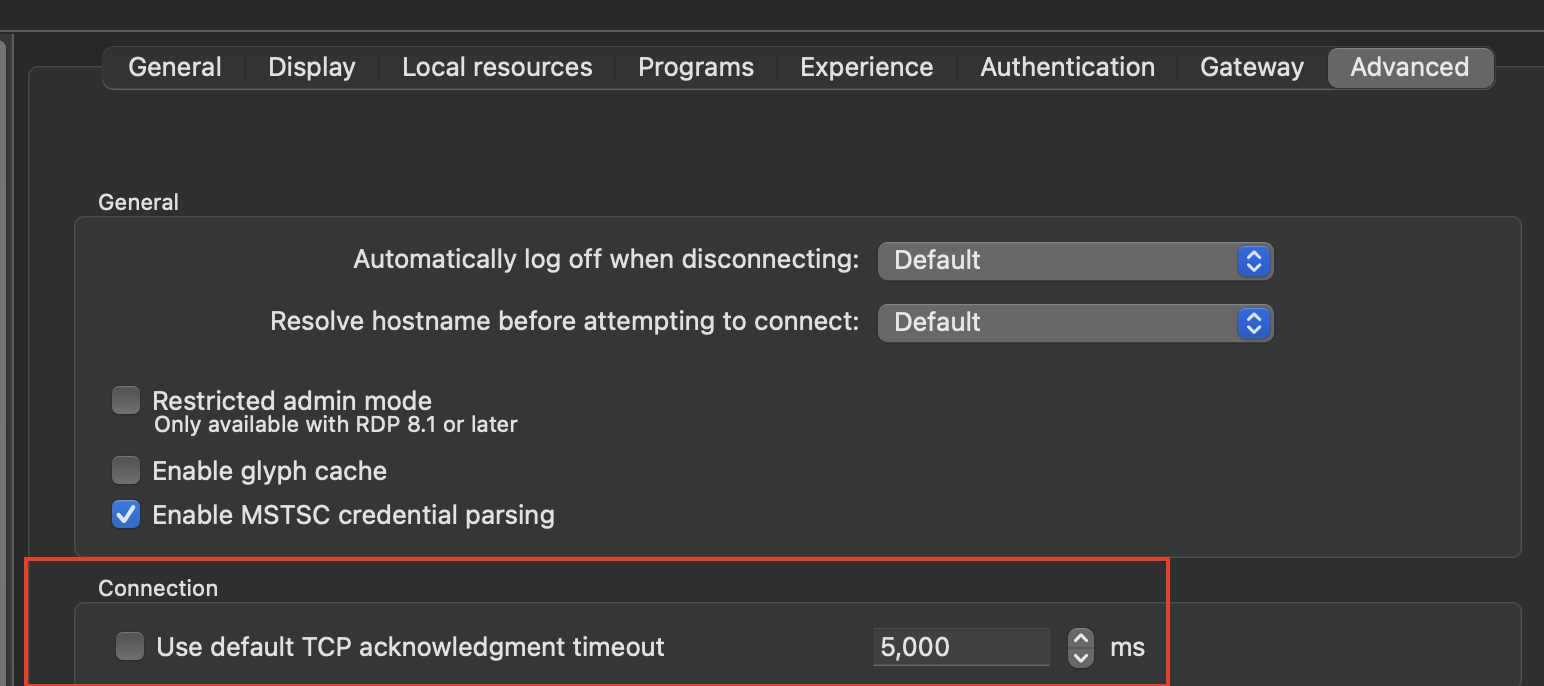
Please, let me know if something isn't clear
Kind regards,
Richard Markievicz
Screenshot 2025-06-18 at 13.31.06.png
Bingo, that looks to be it. I've only tested on one site's set of servers and the initial tests are promising. I've upped the timeout to 30 seconds.
The reason for the delay is that I am in Johannesburg, South Africa, and am connecting to servers around Chicago. Surprising that this RDP connection with the same settings connecting from the same network and internet connection is not experiencing the problem. I'm guessing initialising the connection is a touch slower from Mac?
I'll test out the other site tomorrow and report back. I am hopeful that this is it and can then manage this. Could you possibly show the line in the log that indicates that it was a timeout, or did you evaluated the elapsed time of the connection attempt from the start of the log to when it failed and took an educated guess (based on default RDP settings)?
Is there anyway the software could be improved to return a friendly message when the connection attempt fails on this basis? For example: Error: Connection attempt TCP acknowledgement time out. Consider increasing the timeout (currently X seconds).
Hello
To start with some context: when you use embedded RDP in RDM Mac, it is not Microsoft's RDP implementation. It is not possible on macOS to embed Microsoft's RDP implementation in another application, like we do on Windows. So, the RDP backend for embedded RDP session in RDM Mac is built on FreeRDP.
Although FreeRDP is built to the (open source) RDP specification, it's almost impossible to match the spec 100% (the spec is ill-defined in places, and Microsoft often has off-spec behaviour in their own clients and servers). FreeRDP is built with a different architecture and lacks some of the advanced features of Microsoft's RDP clients. In other ways, it's better than Microsoft's implementation. All that to say: yes, the implementation is different and you can expect to notice some different behaviours.
In the log you sent, these two lines indicate the timeout:
[19:15:44:469] [2611:6dafb000] [ERROR][com.freerdp.core.connection] - [rdp_client_wait_for_activation]: Timeout waiting for activation
[19:15:44:469] [2611:6dafb000] [ERROR][com.freerdp.core] - [rdp_client_wait_for_activation]: ERRCONNECT_ACTIVATION_TIMEOUT [0x0002001C]
This is something we've seen in the past with high latency networks, and for this very reason that the setting is exposed to adjust the default timeout. Actually we're a little conservative here with a 9 second default, I do believe FreeRDP upstream currently has this at 15 seconds. That might be sufficient for your scenario.
Now, I do think the error that bubbled up to the client is weird. The RDP backend will set the error to "Activation Timeout" unless another error has already been set higher up in the call stack. So in this case, another part of the connection sequence has set "Unknown Error". This might just be an edge case based on where the connection fails (it actually is closed to succeeding, so in many ways you are just unlucky here). It's certainly something that we can look at, although this stuff is quite complicated - the connection sequence for RDP is itself very complex, and the code reflects that - and error paths can be non-intuitive.
It might also be the case that the error number itself is getting mangled before landing in the UI. I'll check that too.
Now, in terms of a path forward - why not just bump the connection timeout across the board? You can do this by ensuring the individual RDP sessions are on their default settings ("Use default TCP acknowledgement timeout" is checked) and then in Settings > Types > Remote Desktop (RDP) > Connection, raise the default application wide to something like 15 or 30 seconds. The only negative side effect of this is; if the server is genuinely unavailable due to a network issue, it will take a little bit longer for the connection to fail in the application as it waits for the full timeout to expire. And - to be clear - we're only talking about the network here; another error like an authentication failure will of course still fail immediately.
I hope it's all clear, but please do not hesitate to post back if you have further questions or comments.
Kind regards,
Richard Markievicz
Hello again
It might also be the case that the error number itself is getting mangled before landing in the UI. I'll check that too.
Aha, wait - I've checked the code here. RDM Mac carries its own internal representation of the FreeRDP error codes, and it was last updated a few years ago - before this specific error was actually added to FreeRDP. So that's why we have "Unknown error". I already have a shared, up-to-date implementation of the FreeRDP errors but RDM Mac isn't using it currently, this is an easy fix on our side. I will make a ticket for that and write back once we have an update.
My recommendation stands to increase the timeout to 15 or 30 seconds application-wide, as the side-effects are really minimal.
Sorry for the inconvenience
Kind regards,
Richard Markievicz
Thanks Richard, I appreciate your looking into this further!
I'm happy to report that the other site I was connecting with is also working, so we're onto a winner of a solution. I can at least manage this on my end - this will be even easier once the true error message/reason is surfaced through to the application front end.
t'll update the template being used for creating RDP connections and this will "fix" all connections made after this point in time, but if I could ask if there is a way to bulk update all or a selected subset of existing RDP connections (as opposed to updating them one by one)?
EDIT: Just to add, yes, latency is definitely impacting this. Round trip latency is not extremely consistent but is in the 300-500ms range. You will note from the RDP properties I've done what I can to manage the user experience with things such as 15-bit colour, reducing some of the "pretty effects" in experience (not needed for remote server and application administration and support purposes), using the newer RDP 8 protocol where possible, and higher level CODEC use too. If there are other things you know of and are willing to share to better improve this experience I would appreciate it.
Hello
Ok so first, I've submitted a change for RDM Mac that uses the up-to-date error codes and changes the handling a little bit. For example, whereas before you might've seen something like "ERRCONNECT_CONNECT_FAILED" you'd now just see "CONNECT_FAILED". The missing errors are added, so in this specific case the error reported to the UI will be "ACTIVATION_TIMEOUT". Actual "human friendly" error messages will be a separate feature because we don't have a database of such resources currently. In terms of timing, I'm not sure when that will make it into the product but I'll ask that it gets put on the release branch for an upcoming minor release.
For your sessions, I'm not understanding if there's a reason you just don't want to change the global default for the local application? However, generally, if you want to update a setting on multiple sessions you can multi-select them, right-click and choose Edit > Batch Edit > Edit Entries (Session Type Settings). You'll get a page that lets you choose which settings to override, and it will be applied to all of them.
Note that you also have this possibility from the Advanced Search (so you can customize the search to find what you want to change, multi-select the sessions in the results and use the same batch edit from there).
Otherwise, on Windows we now have an even more powerful feature where you can execute a PowerShell script again multiple sessions to inspect and make changes.
For your high latency sites: modern RDP servers will generally ignore the colour depth setting if using a new codec version. That's probably what you want: the performance gains of the highest codec levels definitely outweigh the advantage of lower colour depths. You'll (in theory) also get the best performance by choosing "Detect network automatically" in the "Experience" tab, rather than tuning these settings by hand. The server will do realtime bandwidth and latency monitoring and tweak things appropriately. RDP data compression should be left at the highest level (6.1). You'll also get a faster connection if you limit the display resolution - this depends on what settings you are using for display - but naturally a 4k resolution has to push a lot more data than 1080 or 720p, regardless of the codec. Finally we'll be adding support for H264 decoding soon-ish; that significantly boosts performance in certain workflows.
Please, as always, let me know if something isn't clear or you have further questions
Kind regards,
Richard Markievicz
I'm not understanding if there's a reason you just don't want to change the global default for the local application?
I later saw and connected the dots that in RDM settings set to "Default" are controlled at a higher level so can be controlled easier across all existing conditions (as opposed to having to do what I need to do now and bulk update off of "custom" settings. I have increased the timeout in RDM's settings and updated entries to use the default (which has now been increased).
if you want to update a setting on multiple sessions you can multi-select them, right-click and choose Edit > Batch Edit > Edit Entries (Session Type Settings)
Ok, batch edit is awesome! I've only quickly looked to see how I had missed this, but can you use this to more easily update all the settings that I had tweaked to rather use defaults. From there I can manage the exceptions and update only those entries. Again, awesome! Thank you!
naturally a 4k resolution has to push a lot more data than 1080 or 720p, regardless of the codec
Yup, and this is the weak point for using a Mac... that it is high resolution. These are the settings I've mainly been trying to play around with... when working on Windows I hate scaling as a lot of apps are either not DPI aware and a lot of those that are still don't look great (when compared to no scaling at 100%. On Mac this feels to be handled better, but then you face the issue of having to remote on to Windows settings so getting the right aspect is quite difficult. This doesn't seem to be a big issue in the Windows app and am trying to get a balance that it seems to be getting right there.
Hello
Yes, DPI scaling is indeed handled much better on the Mac.
Windows App has a setting to Optimize for Retina Displays, which will match the scaling of the remote system to your local screen(s):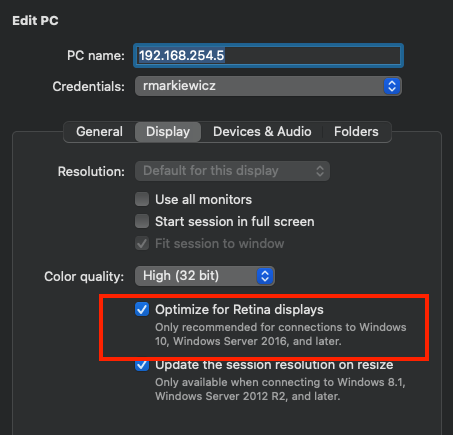
RDM Mac has the same options but offers more fine-grained control: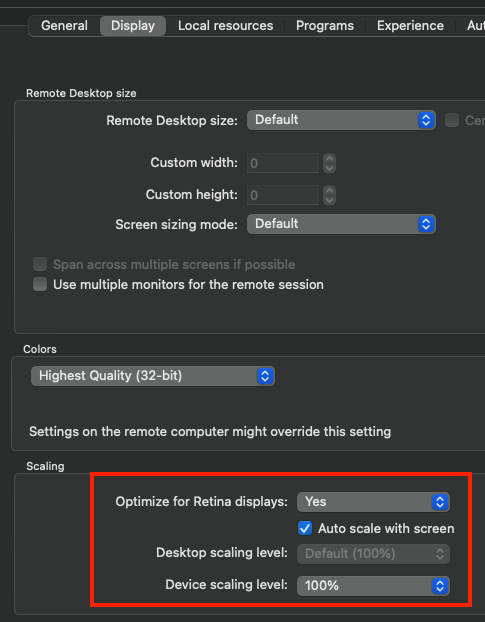
The matching settings for Windows App are "Optimize for Retina Displays" with "Auto scale with screen". However if you turn off the auto scaling, you can choose a custom desktop scale factor which is what Windows will use for the scaling. "Device scaling level" refers to the scaling of Windows Store apps on legacy systems and you can safely ignore it (leave at 100%).
The best experience will be optimize for retina displays / auto scale with screen combined with dynamic resolution in the size settings. With dynamic resolution, the remote resolution will be adapted to match your window, which could be problematic if you are using a full screen tab on a 4k display, for example. If you want to cap the display resolution to something reasonable for performance concerns; you can do that in the display settings but then you'll need to account for the fact that the chosen resolution might not match up with your local window. The options there are to use smart sizing (which scales the content client-side) or scrollbar (you'll get scrollbars if the display is too big for your tab).
As I wrote, I'm working on enabling the H264 (AVC444) codec for our embedded RDP. Whether the server chooses to use it or not depends on the specific workflow, but you might well see performance improvements. You can check for that in the release notes of future versions.
As always, please let me know any more questions or comments
Kind regards,
Richard Markievicz
Screenshot 2025-06-20 at 11.43.49.png
Screenshot 2025-06-20 at 11.42.38.png
I'll have a look at what options I've landed on for now, and compare with what you are suggesting. I am using it with the retina option and auto scale, but it is causing a scaling factor when connected and some of the apps that are "DPI aware" don't appear to be very "DPI aware" (insert sweating smiling face emoji here). For right this second I am managing it by setting the app compatibility for the app to ignore scaling at the system level and this is sufficing for now. In places the scaling factor is causing some things to be minuscule and others just plain wrong - this isn't an RDM issue really, more of a "my Mac screen resolution is high for the Windows world where apps don't seem to scale and work as smoothly as they do on Mac". But if I can get the scaling and RDP settings to a point where it looks good for the most part then I'll be happy (and I think I'm almost there).
Thanks @Richard Markiewicz, I'm looking forward to H264 encoding and seeing how this performs :-)
I have another post also here in the Mac sub-forum about the Console option, one of your colleagues has done an initial reply seeking clarification on my query, so should be fine once I've explained my query suitably.
Ok so first, I've submitted a change for RDM Mac that uses the up-to-date error codes and changes the handling a little bit. For example, whereas before you might've seen something like "ERRCONNECT_CONNECT_FAILED" you'd now just see "CONNECT_FAILED". The missing errors are added, so in this specific case the error reported to the UI will be "ACTIVATION_TIMEOUT". Actual "human friendly" error messages will be a separate feature because we don't have a database of such resources currently. In terms of timing, I'm not sure when that will make it into the product but I'll ask that it gets put on the release branch for an upcoming minor release.
Hi @Richard Markiewicz,
I'm just checking if these changes have been made and published yet?
I had an instance today where I was setting up a connection to a new site and received a message Unable to connect to host some server ERRCONNECT_CONNECT_TRANSPORT_FAILED (0x0000000D). When I tried connecting using the Windows app I could see the actual issue was that I did not (yet) have access to this server.
I was wondering if this instance would show a more meaningful message in the logs with these changes?
3a1ab9d8-ad29-4539-be51-336fd000dde5.png
log.txt
Hello
Thanks for the issue report, although I think there's something else going on here.
The error that's reported in RDM when you get the "grey screen" on connection failure is a protocol error. What's happening here (on Windows) is not a protocol, error: you got authenticated ok but when Windows actually tried to sign you into the session (independent of the RDP protocol), it realized you were on a terminal services connection but not a member of the RD Users group. The key difference here is that the error is reported "inside" Windows rather than by Windows App itself.
Now, I've just tried this on my side: removed myself from the RD Users group and tried to connect, on the same server I got identical results both in RDM and Windows App.
So: I think in this case there's something else going. RDM is hitting an error either in connecting to the server (networking) or at the protocol level and reporting a bad error code. Can you generate a session log for me - I think we did it up thread already, but here's the KB article for convenience - and send it to me?
Please, let me know if something isn't clear
Thanks and kind regards
Richard Markievicz
Thanks Richard, the log attached on my previous post is the session log for this.
Hello
Ok - comprehension failure on my part, sorry about that; I do see the log file.
This is mysterious on a couple of levels:
First, I don't know how you got that result from Windows App. I've realized on my side that NLA was not enforced on the server; so in this case both Windows App and RDM tried NLA, failed; then tried TLS security which does the authentication inside the Windows session itself rather than at the protocol level. That's why I saw the same result as you got in Windows App. From your log file, I can see that NLA is required by the server; so I really cannot understand how you got that result. When I force NLA on my server and try the same test, I do not get WinLogon: Windows App correctly tells me "We couldn't connect to the remote PC. You might not have permission to sign in remotely. Contact your network administrator for assistance.".
Second, as you surmised in your post, there's something up here on our side because we do see the correct error in your log "ERRCONNECT_AUTHENTICATION_FAILED". Which is obviously not what's reported back to you; so yes there is something that needs to be addressed there. However the "authentication failed" error alone would probably not be that useful in this case because it misses the fidelity of the underling status returned by NTLM ("STATUS_INVALID_WORKSTATION") which would tell us the precise reason for the failure (versus, say, bad credentials).
Third, on a quick test - and this is important - I don't seem to be able to recreate your results. In your log, the failure happens at auth time; on my side, I authenticate successfully but then the server just drops the connection later in the sequence. I imagine this might be related to a workstation versus domain environment but I'll have to check.
So - sorry for the inconvenience. I'll look into what's going on here and get back to you, hopefully with the relevant fixes.
In the meantime don't hesitate with other questions or comments.
Kind regards,
Richard Markievicz
Richard, this is awesome feedback, I appreciate your running this down. Please let me know if there is anything else I can do from my end for this. I suspect I won't be able to replicate this soon once my access issue is resolved by my client.
Ok so first, I've submitted a change for RDM Mac that uses the up-to-date error codes and changes the handling a little bit. For example, whereas before you might've seen something like "ERRCONNECT_CONNECT_FAILED" you'd now just see "CONNECT_FAILED". The missing errors are added, so in this specific case the error reported to the UI will be "ACTIVATION_TIMEOUT". Actual "human friendly" error messages will be a separate feature because we don't have a database of such resources currently. In terms of timing, I'm not sure when that will make it into the product but I'll ask that it gets put on the release branch for an upcoming minor release.
Just as an aside, has this bit happened yet or still in the pipeline?
Hello
Sorry for the delay, I didn't forget about this. It's seemingly simple but there is a lot going on here.
So, in the first case and to refer your original post: the latest versions of RDM Mac have updated mappings between the error codes generated by FreeRDP and what RDM understands. So, there should no longer be any case where FreeRDP generates a specific error code but RDM maps that to "Unknown Error". That answers your original question. I think.
Now, for the log you posted more recently where RDM was telling you ERRCONNECT_CONNECT_TRANSPORT_FAILED for what Windows App properly reported as an authentication error. RDM has a feature (I'd call it an anti-feature but it's also not something I can easily remove) where if your connection fails for certain reasons, it will toggle the NLA (Network Level Authentication) setting and try again. So you tried to connect using NLA, and FreeRDP returned us "Authentication Failed", but then RDM toggled NLA to "off" and tried again; NLA is required on that server so we got a security negotiation failure. FreeRDP can't map that to an RDP specific error code (more on that below) so what it returns is "transport failure". You can see that the real error was caught, but lost.
I've submitted a fix to the RDM Mac team today so that spurious retries won't be attempted, and if a retry is attempted, we'll catch the error code from original connection attempt. So if you were to repeat this test once that fix is in-place, you would properly get "Authentication Failed".
If you don't care about the particulars here, please skip what I wrote next and go to the last paragraph of my answer :)
There's a bit more to it than that, because in this particular case we also get a specific status error from Windows - "Invalid Workstation" - that tells us the precise reason for the failure. In most cases, FreeRDP can map that "sub status" to an RDP-specific error code (things like logon failure, account locked). However the RDP error codes are fixed by the protocol itself and in this instance (and others) there's no mapping from the sub status to an RDP error, and FreeRDP doesn't report the sub status to the client, so all we can tell you in our UI is "authentication failed". I've been discussing this with the FreeRDP maintainers and have a plan to fix that (it's something that causes us a headache in other places) but it's also a little tricky because there are a lot of these little subsystems like NLA, RD Gateway, smartcard, that all report errors back in different ways (could be a signed integer, could be a Windows-specific type, could be a string, etc). So that is a work-in-progress for now.
Finally, and I think this is the thing that might help you most; I'd recommend to try changing your "SSPI Module" to "Portable" in Settings > Types > Remote Desktop (RDP) > Authentication. Typically this is required for kerberos authentication with RDM Mac + RDP, but it also works well for NTLM and I've realized that it's behaviour matches Microsoft's more closely than FreeRDP's built-in (System) SSPI module. When I reproduce this problem ("To sign in remotely, you need the right...") with the "System" module I get what I wrote above (authentication failed with the extra detail currently inaccessible) but with the "Portable" module I arrive at WinLogon with a plain, clear text message explaining the problem just like Windows App. I can't easily explain this difference without digging the code but I expect it's a side-effect of FreeRDP's implementation being written according to the specifications, while our implementation is more based on reverse-engineering Microsoft's code (which often does it's own thing where specifications are concerned).
Sorry, I know it's a big answer for what seems like a relatively simple thing. Please let me know if you have some questions or something isn't clear.
Kind regards,
Richard Markievicz
Richard, thanks for this awesome reply and the amount of detail offered. I love to hear and learn more about these things, the devil is in this kind of detail.
I'll give the authentication change a try and reply back after a bit of time.
Keep up the awesome work!