FreeVNC / IronVNC issues in 2025.1.41.0 - UltraVNC deprecation in Devolutions RDM 2025.3
FreeVNC / IronVNC issues in 2025.1.41.0 - UltraVNC deprecation in Devolutions RDM 2025.3

Hi all,
With UltraVNC being deprecated in RDM 2025.3, we’re testing FreeVNC and IronVNC as alternatives. We’re currently on RDM 2025.1.41.0 (64-bit, JIT) and facing a few issues:
FreeVNC – Double Authentication Prompt
When opening a VNC session, we always get two authentication prompts in a row.
It doesn’t matter what we enter in the first window – we can even leave it empty. Only the second authentication prompt is actually used to establish the connection.
Has anyone seen this behavior? Any way to suppress the first window?
FreeVNC – Broken Color Depth
When setting the color depth to 64 colors, the screen becomes mostly monochrome with a black box in the center.
Is this a known issue?
IronVNC – No AD Authentication
IronVNC seems to lack Active Directory authentication, which we require.
Any workaround or is support planned?
Thanks in advance!
BrokenColorDepth.png
All Comments (4)
Hi
Thanks for the feedback and I'm sorry for the inconvenience. I haven't seen any similar reports but I will investigate this.
Can you give some details of the server environment? Operating system, VNC server and version, and what authentication type you are using? The more details you can share, the better. Every VNC server is different and have their own quirks and features so these kind of issues are usually something specific to the environment, and when we can reproduce it we can easily fix that.
IronVNC integration in RDM is still immature at this point, so we'll focus on FreeVNC for now. Ultimately we plan to replace FreeVNC with IronVNC as it's a more modern, robust code base but it's not yet feature complete or totally integrated into the product. It should be considered experimental at this point.
Let me know if you have some questions
Kind regards,
Richard Markievicz
Hello again
One thing I forgot to mention - can you also let me know how you're specifying the credentials on the RDM side? For example; you leave the username/password blank (and expect to be prompted - but only once, of course); you have the username/password configured, or you're using a linked credential entry. Even a screenshot of the settings would suffice.
Thanks again,
Richard Markievicz
Hi,
thanks for getting back to me!
Here are the requested details regarding our environment:
- VNC Server: UltraVNC, version 1.2.1.2
- OS: Windows 11 23H2, Build 22631.5472
- We use two authentication Types (only once at a time):
- Classic VNC authentication with a stored password on both the remote machine and clients
- Active Directory (AD) user authentication is also in use depending on the session
In terms of credential handling:
- Sometimes we leave the VNC password field blank to trigger AD-based authentication.
- Other times, we provide the password directly for classic authentication.
- The double authentication prompt only occurs when authenticating via AD user.
- If a password is stored on the VNC server for classic auth, no double prompt appears.
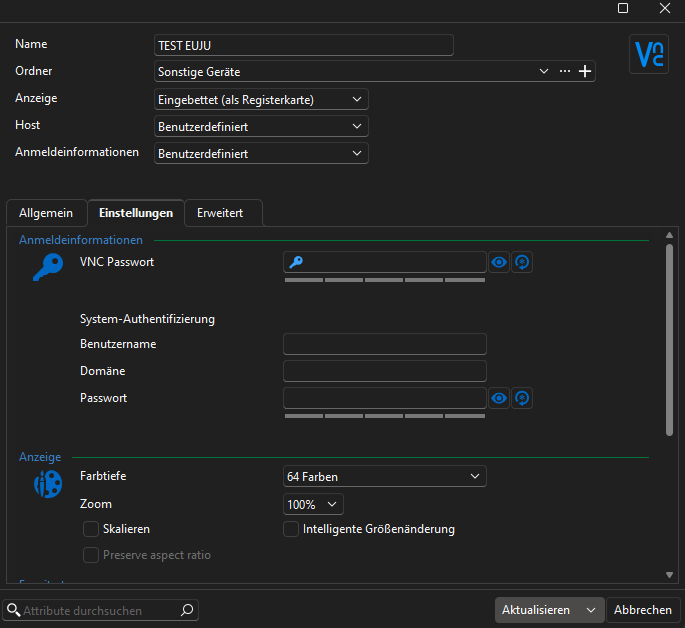
The broken color depth issue appears, regardless of the authentication method used.
Let me know if you need any further details.
Kind regards,
Julian Eustachi
Screenshot 2025-06-17 133847.png
Hello Julian
Thanks for the information.
For the double login prompt, I've found the issue and made a fix for it that. All being well it should be in the 2025.2.16 version which will be released within the next couple of weeks.
For the broken display with a low colour depth, the issue is a bit less clear. It could happen if the chosen pixel format doesn't match on the client and server, but I've tried using the same UltraVNC server version as you and can't reproduce it.
I can reproduce the issue if I force a codec that doesn't seem to support lower colour depths, like zlib; so that is what I'd like to investigate.
- On the VNC session in RDM, under the "Advanced" tab, do you have something configured for "Preferred encoding"? If you force it to "Hextile", does it change something?
- Are other colour depths affected? For example, if you choose 256 colour, does it work properly?
- Can you enable VNC logging in File > Settings > Entry Types > Sessions > Apple Remote Desktop (ARD) / VNC > Advanced? Click the option to enable logging and provide a complete path to create a log file; then save the changes and restart RDM. Reproduce the issue and send me the log file either by PM or to service@devolutions.net (mentioning this forum thread). Afterwards, disable logging again.
- In conjunction with the above, it could be helpful to see the log from the server as well. The VNC server settings has an option to "Log debug infos (sic) to the WinVNC.log file". You may need to restart the server after enabling it. The log path is usually inside the same directory as the WinVNC application.
Finally, your VNC server version is very old. It might be a good thing from a security posture to update to a newer version, if possible.
Please, let me know if something isn't clear or you have further questions
Thanks and kind regards,
Richard Markievicz