VIM does not work as expected using ssh terminal under version 2025.2.13.1
VIM does not work as expected using ssh terminal under version 2025.2.13.1

When I use vim and I copy a line of text (yy) and then paste it, it overwrites the second line rather than pushing it down and adding it as a new line. there may be other issues, but that makes this terminal unusable. I just installed 2024.3.16.0 and it works correctly there.
All Comments (11)
Hello,
Thank you for reaching out to us regarding this,
What type of data source are you using?
Could you test with the latest version of RDM 2025.1.14.0 and let me know if you encounter the same problem?
You can use a portable instance for this test:
https://docs.devolutions.net/rdm/kb/how-to-articles/portable-rdm-installation/
Best regards,
Samuel Dery
It's a local data source. I'm connection to any one of my Redhat linux servers. They all do the same thing. I set the connection up using an SSH shell. I was using the most recent version of the application. I didn't try it with that particular version. I'm very busy at the moment. I'll try to get to testing this when I have a moment.
Hello,
We are currently unable to reproduce the issue on our end. However, we’ve noticed that several users have reported a similar problem.
Would you be able to record the issue and share the video with us? I’ve included a secure link for you to upload the video privately.
Best regards,
Carl Marien
Hello,
Following up on my previous message, would it be possible for you to send us a TRP recording of the SSH session?
Here are the steps to create one:
1. In the SSH session properties, click on Session Recording.
2. Set the mode as required and choose your preferred destination.
3. Click Save.
4. Navigate to the Administration tab and click on System Settings.
5. In System Settings, select Session Recording, and under SSH Recording Type, change it (if necessary) to Terminal Playback (.trp).
Once the recording is ready, please send it to us using the same link I shared with you via direct message.
Best regards,
Carl Marien
You're going to have to be a lot more detailed in your instructions. Which Menu item, when sub menu pick. Screenshots would really help. I can't find any of the options you said I need to set. I found how to record a session but it only saves it as a media file and doesn't show anything useful.
Hello,
Apologies for the lack of precision in my previous message. Please follow the steps below instead:
1. In the SSH entry properties, go to Session Recording. Change the Mode to Required and set the Destination to Custom. Then, choose your preferred file location.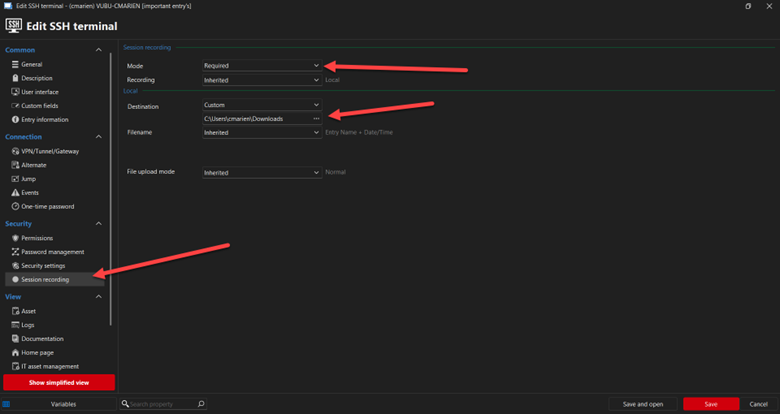
2. In the Administration tab, click on System Settings. Go to Session Recording and, under SSH Recording Type, ensure it is set to Terminal Playback (.trp).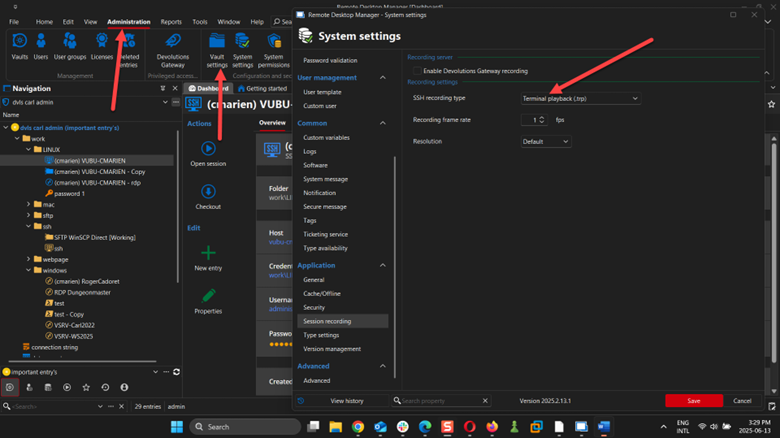
After completing these steps, reproduce the issue. A .trp file should be generated in the selected location.
Best regards,
Carl Marien
Picture2.png
Picture1.png
Hello everyone,
We have the same problem. DVLS 2025.2.3.0 as "data source" and the RDM for Windows 2025.2.14.0.
When editing files with vim and inserting blank lines (press Enter to insert a line), the line that moves down overwrites the line that follows.
But this is only a view problem. Because when I open the file afterwards, everything looks clean. This is my research.
I have made a session recording. trp and rfi are in the attached archiv.zip
However, this problem only occurs in the Windows version. This problem / phenomenon does not occur in the macOS version of RDM 2025.2.6.8. I could not test it in Linux, but I doubt that it occurs there as well.
Many thanks for your help
Alex
Archiv.zip
Hello,
Would it be possible to update to the latest version? The new version should include a fix for this issue.
Best regards,
Carl Marien
Hello
I am using 2025.2.14.0 64-bit and have the same problem.
Alan
I am also having this problem, I am running 2025.2.14.0 64-bit (JIT) and using devolutions personal hub as my data source. All old connections, however do NOT have this issue. "Old" being relative - created maybe 5 or 6 releases back. The problem is only on newly created ssh session entries.
Hello Carl,
we have tested it with the current 2025.2.16.0 version of the RDM.
Everything works as it should with this version.
Many thanks
Alex