Shared templates in vault
1 vote

We are using the templates to configure dynamic sessions across multiple hosts (+15k).
However, only being able to store them on the system (data source) is limiting their use.
It would be great if you could add the option to store templates in the vault, opening features as using linked credentials from the vault in the VPN setup.
And also segmenting the templates, so you don't see templates only relevant for other vaults.
All Comments (5)
Hello,
It would be great if you could add the option to store templates in the vault, opening features as using linked credentials from the vault in the VPN setup.
And also segmenting the templates, so you don't see templates only relevant for other vaults.
Would it be possible to give more information on your setup, maybe with screenshots? I'd like to make sure I understand the way you structure your vaults and how you'd like to use your templates. I assume you're using Host type entries with templates to give them additional information.
It would be possible for us to have a way to specify on templates in what vaults they're available, but I'm not sure I understand what you mean by using linked credentials from the vault. This should already be possible by specifying the credentials on your Host entry and changing the configuration to use the credentials from the Host entry rather than the template.
Regards,
Hubert Mireault
Hello Hubert,
Thank you for reaching out. I will try to elaborate on our setup.
We are a service provider in the retail sector, who have to connect to our customers' environment to provide support.
Our customers have a similar setup of our product in each store, but different network infrastructure, and therefore different vpn/gateway setup's.
The product we deliver uses different host types like.
- Enterprise Server
- WinSCP
- SSH Terminal
- Store Server
- WinSCP
- Local Website
- Proprietary Client
- PuTTY
- Store Client
- VNC
- SSH
For each customer, we create a template folder for each host type, with the needed sessions.
As the different session types require different VPN setups, we do the VPN settings on the session template and not the host.
In most of them, we use the SSH VPN option with Gateway jumps. And here we do not have access to the vault users: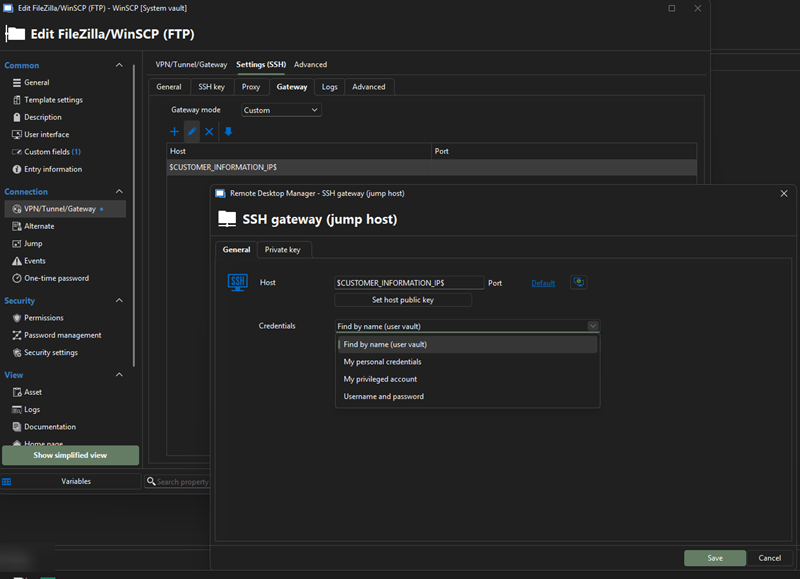
The Vault setup looks something like this: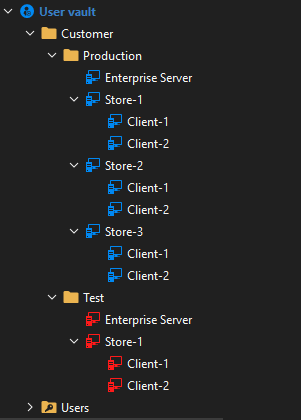
Enterprise Server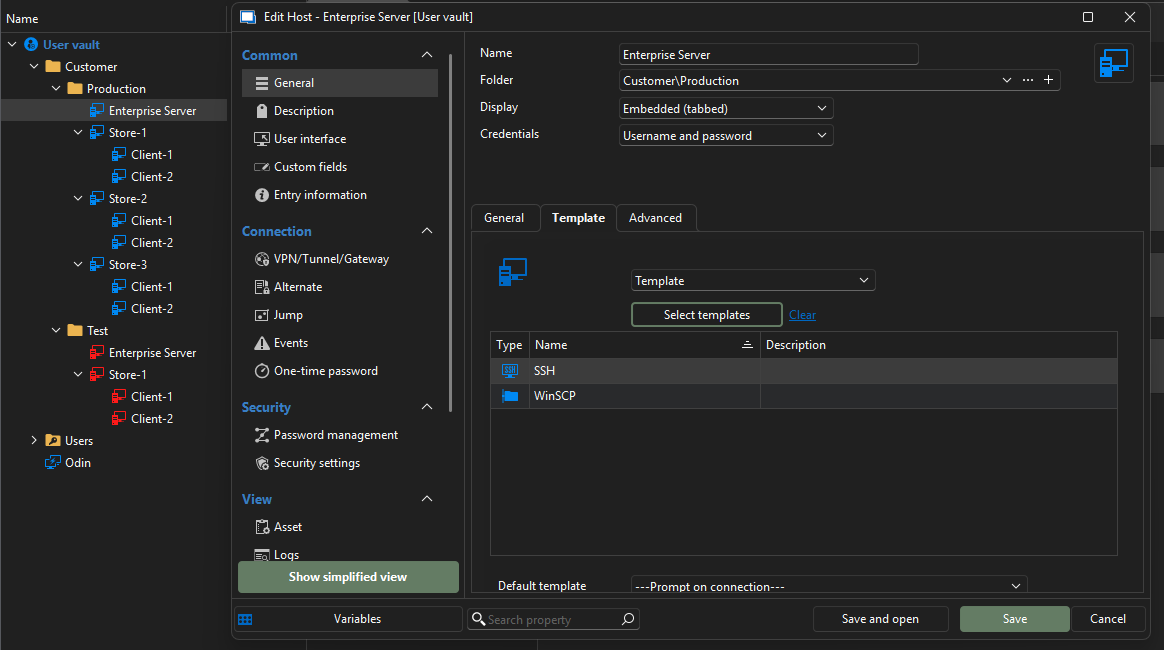
Store Server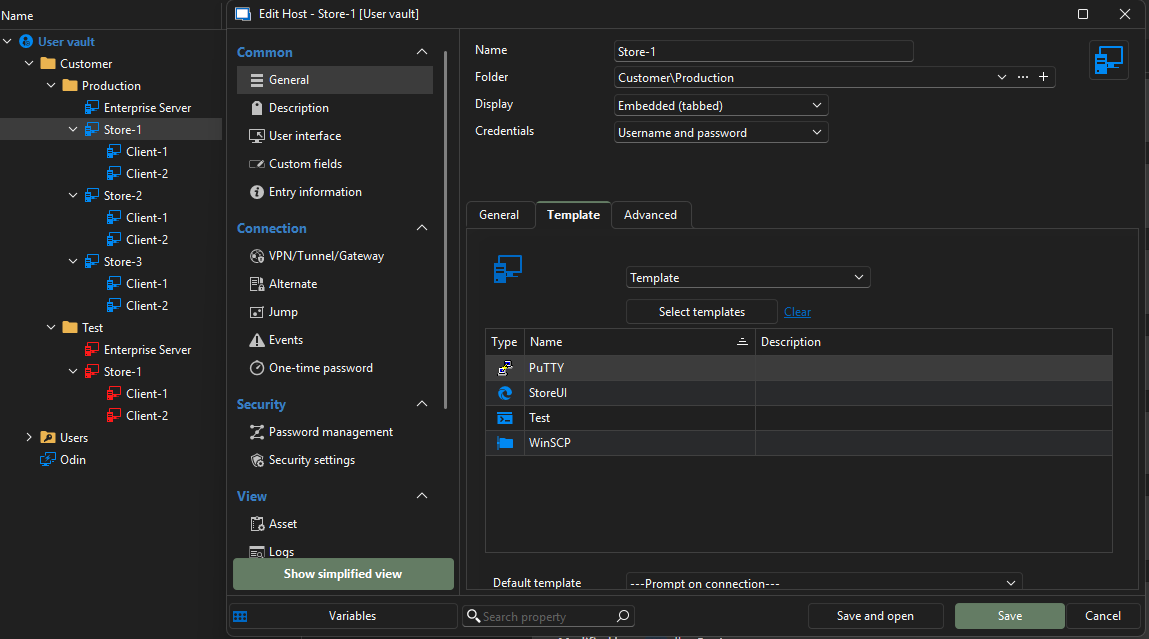
Store Clients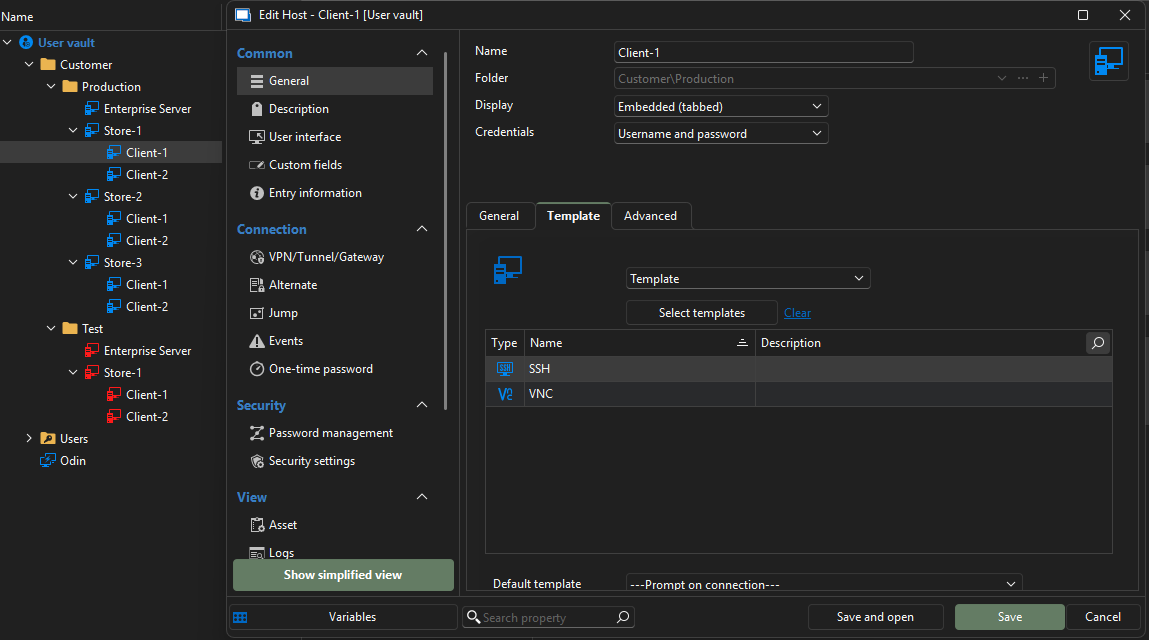
78e90f93-6611-4b64-b652-f664077cb2f7.png
e7fa500f-98b3-4fd3-acec-862d63e3d415.png
83ff52ed-a969-40ab-ba85-fff9e5be47dd.png
7b30d0b9-1aba-45c4-9b63-9b81cec32761.png
e08a8446-c2ff-462c-bf55-24a2d25d978d.png
Thank you for all of the additional information on your environment! I think I have a better grasp of your setup.
From what I understand, and correct me if I'm wrong, but the major issue you're encountering is here:
In most of them, we use the SSH VPN option with Gateway jumps. And here we do not have access to the vault users
You're not able to point to the credentials from your user vault, and that's what you'd like to do that would improve this, is that correct?
If that's the case, then the solution would be to use the "Find by name (user vault)" option, which we can see in your screenshot.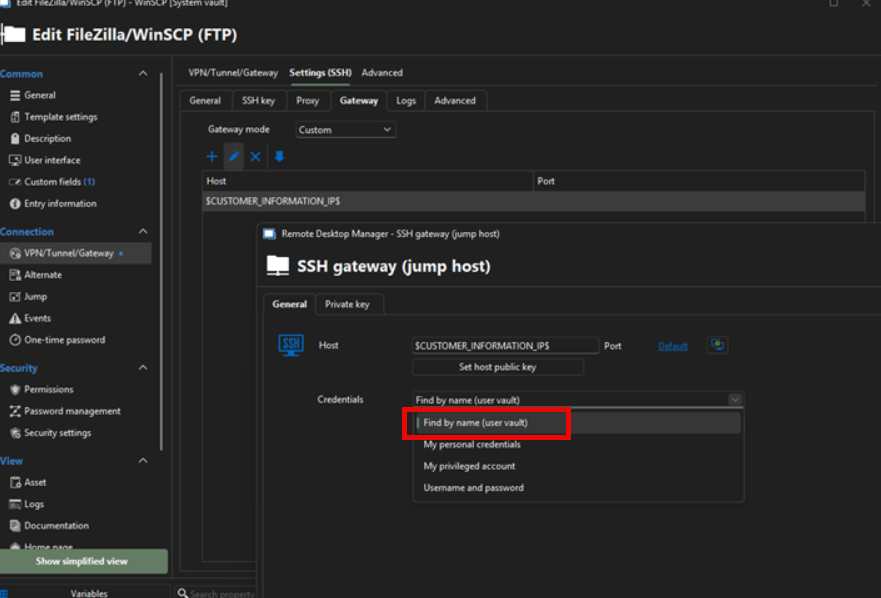
You can enter a text string in the field, and it will find the appropriate credential entry in your user vault that has a matching name.
The reason you can't directly link to an entry in the user vault from a template is because every user has access to these templates, and every user vault is separate. This means linking to a specific user vault entry in a template would work for the user who configured the template, but not for any other user trying to use this template. By searching with a string, as long as the two users have an entry with the same name in their user vault, it can find it.
Additionally, if you were talking about linking to a credential in the shared vault, then the linked (external vault) option could be what we need to implement in the SSH Gateway section. You can read more about this mode in our What's New blog here: https://blog.devolutions.net/2025/06/whats-new-in-remote-desktop-manager-20252/
At the moment it's only available in SQL Server, in the main section of entries, but we will add it to DVLS and Hub in 2025.3, and are going to implement it over time in all our credential selection dropdowns.
Let me know what you think about these leads. It's possible I'm still misunderstanding your needs.
Regards,
Hubert Mireault
ae88b92c-7205-4544-ae85-6c96e8f2447e.png
I think you have gotten the major part of the request. And the option to use "linked (external vault)" would solve that aspect.
The other part is using Valuts to separate customer setups, and using your built-in permissions feature to delegate access. Here are only the templates, the only thing missing, as they are stored on the "system".
Being able to store entry templates in the vault would solve this and be the safest. I will try to explain why.
My colleagues and I have different main customers we service, but we still support others.
With Vaults, we can give write permissions to our main customers and read to the ones we only need to support.
But with the templates being stored on the system, everyone needs to have access to add and edit these, and will have access to other customers' templates.
Which could lead to an entire vault's sessions on working, if somebody changed the wrong template.
Further more we have seen that credentials being removed from the template if it is viewed while connected to a different vault.
Hello,
For the "linked (external vault)", we've opened a ticket and will post back here once it's available.
For allowing templates per vault, I understand how the idea would be interesting. We will have to think about how to properly implement this as there are a lot of questions to answer (how do we handle permissions, how do we handle the UI to manage all templates, etc).
Regards,
Hubert Mireault