SSH tunnels not working with version 2025.2.13.1

After we upgraded to version 2025.2.13.1, our SSH tunnels stopped working.
This is our usual configuration: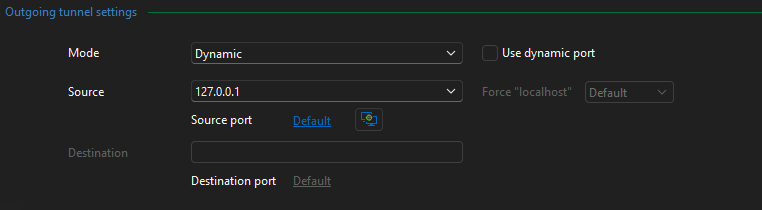
I think the issue might be related to the tunnel port (default: 3390) being randomized.
When connecting to the tunnel, this log is registered:
Listening on: 127.0.0.1:58160D
Every time there is a different random port.
We have web connections that take advantage of this type of proxy configuration: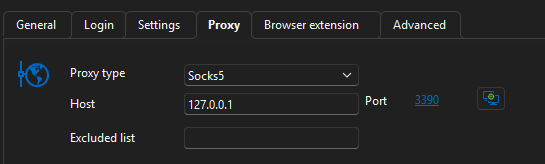
Since the tunnel port is not set to 3390, they are no longer working.
As a matter of fact, if I change this port to the random one that is generated when I connect to the SSH tunnel, it works.
Is anyone else experiencing the same issue?
Thanks,
Daniele
08a3d2db-575c-4b39-9e5c-002924b17fb2.png
fd613080-645c-480b-aadb-4ef0edf9e83b.png
9277e2a8-7a01-4e26-a629-f108c8e8d2e4.png
Recommended Answer
Resolved with version 2025.2.14.0
From the official release notes:
"Fixed an issue where SSH tunnel connections would generate a random port instead of using the configured one"
All Comments (2)
Resolved with version 2025.2.14.0
From the official release notes:
"Fixed an issue where SSH tunnel connections would generate a random port instead of using the configured one"
Hello,
Thank you for your feedback, and confirmed that version 2025.2.14 has solved your issue.
Best regards,
Érica Poirier