Proxmox plugin incosistency
1 vote

I configured the new (preview) proxmox plug but ran in an issue to get it working with the help of support. In the 'host' field you have to enter the complete URL of de proxmox host incuding https and portnumber (8006).
The dialog is a bit misleading, since it asks for the ‘host’.
In other connection types you must only enter the hostname if the label is ‘Host’, the website plugin asks for an URL labeled as such.
I suggest two options:
The label for ‘Host’ in the Proxmox add-in should be renamed to URL just like the website plugin.
Or even better to be more consistent with other connection tpyes:
Modify the dialog in such a way that ‘Host’ is indeed the hostname and a separate field for port number. Then when RDM connects to the Proxmox server it should automatically add the https and portnumber in its connection string.
All Comments (7)
Hi,
Thank you for the feedback regarding our Proxmox integration.
I've opened a ticket to implement option #2 since, as you have noted, it's the most consistent with how RDM normally operates.
Regards
Jonathan Lafontaine
Great, thanks!
Hello,
Is there any documentation for setting up a connection? I understand that the host string should include HTTPS and the port, but I can’t connect using the login and password. What value is expected in the 'Realm' field?
Hi,
Proxmox default realm is 'pam', or 'Linux PAM standard authentication' in the web interface login window, and that's what RDM will use if the field is left empty.
However, if, when connecting to the web interface from a browser, you have to select 'Proxmox VE authentication server', then the realm value should be 'pve'.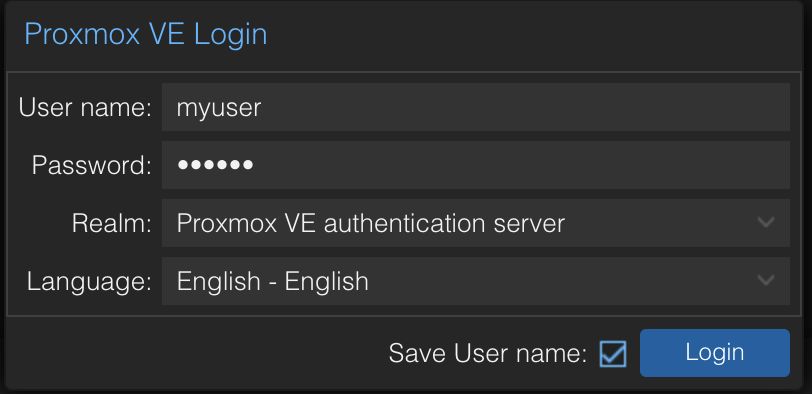
To help clear things out, I'll open a ticket to change how we handle the realm field and instead have a combo box with same choices the web interface offers.
Let me know if you still have difficulty login in.
Regards
Jonathan Lafontaine
5ff882fa-6631-4ef8-876b-30f549579117.png
@FrankWest
Hi,
Just letting you know that, contrary to what I said, I implemented option #1. As what we ultimately need is the server's URL, it made more sense to simply ask for it. However, to help clarify what we are expecting, I've added placeholder text that displays an example value.
Regards
Jonathan Lafontaine
Hi,
ok, but it's not possible to change the 8006 port number for the web interface and it's always HTTPS, so it would also be logical to only ask for the hostname ;-)
Hi,
Proxmox default realm is 'pam', or 'Linux PAM standard authentication' in the web interface login window, and that's what RDM will use if the field is left empty.
However, if, when connecting to the web interface from a browser, you have to select 'Proxmox VE authentication server', then the realm value should be 'pve'.
To help clear things out, I'll open a ticket to change how we handle the realm field and instead have a combo box with same choices the web interface offers.
Let me know if you still have difficulty login in.
Regards
@Jonathan Lafontaine
Thanks Jonathan. And the combo will help for the future. ;-)