Remote Desktop Manager no longer opening and says the executable is missing
Remote Desktop Manager no longer opening and says the executable is missing

I came in this morning and Remote Desktop Manager is no longer working. When I open from start menu or desktop shortcut nothing happens. When I open direction from C:\program files\devolutions\remote desktop manager\RemoteDesktopManager.exe this error pops up: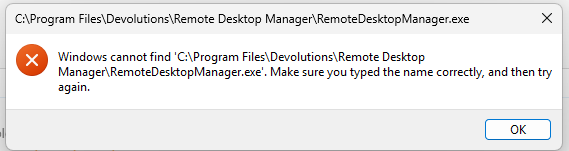
I tried uninstalling and reinstalling with the same result, I tried installing an older version and same thing. I tried completely uninstalling and deleting any related folders in ProgramData and AppData folders and still same results.
I am running Windows 11 Education 24H2 OS Build 26100.4061.
Screenshot 2025-05-29 072854.png
All Comments (7)
Hi
I've seen something like this before, do you know if you're using an SCCM like PatchMyPC?
You can open regedit and look at the key "HKEY_LOCAL_MACHINE\SOFTWARE\Microsoft\Windows NT\CurrentVersion\Image File Execution Options". Is there a subkey in there for RemoteDesktopManager(.exe)? If so, can you show us the values in that key?
Kind regards,
Richard Markievicz
Hello,
It appears that the shortcut you are trying to use points to a deleted installation of Remote Desktop Manager.
Could you please delete the shortcut and then follow the steps below to completely remove the current RDM installation and reinstall it from scratch?
1. Go to Settings > Apps > Installed Apps, and uninstall any existing RDM installation from the list.
2. Navigate to C:\Program Files\Devolutions and rename the folder named RemoteDesktopManager to RemoteDesktopManager.old.
3. Do the same for the folder located at C:\Users\%username%\AppData\Local\Devolutions.
4. Download and reinstall the latest version of RDM using the following link:
https://devolutions.net/remote-desktop-manager/download/thank-you/?platform=RDMsetup&edition=team&os=windows
Once reinstalled, please check if the issue persists.
Best regards,
Carl Marien
Hi
I've seen something like this before, do you know if you're using an SCCM like PatchMyPC?
You can open regedit and look at the key "HKEY_LOCAL_MACHINE\SOFTWARE\Microsoft\Windows NT\CurrentVersion\Image File Execution Options". Is there a subkey in there for RemoteDesktopManager(.exe)? If so, can you show us the values in that key?
Kind regards,
Richard,
Yes we do use PatchMyPC with SCCM.
There are 2 subkeys
"remotedekstopmanager.exe" with the value Debugger REG_SZ "C:\WINDOWS\SoftwareDistribution\Download\Install\patchmypc-preventstart.exe" /StopProcess /ApplicationName="remotedesktopmanager.exe"
Also
"remotedesktopmanager64.exe" with the value Debugger REG_SZ ""C:\WINDOWS\SoftwareDistribution\Download\Install\patchmypc-preventstart.exe" /StopProcess /ApplicationName="remotedesktopmanager64.exe""
Hello,
It appears that the shortcut you are trying to use points to a deleted installation of Remote Desktop Manager.
Could you please delete the shortcut and then follow the steps below to completely remove the current RDM installation and reinstall it from scratch?
1. Go to Settings > Apps > Installed Apps, and uninstall any existing RDM installation from the list.
2. Navigate to C:\Program Files\Devolutions and rename the folder named RemoteDesktopManager to RemoteDesktopManager.old.
3. Do the same for the folder located at C:\Users\%username%\AppData\Local\Devolutions.
4. Download and reinstall the latest version of RDM using the following link:
https://devolutions.net/remote-desktop-manager/download/thank-you/?platform=RDMsetup&edition=team&os=windows
Once reinstalled, please check if the issue persists.
Best regards,
Carl,
I tried this, and was able to uninstall, there was no Devolutions folder in program files nor in appdata local. I reinstalled and had the same issues.
Hi
You should be able to safely delete those two "Debugger" values and I believe it will fix the issue. The usual disclaimer applies around editing your registry, but it is safe to delete those values.
PatchMyPC creates those values while running an update as a mechanism to prevent you from launching the application while the update is in progress. If there's an issue with the installation (for example, it gets hung up) it's possible that it fails to remove them again and leaves the application in an unlaunchable state. There was a related issue with the RDM installer several versions ago so this might be related, but you didn't say what version you are running.
Please let me know if something isn't clear or if you have other questions
Kind regards,
Richard Markievicz
Hi
You should be able to safely delete those two "Debugger" values and I believe it will fix the issue. The usual disclaimer applies around editing your registry, but it is safe to delete those values.
PatchMyPC creates those values while running an update as a mechanism to prevent you from launching the application while the update is in progress. If there's an issue with the installation (for example, it gets hung up) it's possible that it fails to remove them again and leaves the application in an unlaunchable state. There was a related issue with the RDM installer several versions ago so this might be related, but you didn't say what version you are running.
Please let me know if something isn't clear or if you have other questions
Kind regards,
Richard,
Thanks so much that did the trick! I did notice it looked like software center was trying to update it but was a failed installation, so Im guessing thats where it hung at. Much appreciated!
Richard,
Thanks so much that did the trick! I did notice it looked like software center was trying to update it but was a failed installation, so Im guessing thats where it hung at. Much appreciated!
Awesome! Don't hesitate to post back if the problem reoccurs or you have other questions. If you get the issue again, please let us know the relevant RDM versions.
Best regards,
Richard Markievicz