Execute Powershell Scripts on remote Machines with storedCredentials
Execute Powershell Scripts on remote Machines with storedCredentials

I created a Powershell script Using "Powershell script (macros/script/Tool)" but I cannot find anywhere how to link my credentials to run the script. I am trying to restart a service on a remote server. I can create a Powershell to do this but I want to use the RDM to save the script. But I cannot find how to link the credentials. I appreciate any help.
All Comments (5)
Hello,
Thank you for contacting us on this matter!
Could you please try to use the PowerShell Terminal session instead of the PowerShell script (macros/script/Tool)? This should achieve your needs. 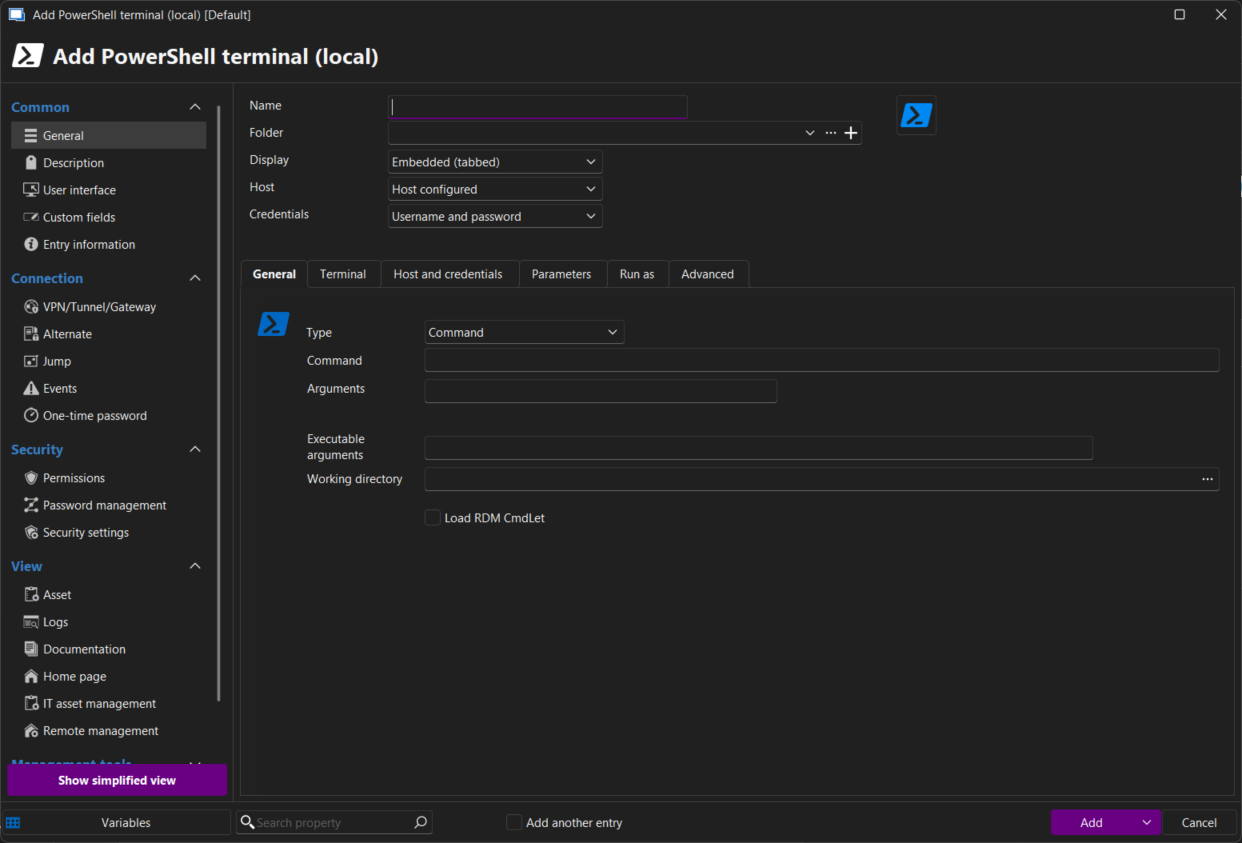
Please let us know if you have further questions or encounter any other issues.
Best regards,
Maxim Robert
2025-05-15_15-56-33.png
That worked. Thank you so much for your prompt reply. Have a nice Day!
Regards
Steve
Hello @Maxim Robert,
Which “entry” can I use if I want to run a PowerShell script on multiple servers simultaneously?
Hello,
Thank you for your question, and sorry for the delay.
You should try the "PowerShell Script - Macro/Script/Tool "Entry type. Then, when the entry is created, you can either link it directly to the entry or select multiple entries in your navigation pane, right-click, and then select your PowerShell Script entry under Macro/Script/Tool.
If you encounter any issues, feel free to let us know.
Best regards,
Maxim Robert
In Devolutions Remote Desktop Manager, credentials are not embedded directly in the PowerShell script. Instead, you link a saved credential entry to the PowerShell Tool via the Credential or Variables section, then reference it in your script (for example, using Get-Credential or RDM variables). This keeps credentials secure while allowing the script to authenticate when running against remote machines.