Open (External) RDP or Web entry does not Close when ending external session.
Open (External) RDP or Web entry does not Close when ending external session.

When opened a web entry or RDP session External, then when closing the RDP session or closing the browser Tab or browser this Entry will not be closed automatically in RDM (and can't be used again). Action button Close remains highlighted and pressing Close will not execute this either. Executing in Embedded RDM there everything goes as desired, entry session is closed again.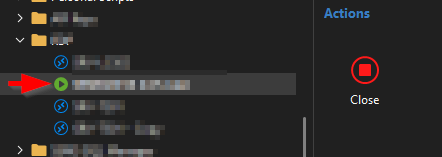
The sessions in question are detected by RDM when closing RDM and will indicate/message that there are still sessions open, but after rebooting/restart RDM these sessions are closed again and you do not get the default option to resume that last opened sessions.
RDM version 2025.1.38.0 - Microsoft Azure SQL
RDMentry.png
All Comments (16)
Hello,
Thank you for reaching out to us regarding this,
When launching a session in External RDM, it is simply using the command line to launch the entry. Once started, in most cases, RDM will not have control over it anymore, which is why using the "Close" button only changes the status of the session inside RDM.
Let me know if you have further questions regarding this
Best regards,
Samuel Dery
Hi Samuel,
Then in (all) previous versions this behavior is different now in this latest version??
If I create an RDP entry in version 2025.1.37 and start it with the Action button 'Open (External'), the Session will be opened and the Action button will turn 'red' and the entry in question will be Checked out and turn into green 'play-icon'.
Closing the RDP session from the external windows Using cross or Log-out RDP) then the entry will go back to status normal (rdp icon) and the Action button disappears.
When I do the same action in version 2025.1.38 (same Database- Azure SQL) then the behavior is completely different, entry status remains checked out and 'green play-button' after closing the session (using cross or Log-out RDP) .The Action Button also remains active if you still want to close it in RDM (as in first screenshot ).
The same behavior is if starting a Website entry, external the session manually close and the entry in RDM stays 'Green- play-button icon'
WebV38.png
RDMV37-2.png
RDPV37.png
Hello Marcel,
Thank you for your reply,
I see, does the Green play button icon remain even after using the manual "Close" action in your case?
I'm assuming you have the same behavior with multiple hosts, is that correct?
Let me know,
Best regards,
Samuel Dery
Hi Samuel,
Yups, closing a web session via the browser or via the close button, button and icon remain active, same with an RDP session, closing directly from the session or close button.
Concerns all Web/RDP -sessions, -entries which we start from RDM.
If necessary we can also show this via a remote session, just let me know
I also confirm this problem! I can no longer close the sessions as detected by Marcel G.
Gabriel
Hello all,
Thank you for confirming the issue.
We've been able to reproduce it on our side and are currently working on a fix.
In the meantime, you can use one of the following workarounds:
- Switch the display option to either "Embedded" or "Undocked"
- Alternatively, you can revert to version 2025.1.37.0, which is also available as a portable version—so there's no need to uninstall your current installation.
🔗 Download 2025.1.37.0 (Portable Version)
📘 How to Use the Portable Version
Please let us know if you have any questions or need further assistance.
Best regards,
Stephan
Hi all,
We believe we’ve identified the root cause of the issue. Unfortunately, while addressing one problem, we inadvertently introduced another.
To help us confirm this, could you please check whether the button returns to its expected state after waiting for 30 seconds to one minute?
Thank you for your assistance.
Regards,
Jean-Francois Duchesne
I confirm the behavior of the button.
Regards,
Quick check at my site.. After starting RDM and opening a random RDP session in the user vault I noticed that the entry in RDM went back to default after 20-35 seconds while the external RDP session was still open ?. Further testing and opening RDP session in Vault and closing/logging out externally RDP session, unfortunately the entry status in RDM remained as running and the close button could not be operated. Not closing, even after a long wait. Also opening web session externally same problem, when closing entry status still running and unresponsive.
Only restart RDM (Message you've opened/running sessions when exiting) set that entry's back in expected, closed/not running, state after start RDM again.
I will do a new check for multiple entries tomorrow and report back.
Same here as Marcel G described. All external opened are effected, Edge, Firewall Admin, Storage Admin, Active Directory, ...
The biggest impact for us is, that when an external programm is closed, the state doesnot change back to closed and you cannot start it again. You have to close RDM to use it again.
regards
Hello,
I have a possible workaround. You can open the file remotedesktopmanager.cfg located in %localappdata%\Devolutions\RemoteDesktopManager and add this XML line:
<RefreshOpenedConnectionInterval>5000</RefreshOpenedConnectionInterval>
Please make sure to back up your file before. We hope to release the fixed version tomorrow.
Regards
David Hervieux
This workaround unfortunately does not help me, external opening of web session there entry status remains active, even after manually closing external session via browser.
Same if an RDP session is started, closing entry or logout, Entry status remains active.
added line to cfg file just before the </Option> tag restarted RDM and the line got removed from the cfg file. So will wait until you release fixed code.
Hello,
The team has just released a new version (2025.1.39.0) with a fix for this. Could you give it a try?
https://devolutions.net/remote-desktop-manager/download/
Regards
David Hervieux
Have installed latest 2025.1.39 and for remote desktop and ssh sessions (tera term) works as expected however for web browser sessions it resets after about 5 seconds so shows as not connected. This could be understandable due to the nature of web browser connections but is not the older behaviour. The browser connections I use are using Edge. This can be lived with.
Hello,
We have made another version, not in download yet but available here. This should resolve the issue and it also contains an improvement to immediately refresh the UI if you press Close
https://cdn.devolutions.net/download/Setup.RemoteDesktopManager.2025.1.40.0.exe
Regards
David Hervieux