RDM and vault loading problems after authenticating

I think since version 2025 we have problems after authenticating:
- I start Remote Desktop Manager, it connects to the Devolutions Server and I authenticate with Entra ID.
- It loads and opens the first vault in the list.
- So I change the vault to another one.
- Now RDM is not connected to the Devolutions Server anymore, it also doesn't show the vault anymore (see screenshots).
- I refresh RDM and it loads and opens the first vault in the list again.
- I change the vault to another one and now the vault does load and open.
This only seem to happen when I need to authenticate first.
There was also the problem with disconnecting from the Server randomly while the connections (via the gateway) still worked, but this happened rarely and maybe that has been fixed already.
RDM version: 2025.1.34.0 64-bit
Server version: 2025.1.7.0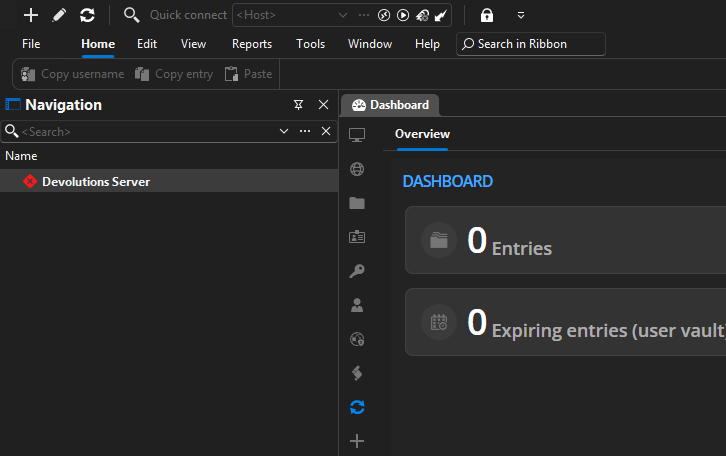
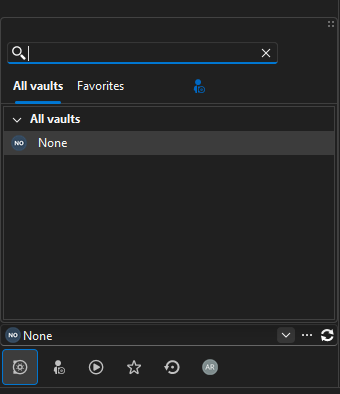
Screenshot 2025-04-23 091600.png
Screenshot 2025-04-23 091545.png
All Comments (7)
I had the problem just now while working in RDM. I had an active filter that showed some entries, did some stuff inside an entry and when I went back to the navigation panel (I have auto hide active) and saw it was disconnected. After a refresh I was connected again but it defaulted to the first vault.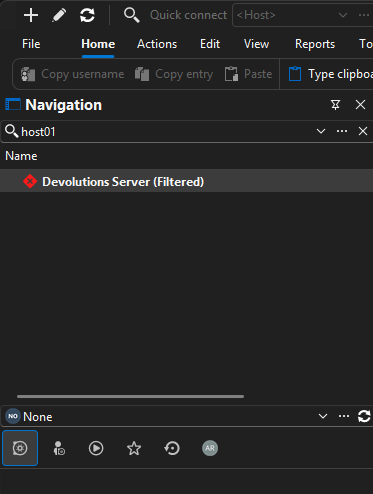
32add381-8485-4eb3-894d-8b435f885633.png
Hello,
Thank you for reaching out!
My name is William and I'm here to assist you in any way I can.
This is currently a known issue with RDM and DVLS. Our development team are making some progress on finding the root cause of the issue.
At the moment, the only workaround we have is disabling the Caching mode from the RDM data source under File > Data Source > Edit > Advanced: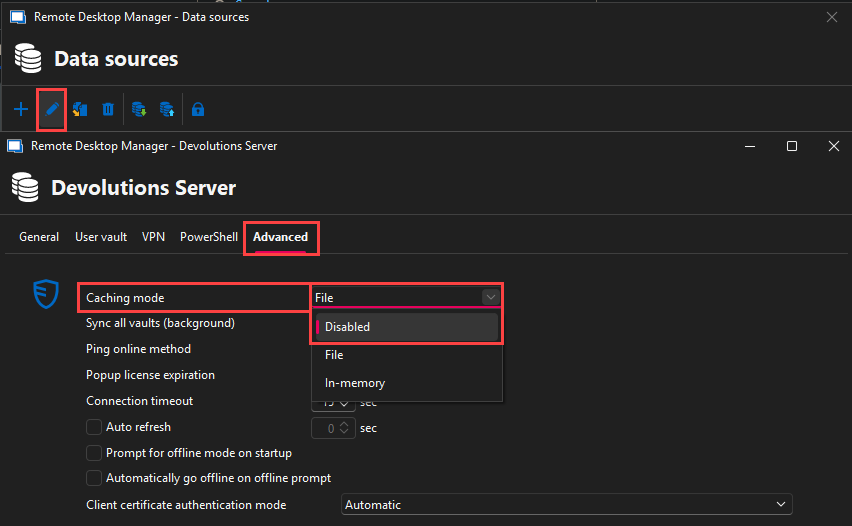
Note that this will prevent you from using the Offline mode.
Best regards,
b60ec648-d2ce-451b-8044-e61db6e95b6c.png
Hi William. See my topic, I have the same issue. Thanks for the hint with disabling cache mode, it helps for the moment.
Best regards, John
Hello,
Thank you for reaching out!
My name is William and I'm here to assist you in any way I can.
This is currently a known issue with RDM and DVLS. Our development team are making some progress on finding the root cause of the issue.
At the moment, the only workaround we have is disabling the Caching mode from the RDM data source under File > Data Source > Edit > Advanced:
Note that this will prevent you from using the Offline mode.
Best regards,
Hi William,
I want to keep the offline mode and it is not really a big issue for us so I will wait for the fix.
But thanks for the workaround!
Best Regards,
Arjan
Hello,
Thank you for the confirmation.
The only other workaround is doing a CTRL+F5 when this is happening to get reauthenticated to the Devolutions Server. I will let you know as soon as we have a fix available.
Best regards,
It seems to have been fixed. We are on version 2025.2 now but I I think the problem was already gone in one of the versions at the end of 2025.1. Thanks!
Hello,
Thank you for the confirmation. I'll set the thread as resolved.
Feel free to reach out if you have any questions.
Best regards,