RDM manager doesn't start after updating to any 2025.* version
RDM manager doesn't start after updating to any 2025.* version

Hi
after updating to any 2025.* version, RDM doesn't start anymore. I tried every 2025 update none of these are working. The only way to make it start is to downgrade to the last 2024.* version.
I've installed either the .NET runtime 8.0.15 and 9.0.4. I also tried to rename the "RemoteDesktopManager" in AppData/Local/Devolutions to "RemoteDesktopManager.old" but it doesn't recreate the "RemoteDesktopManager" folder when I try to start the application.
Please let me know if you have any suggestions or need more information.
Luca
Recommended Answer
Hello Luca,
Alright, thank you for the details! The main reason RDM isn't working anymore is that your OS is outdated. Therefore, it seems .NET 9 is not supported or is not working as expected.
https://support.microsoft.com/en-us/topic/april-11-2023-kb5025221-os-builds-19042-2846-19044-2846-and-19045-2846-b00c3356-baac-4a41-8342-7f97ec83445a
I would suggest upgrading to a newer OS release.
Regards,
Min
All Comments (6)
Hello Luca,
Is there any additional information available in the Event Viewer?
Which OS build are you using? (Start => cmd => winver)
Regards,
Min
Hi, I'm using 22H2 Win10: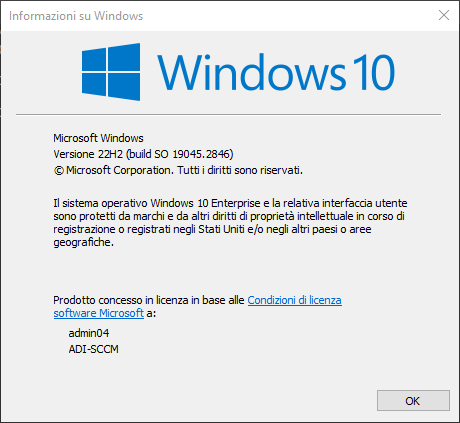
Winver.png
I've found this in the Event Viewer:
Faulting application name: RemoteDesktopManager.exe, version: 2025.1.34.0, time stamp: 0x67d30000
Faulting module name: KERNELBASE.dll, version: 10.0.19041.2788, time stamp: 0x62e593d6
Exception code: 0xc0000602
Fault offset: 0x0000000000117cd2
Faulting process id: 0x51a0
Faulting application start time: 0x01dbc0b2c4228c01
Faulting application path: C:\Program Files\Devolutions\Remote Desktop Manager\RemoteDesktopManager.exe
Faulting module path: C:\WINDOWS\System32\KERNELBASE.dll
Report Id: 6416f6c9-808e-4ce4-8aa2-4b9cb6981f2d
Faulting package full name:
Faulting package-relative application ID:
Hello Luca,
Alright, thank you for the details! The main reason RDM isn't working anymore is that your OS is outdated. Therefore, it seems .NET 9 is not supported or is not working as expected.
https://support.microsoft.com/en-us/topic/april-11-2023-kb5025221-os-builds-19042-2846-19044-2846-and-19045-2846-b00c3356-baac-4a41-8342-7f97ec83445a
I would suggest upgrading to a newer OS release.
Regards,
Min
Thanks for your answer! I plan to switch to Windows 11 in the coming months, but for now I’ll downgrade to the latest 2024 version.
Thanks
Luca
Maybe you can just upgrade your Windows 10 to a newer build? My version is as follows (although it's not Enterprise but Pro), compare it with yours. Ask your admins if you can update to this version, it'd solve your issues with .NET and RDM. I have just been installing monthly updates to get to this build.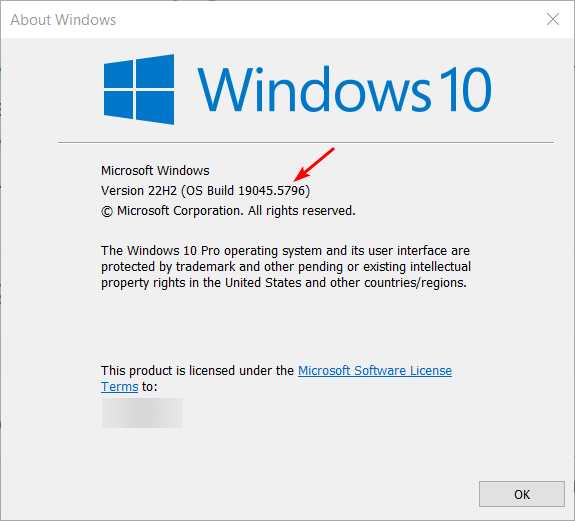
689700b9-77d3-4c80-8ed8-b7fcd4ffb722.png