Using shortcuts and auto-launching session

Is there a way so that you can use a shortcut by double clicking and auto launch the session instead of having to right click and go to to the "Select entry in navigation pane" and then launch the session from there? Example below: 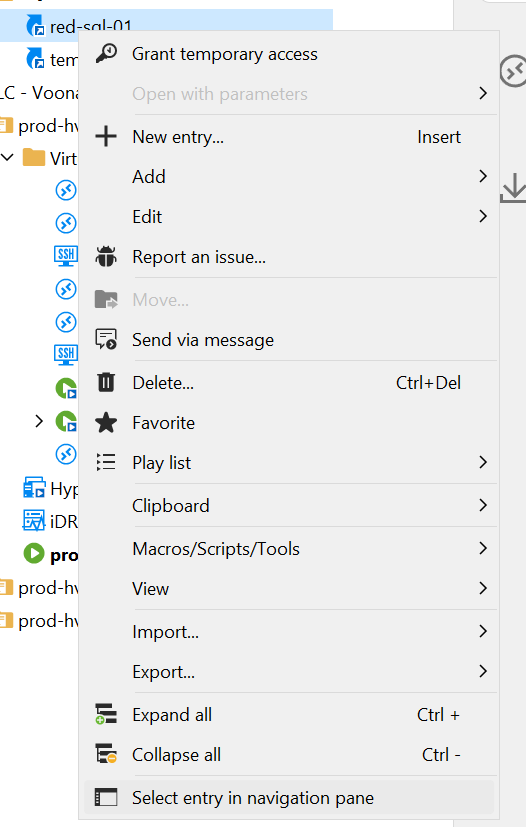
4a65b981-d200-4ebc-a711-2a0a89bf2a79.png
All Comments (10)
Hello,
Thank you for reaching out to Devolutions Support.
Based on the screenshot you provided, it appears that you don’t have the necessary permissions to launch the shortcut. With the appropriate permissions, you should be able to launch the shortcut by double-clicking it.
In my tests, this functionality is working as expected.
Please let me know if you’re able to test again with elevated permissions on the shortcut.
Best regards,
Jacob Lafrenière
Hello,
Thank you for reaching out to Devolutions Support.
Based on the screenshot you provided, it appears that you don’t have the necessary permissions to launch the shortcut. With the appropriate permissions, you should be able to launch the shortcut by double-clicking it.
In my tests, this functionality is working as expected.
Please let me know if you’re able to test again with elevated permissions on the shortcut.
Best regards,
I dont see any option to edit the shortcut permissions. I have super admin privileges on the Vault and I am the person that created both the original entry and also the shortcut. Where are the permissions you are referring to?
Hello,
Thank you for the follow-up.
I was referring the permissions to the entry that the shortcut is linked to.
Could you please confirm what type of entry the shortcuts are pointing to?
Let me know what you find.
Best regards,
Jacob Lafrenière
Thanks - its a Microsoft Remote Desktop session that the shortcut is pointing to. I added myself specifically to the operators security permissions of the entity and it still doesnt auto launch
Hello,
Thank you for the follow-up.
Can you test re-creating a shortcut again and let me know if the behavior changes?
Best regards,
Jacob Lafrenière
Hello,
Thank you for the follow-up.
Can you test re-creating a shortcut again and let me know if the behavior changes?
Best regards,
No such luck - Can i send you a screen recording directly? (dont want to post link in forum).
Hello,
Thank you for the follow-up.
A screen recording would be helpful—could you include an overview of the entry properties? It would also be useful to see you create the shortcut from a working entry, followed by an attempt to launch the newly created shortcut that does not work.
I’ll send you a link via private message where you can upload the recording.
Best regards,
Jacob Lafrenière
Hello,
Thank you for the follow-up.
A screen recording would be helpful—could you include an overview of the entry properties? It would also be useful to see you create the shortcut from a working entry, followed by an attempt to launch the newly created shortcut that does not work.
I’ll send you a link via private message where you can upload the recording.
Best regards,
Uploaded! Might be hard to tell from the video but I tried double clicking and also pressing enter on the short cut to get it to launch before going in and right clicking to bring up the context menu.
Hello,
Thank you for the video.
I believe the behaviour is different with a Hub business data source cause I can replicate it while using my Hub setup.
There is no way to double-click on the shortcut to open the session, you need to use the "Select entry in navigation pane".
A feature request has been made for the same feature you are looking for. Here is the link: https://forum.devolutions.net/topics/41747/more-actions-on-shortcuts
You can follow their advancement on the topic.
Best regards.
Jacob Lafrenière
Hello,
As of the upcoming 2025.2.10 version, double clicking a shortcut on hub datasources will launch the entry.
Regards,
Jafran Majeau