Export all sub-folders names to csv/Excel

Under a specific top-level folder, we need to export a list of all the sub folders. Only the name os those sub folders, we dont need any sessions or anything.
Basically we just need a list of customers, for a specific project. And this seems to be the best way to do it.
There doesnt seem to be a native way in the RDM client, but I guessing this is possible with Powershell?
Recommended Answer
Hello,
Thank you for the clarification.
Unfortunately, we don't have many options for an export of specific folders in RDM.
But, you could achieve this with our PowerShell module. It would allow you to manage an export of specific entries.
For more information regarding our PowerShell module, you can refer to this page: https://docs.devolutions.net/powershell/overview/what-is-powershell/
For script samples, you can refer to our GitHub here: https://github.com/Devolutions/DevoSamples-ps
Unfortunately we don't have a sample script that does exactly that but we do have some samples on exporting entries that you could modify: https://github.com/Devolutions/DevoSamples-ps/tree/main/module/export
Feel free to reach out if you have any questions or need further clarification.
Best regards,
All Comments (5)
Hello,
Thank you for reaching out!
My name is William and I'm here to assist you in any way I can.
You could use the Advanced Search option in RDM and set it to look only for Folders: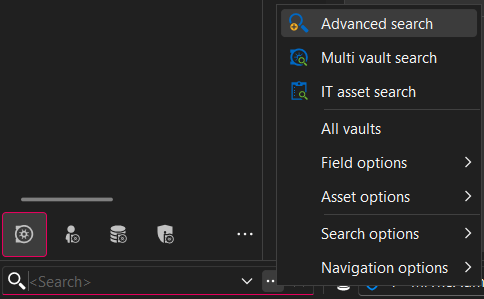
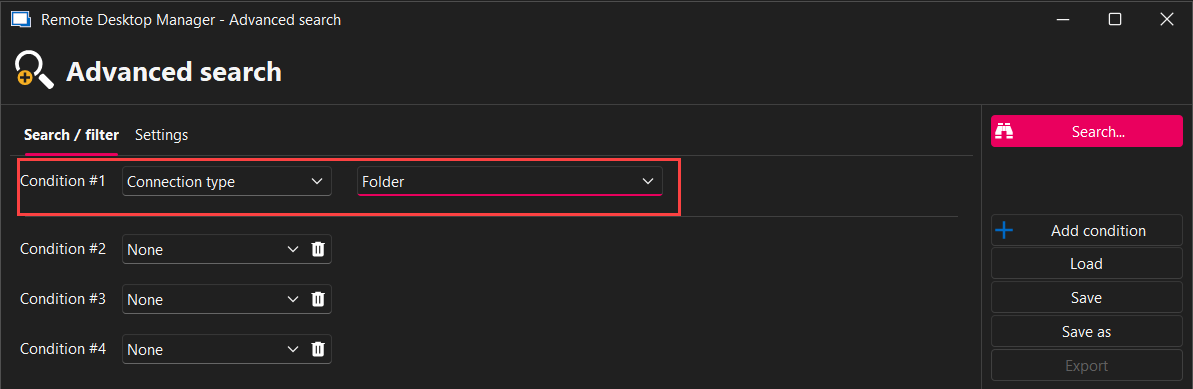
Then select everything from the result and use the Export... > Export Special > Export Selection (.csv)...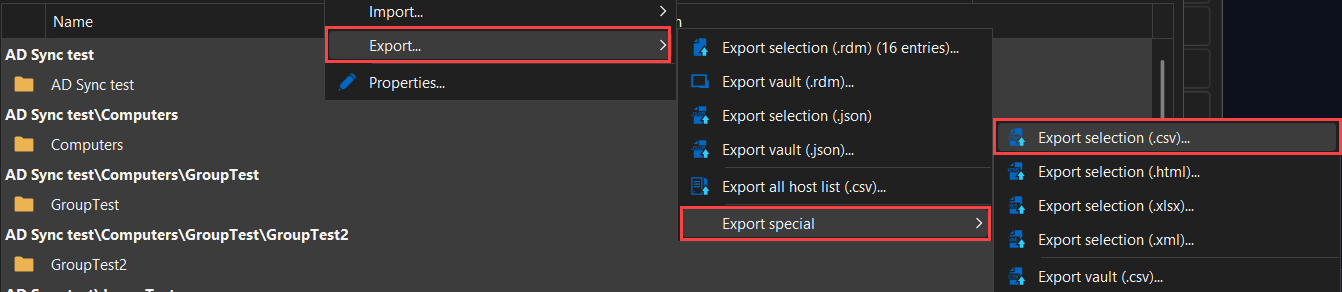
This will allow you to export only the folders of your vault to a CSV file.
Best regards,
da654b1f-3517-46ea-acec-334826e2e767.png
eae9ac5b-68ec-4e8c-959f-f0e79ed2cb97.png
bb6c5b0f-7cb5-4e14-8c0e-a0894ef2643f.png
The problem is that it also give all the sub folders. I just want the top-level folder under a specific folder.
It will be used as a customer list for a project.
Hello,
Thank you for the clarification.
Unfortunately, we don't have many options for an export of specific folders in RDM.
But, you could achieve this with our PowerShell module. It would allow you to manage an export of specific entries.
For more information regarding our PowerShell module, you can refer to this page: https://docs.devolutions.net/powershell/overview/what-is-powershell/
For script samples, you can refer to our GitHub here: https://github.com/Devolutions/DevoSamples-ps
Unfortunately we don't have a sample script that does exactly that but we do have some samples on exporting entries that you could modify: https://github.com/Devolutions/DevoSamples-ps/tree/main/module/export
Feel free to reach out if you have any questions or need further clarification.
Best regards,
After almost giving up, I managed to create a powershell script in the end, that gave me the result I was looking for
Hello,
Thank you for the confirmation, and sorry for the delay in our response.
I will mark this thread as resolved.
Feel free to reach out if you have any other questions.
Best regards,