improve of macro button
1 vote

Hi, Team
Thank you to create such good production. Here is one area maybe you can make this product better:
We could have macro button on terminal, but it has text context after each button, it takes quite some space, is possible change to only show button, the text will fly out when user click on it. It will save space and make GUI more clean and simple.  2nd is possible add a folder selection at right, so user can select different script folder to run differnt script? something like this:
Thanks for considering.
da6e0c23-c441-4cce-a62b-8a4c22943339.png
0bad1f45-41cf-49dd-822f-ac00e94f0f38.png
All Comments (35)
Hello,
From what I understand, instead of having all the macros listed on the bar, you would like them to be in a folder to save space and make the UI cleaner.
Is putting them in one folder called "Macros" good enough for you, or do you need to be able to customize the folder structure and names of folders? I'm asking this because adding an option to put them in a generic folder is a really simple task, but making this customizable is more complicated.
Regards,
Hubert Mireault
Hi,
Actually, there two points:
- save space on UI, I think will be easy achieve.
- Better to have a folder with structure and name it. the marco button will change with selected folder. I think this may a bit complicated, thanks for considering.
Thank you for the details. We'll monitor this thread for additional feedback to help us prioritise this for a future roadmap.
Regards,
Hubert Mireault
Hi,
Just check any update on this?
Hello,
Nothing new for now as we're waiting for more feedback. It would be a simple change to add an option to put them in a folder, but allowing this folder to be customized is more difficult and comes with some design challenges. If even adding an option to put all these macros in a folder would be a notable improvement for you, we could fast track this part pretty quickly for our major release in a few weeks. Let me know what you think.
I forgot to mention but you might also be interested in the "command palette" feature for the SSH terminal entry. You can read more about it here: https://docs.devolutions.net/rdm/kb/how-to-articles/command-palette-ssh/
By default, it can also be easily opened by keyboard shortcut with Ctrl+Shift+P (and this shortcut can be customized).
Regards,
Hubert Mireault
Hi,
Refere to another thread in forum https://forum.devolutions.net/topics/37277/shortcut-button-bar, here is the exact what I want, we create macro or script for different purpose save in folder structure, generally those are used by ssh, if we can provide an GUI to allow us select different folder to get different macro/script button, that will be perfect.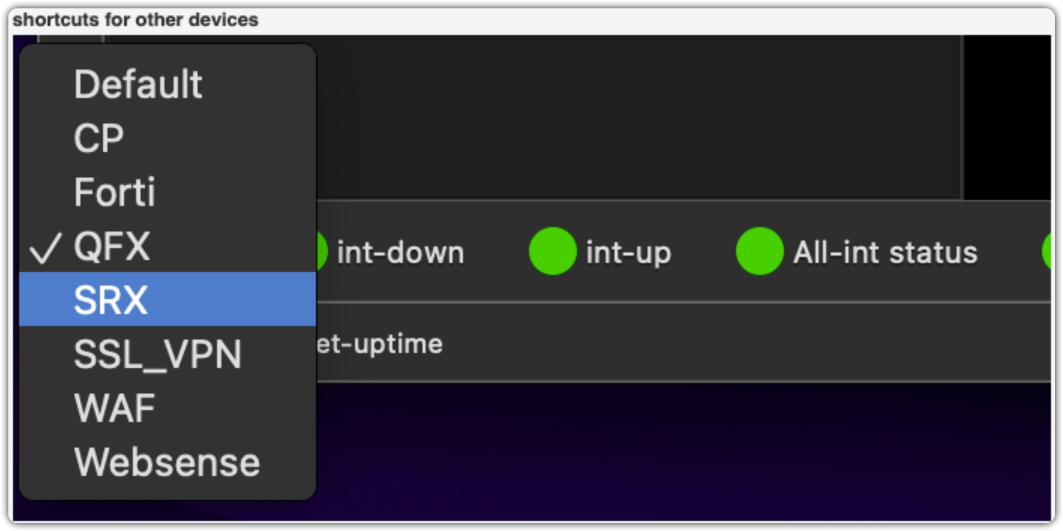
8ddbe29f-2d5d-468d-8d19-52ff1250697f.png
Hello,
That's a great find! I think handling the folders this way would make the solution a little simpler than what I had in mind. I've added this information to our internal ticket.
Regards,
Hubert Mireault
Hi, Hubert
Any chance to implemnt this on future release?
Hello,
This is currently on the todo list of one of our developers. I can't give you an estimate on when he will be able to work on this but we will update this topic when we have an update on the development.
Regards,
Hubert Mireault
Hello,
We've implemented the possibility to have a "Compact" option for the macros in the toolbar. This option can be found under File - Settings - Entry types - Sessions - Terminal, under the name Compact macro display. It will display the macros split by Folders, in a dropdown fashion.
You can expect this with the upcoming 2026 version.
Regards,
Jafran Majeau
Thank you, let's wait for new version. Do you have ETA on this?
Hello,
We are hoping to release this around march.
Regards,
Jafran Majeau
Hi,
I tested this function, is possible when I select Cisco folder, all related entried will fix on line of Macros, so I can direct click those buttons instead of I need select them every time? 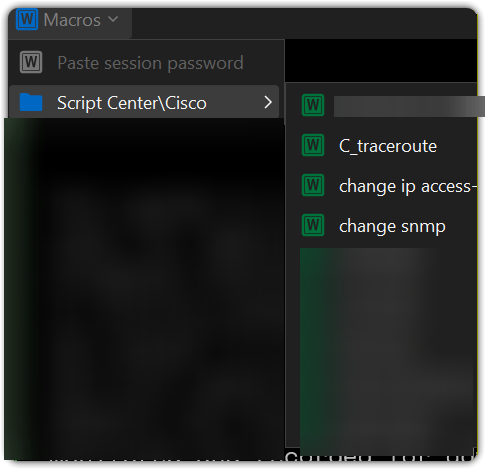
4660e6af-e41d-46d7-be84-2951931f7f41.png
Hello,
You're right, this would be a better layout. I've implemented this change, and you can expect this to take effect with the upcoming 2026.1.11 version.
Regards,
Jafran Majeau
Hello,
Thank you for being so patient!
I'm pleased to inform you that a new version of RDM (2026.1.11.0) has been released, featuring the requested feature.
Latest Version: Download RDM
Please let us know if this works or if you encounter any issues.
Best regards,
Maxim Robert
Hi
Is possible keep the selection fixed with my previous selection on all entries instead go back to default as always?
For example
Default
Cisco
Others
I want selection fix to Cisco always until I made another selection, this selection should impact all entries, no need I change one by one.
Hi,
Any update on this?
Hello,
We will investigate the possibility to do this properly and come back to you when we have more information.
Regards,
Jafran Majeau
Hi
Just check any progressing on this?
Hello,
The task is still open for now, I'll see about increasing its priority.
Regards,
Jafran Majeau
Hello,
The Compact macro display mode will now remember the last selected folder between sessions. You can expect this to take effect with the upcoming 2026.1.21 version.
Regards,
Jafran Majeau
Hi
Thanks for deploy this, It exactly what I need.
Just one small unrelated issue, why the color on top shows different as what I choosed icon color within typing macro? 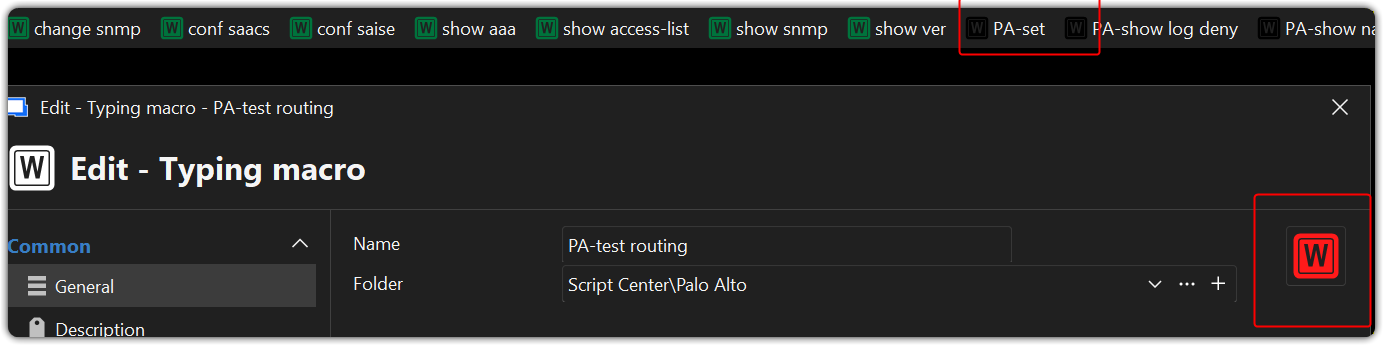
7fc0c0ee-fed4-40d4-b24f-ce564b6d42c1.png
Hello,
We are currently in a massive overhaul of our interface. What you are seeing is an unfortunate bug that slipped by (unrelated to what we did here), and will be fixed fairly shortly. Sorry for the inconvenience.
Regards,
Jafran Majeau
Hi,
Thanks. Is possible hide disabled/archived typing macro on the tool bar? Currently it still shows there no matter what status I setup for this.
Hello,
We could have the Macros in the Toolbar respect the options located in File - Settings - Tree view, specifically the 3 options used to hide archived, disabled and expired entries. Would that be an acceptable solution for you?
Regards,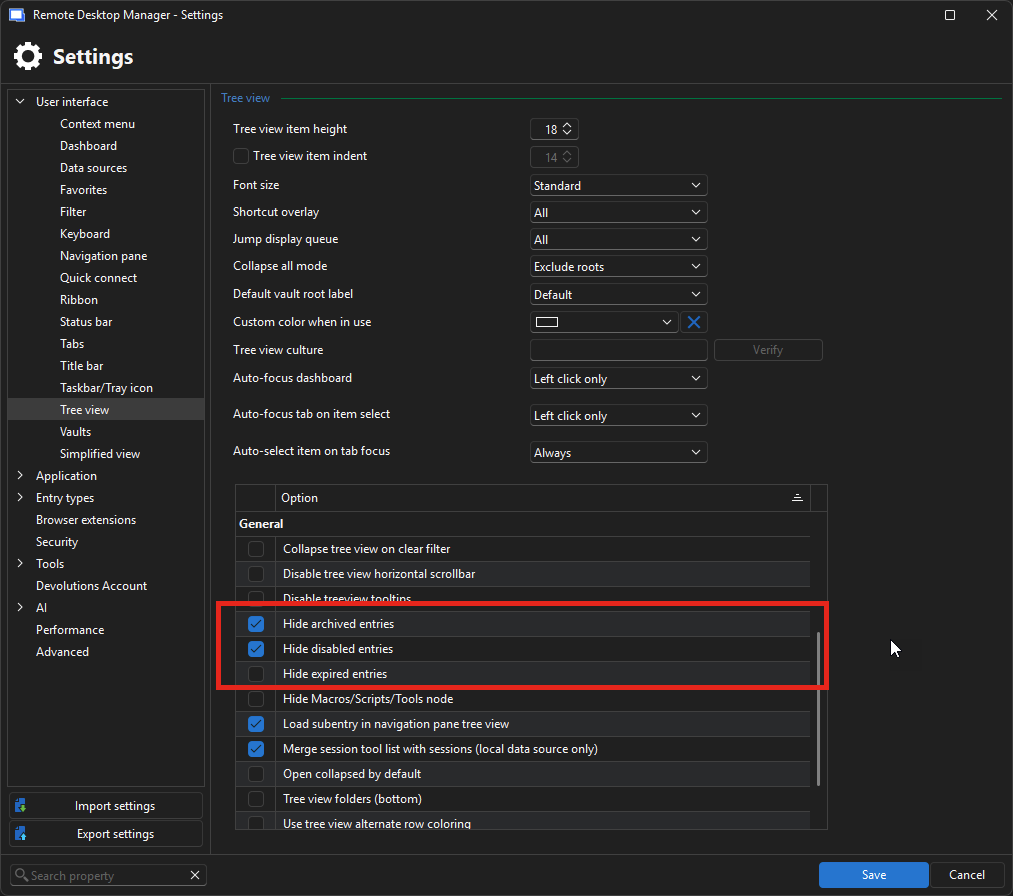
Jafran Majeau
5cead663-bfe0-4bc6-883e-04d16c72e3ef.png
Hi,
I mean is possible hide in each session Marco menu, if I setup "show ver" to disabled, is possible not list as picture shows? 
2nd question: Is any quick way we can toggle show/hide disabled entry in Treeview?
093df998-6077-473e-b08e-75cf73ff2711.png
Hello,
To follow up on your first question, if we add a new option in File - Settings to hide Disabled/Archived/Expired Macros in toolbars, is that an acceptable solution for you?
For your second question (hiding the entries with similar status in tree view), you can toggle these options in the filter.
Regards,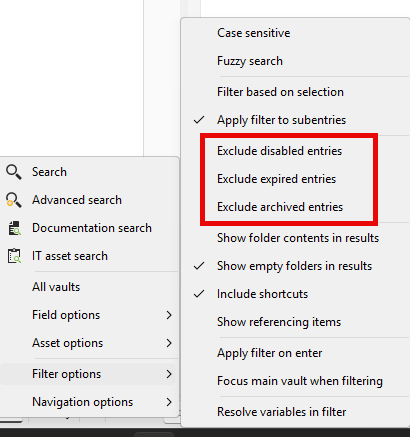
Jafran Majeau
83f82dc5-087b-4ac6-b8f3-79eff5f4eafb.png
Hi
To follow up on your first question, if we add a new option in File - Settings to hide Disabled/Archived/Expired Macros in toolbars, is that an acceptable solution for you?
Yes, that will be good enough. Thank you.
Hi
Just check about the progessing of File - Settings to hide Disabled/Archived/Expired Macros in toolbars?
By the way, can we have a shortcut key or toggle button for this? Thanks
Thank you.
Hello,
My mistake, I forgot to give you an update, but the option is already available (at least with the latest available release, 2026.2.9). You can find it in File - Settings - Entry types - Sessions - Terminal. In the Settings tab, under the User interface section, in the same place you can find Compact macro display. I will see about adding a toggle button for this.
Regards,
Jafran Majeau
Hi,
Just some extra improvement to see whether you can do or not, as you see the macro button displayed with Macro name, I have quite a bit macros there, so it shows very crowed on my macro toolbar, is possible only display button self instead of with full name, I hope the full name only will be displayed when you move your move over the button.
Thanks for consideration. 
c8b4573c-7850-466b-9be8-1850e97acf69.png
Hi
Any update on this?
Hello,
Sorry for the delay, I added a new "Show icon only" option (in the same place as the previous option). When activated, it should provide the exact behavior you have described. You can expect this to take effect with the upcoming 2026.2.14 version.
Regards,
Jafran Majeau
Great, thank you.
Hello,
Thank you for being so patient!
I'm pleased to inform you that a new version of RDM (2026.2.14.0) has been released, featuring the fix for your issue.
Latest Version: Download RDM
Please let us know if this works or if you encounter any issues.
Best regards,
Maxim Robert