RDP window is minimized to nowhere

Hi,
In smart sizing, in such flow:
full screen -> windowed (docked) -> full screen -> minimized
RDP window is minimized to nowhere. There is no way to restore it but into full screen using context menu. You can't view it docked and "focused" anymore.
All Comments (8)
Hello,
Thank you for reaching out to us regarding this,
Could you please specify the version of RDM you are currently using?
What type of data source are you using?
Would you be able to provide us a recording of this behavior? I will send you a link via private message so that you can provide it to us securely.
Best regards,
Samuel Dery
Hi,
I believe I have current version 2025.1.25.0 64-bit
I use local data source. In both XML and SQLite the behavior is the same.
I uploaded a video file.
Many thanks for your support.
Nik.
Hello,
Thank you for your reply and for the recording.
Could you update to the latest version of RDM 2025.1.34.0, which you can download from here, and let me know if you encounter the same issue?
https://cdn.devolutions.net/download/Setup.RemoteDesktopManager.2025.1.34.0.exe
Best regards,
Samuel Dery
Hi,
I am on latest, 2025.2.14.0 , can confirm there is still an issue with minimized RDP sessions becoming inaccessible. (using dynamic resolution , win 11)
Recreate:
- Open an RDP session docked,
- Switch to full screen,
- Minimize,
- The RDP session is now not directly accessible.
To restore:
- Switch to Working Area,
- Dock
The behaviour repeats consistantly.
Hello,
Thank you for your reply,
When you minimize the entry, it should create another tab for it behind RDM in your Windows Taskbar; it may be a bit difficult to see.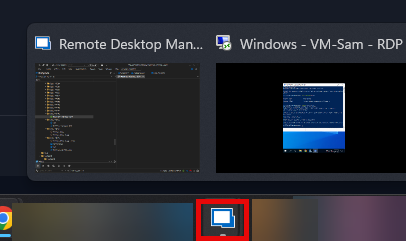 Let me know,
Best regards,
Samuel Dery
a0785fd2-45ca-4e5c-a088-e7478a970a21.png
Hi Samuel,
I'm not sure what you mean and honestly your screenshot is hardly understandable but actually I posted a video to R&D and the bug was confirmed.
I restore hidden sessions by double "Full Screen" call (single call does not help, you have to do it specifically twice).
Hi,
That solution did not work for me earlier, but does now... Interestingly enough...
Actually, there is a diff I can point to between attempts. The laptop has since been restarted (whereas before it was "first run" after waking the laptop from hybernation. a lot of resouces were freed)
With that said, I will point to yet another bug, direclty relate dot this, though a minor one, a resolution one.
I'm not sure if it's the rightest thing to do to include it here, but we are more or less on the topic...
Having re-maximized the tab , I decided to semi-minimize it (or whatever it's called, the button that takes it from full screen to small screen, docked),
However, though it docked back, the resolution is completely off. Looks like it's full-screen resolution, but docked.
To resolve it, I switch it to "Work Area", and then minimize again, then dock, and now it's docked, in proper docked-resolution.
EDIT: NOW THE BUG IS BACK!!!
After all I did, minutes passed, and a bit more playing around with the window, the bug where the window is gone and inaccessible is back!!! 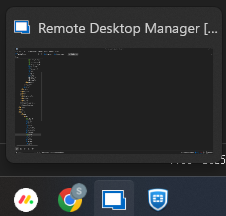
91d1c550-ebac-4203-bd14-c709cbfac01f.png
Hello guys,
Thank you for all the information!
After some testing, I was able to reproduce the issue. I will provide all the information to our development team and let you know with more details as soon as possible.
I appreciate your patience and your collaboration on this matter!
Best regards,
Maxim Robert