IP address list import csv
1 vote

Good morning, it would be useful to be able to import values from a csv or excel file into an "ip address list" object
All Comments (31)
Hello,
Thank you for the suggestion. We've already implemented a way to populate the list from the current vault for our next version, so we'll see about adding a way to import from CSV as well eventually.
Regards,
Hubert Mireault
Thanks, I'll wait for the next version then!
Hello,
Thank you for the suggestion. We've already implemented a way to populate the list from the current vault for our next version, so we'll see about adding a way to import from CSV as well eventually.
Regards,
@Hubert Mireault Was this implemented? We are looking for a way to see all IPs a customer (folder) has, so we know which ones are taken.
Hello,
We have a CSV import as well as a new dynamic mode that will list the hosts found in the vault (and it can be filtered by folder), coming with our release of 2025.3 this fall. I hope these new features will help improve your workflow.
Regards,
Hubert Mireault
Hi Hubert
Is there also a possibility to display all IPs from a folder and ALSO add entries manually? Or do we need to decide if we do it manually or show entries from a folder?
Best regards
Patrick
Hello Patrick,
With the current change this is not possible, you would need to either have two IP Address List entries, or find an alternative.
Speaking of alternatives, maybe you could leverage the folder entry's dashboard to list the hosts and IPs of the entries within it? When you have your folder entry selected, the "entries" tab contains the list of entries in that folder. You can right click the header of the columns and open the column selector. From there, you can add the Host or IP Address columns, for example, to see their values: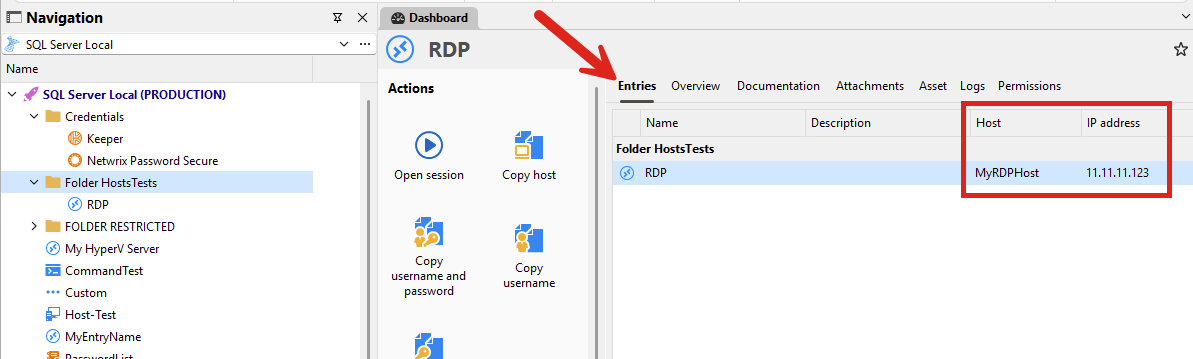
That way, you could keep your IP Address List entry for values that aren't associated with specific entries in RDM, while you could consult the hosts/IPs of entries in your folder that way.
Let me know what you think.
Regards,
Hubert Mireault
103d5cee-e38f-4d3d-acfc-2a81c8b6395d.png
Interesting idea. The thing is we want to accumulate the Entries of all machines in the folder and some IPs which don't have entries in the folder, because the are not accessible.
So I wonder, if we add an IP address list to a folder and create a new IP address list entry which has the functionality of displaying all IPs of a folder. Will it also show all the entries of the IP list we already have in that folder?
Like that we could achieve to summarize machine entries with the IP address list that has manual IP entries.
This is mostly for documentation purposes and to find the next IP address which is not in use.
Another question, what if a machine has more than one IP, I think this can be documented in the documentation tab, will these IPs also be displayed in the Ip address list summary?
Thanks and best regards
Patrick
My initial request was to avoid having to write it by hand. What you describe should be the IP address list from IT Asset Management, but there's no way to enter values other than one at a time.
Yes I saw the initial request, and just wanted to add ours which is a bit different, but very close to the new feature that is coming.
There are two things we want to combine:
- We have manual IP address lists, where we enter all IP's that are not as entries in the folders
- We have entries with IP addresses in Folders
What we need is an overview, which IPs are taken at a customer. (manually added ones in the IP address list entry + all entries from the customer folder)
So I wonder if the ne function in the IP adress list, which can show all IPs in a folder, also displays the IP addresses from an address lists entry in that folder.
Like that it would be perfect, and we would see all IPs a customers uses.
Best regards
Patrick
@mad I'll go over your points since there are a few to address.
So I wonder, if we add an IP address list to a folder and create a new IP address list entry which has the functionality of displaying all IPs of a folder. Will it also show all the entries of the IP list we already have in that folder?
Like that we could achieve to summarize machine entries with the IP address list that has manual IP entries.
At the moment this is not how it works. The feature was moreso meant for listing IPs/Hosts for entries like RDP, SSH, etc. listed in your vault (or in a specific folder). It doesn't include other IP address list entries' data, due to how the data is saved. This could be possible to add if it's something you'd need.
Another question, what if a machine has more than one IP, I think this can be documented in the documentation tab, will these IPs also be displayed in the Ip address list summary?
The way we implemented it, we list the host as the value in the 'main' section of the entry that we consider the host, for which the field can vary depending on the entry type, but it's usually simply called "host". For the IP, it's the value listed in the asset section of the entry.
I would be curious to know how you stored these multiple IPs in your entry in RDM, as that might have been something we forgot to take into account.
So I wonder if the ne function in the IP adress list, which can show all IPs in a folder, also displays the IP addresses from an address lists entry in that folder.
Like that it would be perfect, and we would see all IPs a customers uses.
So if I understand correctly, a little similar to the first point I addressed in this post, if this dynamic mode also listed the values from non-dynamic IP address list entries it found, that would work perfectly for you. Is that correct?
Regards,
Hubert Mireault
Hi Hubert
Thanks for all the feedback. At the moment we can only store one IP per machine, I had this wrong, as we had another tool before, where we had more than one IP field.
So the part "if this dynamic mode also listed the values from non-dynamic IP address list entries it found, that would work perfectly for you. Is that correct?" Is exactly what we need.
Any idea when the new version 2025.3 will come out? in September?
Best regards
Patrick
Hello Patrick,
I will open an additional ticket for this minor improvement to the dynamic mode. We'll try and have it implemented before our release.
As for our release date for 2025.3, the current plan is early October. It's difficult to give the exact date when there's always a chance we might delay to improve stability after feedback from our Beta version.
Regards,
Hubert Mireault
Hello,
We've improved the IP List dynamic mode to also list other non-dynamic IP List entries found. This will be available with the upcoming 2025.3 update this fall.
Regards,
Jafran Majeau
Hi Jafran
Great news! Thanks a lot.
Patrick
Hi Jafran
Great work. Just tested it. It seem the IP Address List shows the entries which are in the IP address field under asset. We mostly used the hostname for it, and a lot of times a name instead of an IP.
So I wonder how we could get the IPs in the asset IP field from the hostname.
Is there a mass mutation function for that?
Or what's the best way go get this IP address field automatically?
Thanks and best regards
Patrick
Hello Patrick,
I’m not entirely sure I fully understand your question, so I’d like to clarify a few points.
In the IP Address List entry, each item includes both a Host and an IP field. The Host field is meant to display the hostname (as you mentioned), while the IP field corresponds to the IP address field in the associated Asset. Several other fields are also automatically populated from the Asset, as they align with the fields available in the IP Address List entry — this is by design.
Are you asking whether we could add a setting that automatically populates both the Host and IP fields with the hostname value (using the same main Host setting from an entry)?
That would be somewhat counterintuitive to how the entry is structured.
Could you please clarify what behavior you’d like to achieve?
Regards,
Jafran Majeau
Hi Jafran
Thanks for your reply and sorry for the confusion.
I completly understand how the IP address List entry works. That's why I am asking how we get the IP address into the field of a normal entry, so it shows it correctly in the IP address list.
Until now we only added the IP (or a name) in the Host field, so we are looking for a way to copy this entry from the hostname into the IP field, or if its not an IP, do an NS lookup and past the IP of the hostname into the IP address field.
Is there a way to do this automatically instead of manual work? Our goal is, that we have a good IP address list from all the IPs of the entries.
Thanks and best regards.
Hello,
Assuming your setups permits it, it is possible to use the context menu options Edit - Special actions, and then use Load from system information (this can be done on multiple entries at once). If your machines are WMI available, this will automatically detect the IP address (as well as several other information) and fill them in (this process can take some time, especially if used on several machines at once).
I don't think there are other ways to currently automatically fill this field.
If using this (or doing it manually) isn't something realistic for you, let me know. We will investigate for alternative solutions.
Regards,
Jafran Majeau
Hi Jafran
Thanks a lot. I also tried this function sometime, but it always hung itself. I just tested it again and it seems, not it worked.
So I will try this to fill the entries. What happens if a machine has more than one IP?
Also why is the checkbox "is virtual machine" not automatically checked, when it detects Vmware as a manufactere. Or is there a way, to set this box for all machines, which have this manufacture?
Thanks!
Hello,
If a machine has more than one IP, I would recommend inputing the "Default" one in the IP address field, and filling in the IP Range (in the Advanced section just below) with the range of IP addresses possible (using the format to your liking, depending on what you need).
As far as I can tell, we do no automatic detection for the Is virtual machine checkbox, likely due to there being too many variants in setups between users. You mentioned Vmware, I assume you are referring to the selection in the OS field. This field is purely textual, and while it does have a basic list of possible selection, it can be modified by users (thus adding more to the list), and we don't make any specific verifications related to its content, as it would end up being speculation in most cases.
Regards,
Jafran Majeau
Hi
The end goal is, to have an overview over all used IPs.
If we start entering them into fields like under advance, I think the won't be Displayed in the IP list entry. So how do we get all IPs of a server into the list?
Which IP does it take if there are more than one?
Is it possible to select "is virtual machine" via a mass mutation where it checks if the word VMware is in the manufacture field?
Thanks
Hello,
We will investigate your requests, and come back to you with more information when we can.
Regards,
Jafran Majeau
Hello,
We are currently investigating the feasibility of the last two items we discussed. I’d like to provide a few clarifications and get your input on how you would prefer this information to be presented.
1- Virtual Machine Checkbox
We could implement it so that when the OS selection includes a VMware-based option, the “Virtual Machine” checkbox is automatically checked. However, users would still be able to manually uncheck it afterward if desired. As mentioned previously, the OS field is meant to offer general suggestions and can also be filled in manually. Because of this, we want to avoid unintended behavior with existing configurations or situations where users might not want the checkbox to be automatically checked.
Would this approach work for you?
2- Machines with Multiple IP Addresses
We are exploring the best way to display and load this information. Currently, the IP address list only retrieves data from internal entries to populate its values. Dynamically pinging every machine to detect additional IPs isn’t ideal, as it could introduce delays or connectivity issues—especially in environments with many machines. As an alternative, we could add a new field in Assets (likely near the main IP field) called Sub-IPs, where additional IP addresses for a machine could be entered. We will also investigate adding an automatic loading feature for this field. In the UI, this could appear as a separate column displaying entries like: 192.168.7.40, 192.168.7.41, 192.168.7.42. Hovering over the field would show the full list in a tooltip with line breaks.
Would this solution meet your needs?
Regards,
Jafran Majeau
Hello Jafran
Thanks for discussing it internally.
- Yes that would make sense, is there also a way to find it when it's a Hyper-V OS?
- If there is a way to enter it manually that would be OK as well. But most of the time, these IP's are from other subnets as well, so an entry per IP would be better. Also the whole sense is to have an overview over ALL IPs that are used in the network, so if we need a new IP for a device, we can check which of them are already in use. So it should be possible to sort them by IP and also filter the whole list, which is already possible at the moment.
Hope this helps to further show, what the sense behind it is. An overview over all IPs that are in the network. Another input, if we add another device and give it an IP, we always connect to a server of this customer and do a manual Ping to be 100% sure, the IP is not used yet. If there were an option to check this from within RDM, via a customer server, that would be nice to. Perhaps via a script? But it should als for a variable for the IP, before starting it.
Thanks and best regards
Patrick
Hello,
For #1, yes that shouldn't be a problem, we can include both Hyper-V OS as well as VMware.
For #2, I'm starting to get a better picture of what you actually need, and I'm trying to see how to best implement this.
If I understand correctly, you want to be able to see All available "SubIPs" for each specific host, is that correct?
For instance, if you have 3 entries using the same Host, and all 3 are using different IP addresses (that all work for that specific host), you also want displayed "all remaining IP addresses" for that specific host. Right now (if you used dynamic mode, with all entries shown) we would display all recurrence of each host, and the IP they have associated in their IP field (in the assets), but nothing else.
I have yet to investigate how feasible that is (I believe it should be, if my understanding above is correct) because I first want to make sure we're on the same page. If I've correctly understood your request, here is my proposition.
This "Detect unused SubIPs" feature would:
- Only work in dynamic mode (at least for now).
- Require including all entries in the result.
- When activated, we would group the results by "Host" rather than by the folder/location where they were found, and we would list other available IPs at run-time here.
- The exact final result as to what that would look like is subject to testing once I've reached that phase.
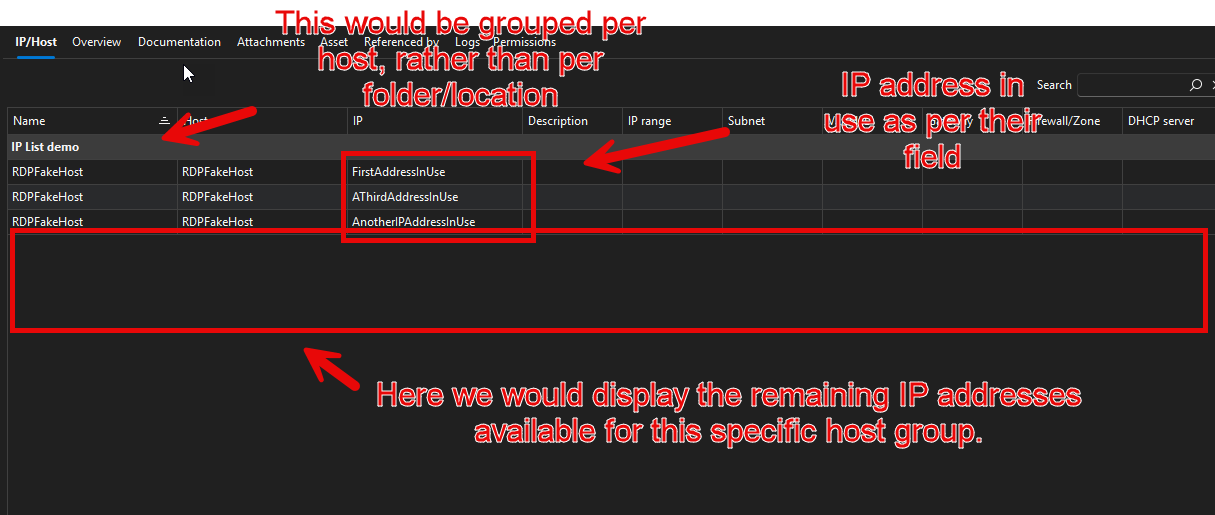
Let me know if this works for you.
Regards,
Jafran Majeau
cc1fb4be-0ad1-4d26-9e82-415f4841c20c.png
Hello Jafran
Thanks afor going into the details. I think we are very close to a solution.
We normally have a server only once in RDM and access it via the main IP Address. But the server could have more than one IP, either in the same subnet or even to other subnets.
Example: Main IP: 192.168.1.1 / Second 192.168.1.2 / Third: 10.0.10.1
We need the list as an overview, which IPs are used at a customer. We don't need a grouping of the IPs per host. As we can sort the list by name and see all the IPs of host.
But there needs to be a way to add Second / Third and so on IPs to a host, so that they are also showing in the IP address list. For every IP one entry in the list, even if there is only one host in RDM.
Example:
Server A: 192.168.1.1
Server A: 192.168.1.2
Server A: 10.0.10.1
"Here we would display the remaining IP addresses available for this specific host group" -> It should just display all used IPs in this folder from any device or host. We will just check for used ones, and don't need a list of unused ones.
I hope this helps to explain it better, and please let me know if you have another question.
Thanks!
Hello,
If I understand correctly, and manual input isn't a problem for you, then we can likely make something much simpler than my previous proposition
If we go back to the idea of adding a field where you can input multiple IP.
We could detect if an entry has content in this field, and for every IP in this field, we would list an additional entry under the host (with the same host name).
Would this work for you?
Regards,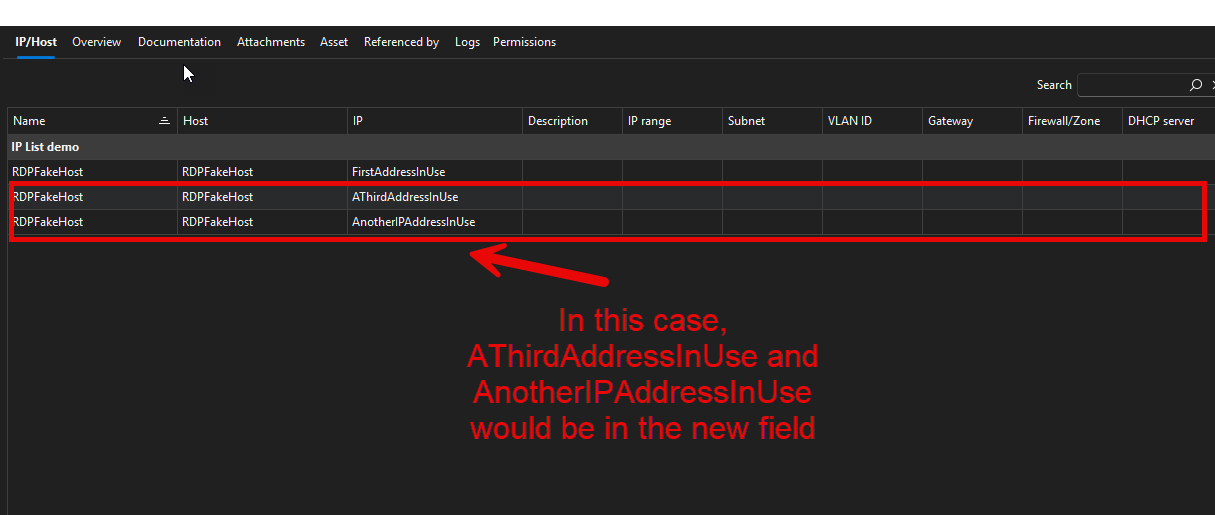
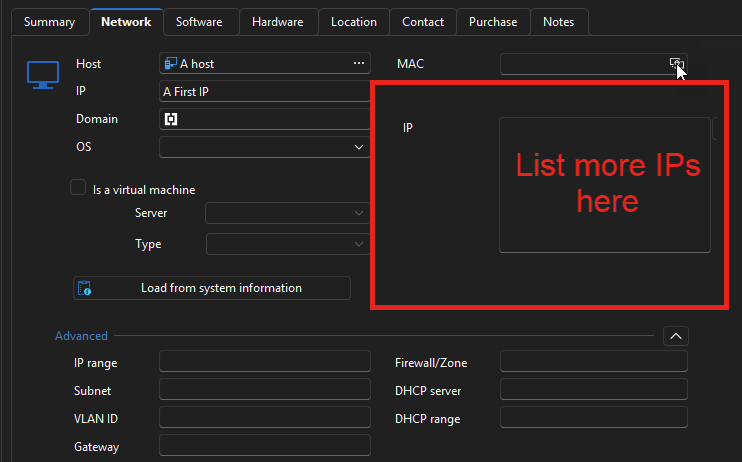
Jafran Majeau
f6def8ab-60e7-41a9-ad26-10b23f5d8df9.png
7301378a-7080-4bf6-a71a-5b01affa589a.png
Hello Jafran
Yes that would work, only that it would be nice if when we fetch the asset data from the server, could it also get all IPs and fill them in these fields automatically, instead of that we have to enter them manually? Would this be an option?
Thanks
Patrick
Hello,
When you mention "fetching asset data from the server", you mean when using the Load from system information button? Or through other means?
Regards,
Jafran Majeau
Hi
Yes that's exactly what I meant. Or another script / button which just gets the IPs would also be ok. Whatever is easier to implement. I just saw that sometimes the load from system Information did not work (missing wmi access for example).
Thanks!
Hello,
We should be able to make a separate feature only to load IP addresses. I believe I have everything I need to implement the feature. I will keep you updated when I have more information.
Regards,
Jafran Majeau