Connecting to linux RDP - Client does not support H.264 in YUV420 mode
Connecting to linux RDP - Client does not support H.264 in YUV420 mode

I have KDE (6.3.4) remote desktop set up. I can connect to the Linux machine using RDP if I use the official Microsoft remote desktop client.
If I try to connect using RDM (2025.1.13.3), I see these errors on the host. below. I tried changing a bunch of options for experience and display and stuff in advanced like codec level and rendering engine. It seems like none of the options make any difference because the log output is always the same. Am I missing anything? I'll also attach the RDM log.
Apr 17 10:19:53 datacenter-xps xdg-desktop-portal-kde[2304]: xdp-kde-remotedesktop: MegaAuth: Failed to lookup permissions: "No entry for remote-desktop"
Apr 17 10:19:53 datacenter-xps krdpserver[2397]: [10:19:53:951] [2397:6318] [WARN][com.winpr.negotiate] - AcceptSecurityContext status SEC_I_CONTINUE_NEEDED [0x00090312]
Apr 17 10:19:53 datacenter-xps krdpserver[2397]: [10:19:53:952] [2397:6318] [WARN][com.winpr.negotiate] - AcceptSecurityContext status SEC_I_COMPLETE_NEEDED [0x00090313]
Apr 17 10:19:53 datacenter-xps krdpserver[2397]: org.kde.krdp: New client connected: Unspecified platform Unspecified version
Apr 17 10:19:53 datacenter-xps krdpserver[2397]: org.kde.krdp: Client does not support H.264 in YUV420 mode!
Apr 17 10:19:53 datacenter-xps krdpserver[2397]: [10:19:53:992] [2397:6330] [ERROR][com.freerdp.core] - rdp_set_error_info:freerdp_set_last_error_ex ERRINFO_GRAPHICS_SUBSYSTEM_FAILED [0x0001112F]
Apr 17 10:19:53 datacenter-xps krdpserver[2397]: [10:19:53:993] [2397:6330] [ERROR][com.freerdp.channels.rdpgfx.server] - context->CapsAdvertise failed with error 20
Apr 17 10:19:53 datacenter-xps krdpserver[2397]: [10:19:53:993] [2397:6330] [ERROR][com.freerdp.channels.rdpgfx.server] - rdpgfx_recv_caps_advertise_pdu failed with error 20!
Apr 17 10:19:53 datacenter-xps krdpserver[2397]: [10:19:53:993] [2397:6330] [ERROR][com.freerdp.channels.rdpgfx.server] - Error while parsing GFX cmdId: RDPGFX_CMDID_CAPSADVERTISE (0x0012)
Apr 17 10:19:53 datacenter-xps krdpserver[2397]: [10:19:53:993] [2397:6330] [ERROR][com.freerdp.channels.rdpgfx.server] - rdpgfx_server_receive_pdu failed with error 20!
Apr 17 10:19:53 datacenter-xps krdpserver[2397]: [10:19:53:993] [2397:6330] [ERROR][com.freerdp.channels.rdpgfx.server] - rdpgfx_server_handle_messages failed with error 20
Apr 17 10:19:53 datacenter-xps krdpserver[2397]: [10:19:53:994] [2397:6318] [ERROR][com.freerdp.core.transport] - BIO_read returned a system error 0: Success
log.txt
All Comments (25)
Hello
I'm not sure that we build FreeRDP with H264 support on macOS, I'd need to look into that.
Can you try changing the codec level to "7" in the "Advanced" tab of the RDP session in RDM? Let me know if it helps. If it doesn't help, try "6" as well.
Thanks and kind regards,
Richard Markievicz
I tried all the codec levels, none of them made a difference.
Hello
You might try setting a lower colour depth, but having looked at the readme for krdpserver it looks like it only works with clients that are H264 capable.
I'll open a ticket to add that on our side; I'm not sure how tricky it is but I'll post back with an update once I've some more information.
Sorry for the inconvenience.
Kind regards,
Richard Markievicz
Unfortunately, the color settings didn't matter either. If you can add this option to the program that would be awesome. In the mean time I can use the Microsoft client.
Hello
Thanks for the follow up.
I've done some local testing here and with H264 support, the performance improvement in our RDP client is quite pronounced. As you note, enabling that feature should also allow you to connect to krdp servers where that isn't currently possible.
I've got a ticket open to properly integrate this and I'll come back to this thread when there's some progress. From my initial tests it doe not seem that difficult.
Thanks for your patience
Kind regards,
Richard Markievicz
Hello
I wanted to update you that I didn't forget about this issue. We have made some progress. Our FreeRDP builds now support H264, which I've tested and it works well, but there is integration work to be done.
We'll depend on OpenH264 for this; and Cisco has stringent license requirements that must be met on our side to meeting the licensing obligation with MPEG-LA. I've opened a ticket with the RDM Mac team specifying exactly what needs to be done to integrate this cleanly. I can't provide a timeline for that but the changes are relatively easy so I hope it can be done soon.
In the meantime, thanks for your patience and please don't hesitate with further questions or comments
Kind regards,
Richard Markievicz
No problem, I have a workaround for now. Thanks for keeping at it.
Hello,
The latest version of RDM Mac (2025.2.11.0) should now support H264.
If you need anything else, don't hesitate to communicate with us.
Best regards,
Michel Lambert
Hello
Just a quick follow up because it's not immediately obvious. We can't distribute OpenH264 with RDM and have to expose the feature in a specific way, to comply with the Cisco licensing terms.
So, you'll need to install openh264 yourself. You can download the binaries directly from Cisco or, for example, install with Homebrew (`brew install openh264`).
Once you'e done that, you'll need (in RDM) to go to Remote Desktop Manager > Settings > Types > Remote Desktop (RDP) > Codecs, and check "Enable OpenH264 decoding". You'll also need to provide the complete path to libopenh264. See my screenshot for an example: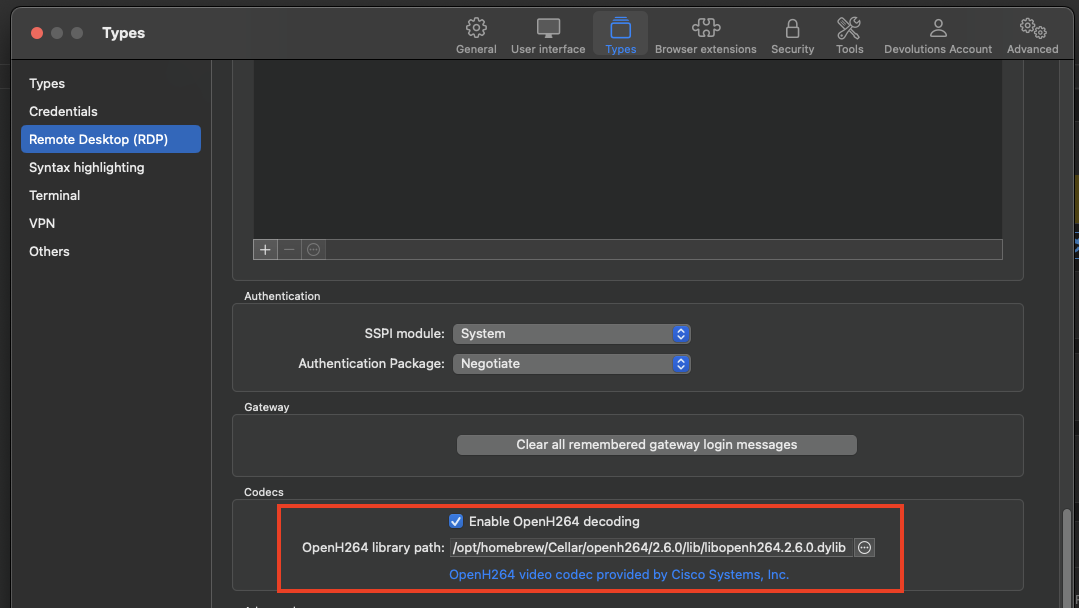
After changing the settings, please restart RDM and let us know if you have any trouble or questions.
Kind regards,
Richard Markievicz
Screenshot 2025-08-14 at 11.44.12.png
Hello,
Is there any chance the H264 decoding could be integrated into the iOS / iPadOS clients? Use case is the same, accessing linux machines over krdp.
Hello
Technically it's possible but right now it seems unlikely that we can add it. We can't embed Microsoft's RDP in our non-Windows clients, so we use freerdp in those environments. FreeRDP supports a few different H264 backends; OpenH264 and FFmpeg are possibilities on non-Windows and for Android they support the system MediaCodec framework.
Unfortunately I don't think it's possible for us to use OpenH264 or FFmpeg on iOS simply because of licensing concerns. OpenH264 has a custom BSD license that specifies constraints we cannot meet on iOS (specifically- the user must "bring their own" copy of OpenH264, we can't distribute it; and iOS doesn't allow us to dynamically link to external code). FFmpeg has either a GPL or LGPL license which would be almost impossible to meet inside RDM on iOS. Additionally, there is a further concern of patent licensing to MPEG LA - i.e. does the user have a license to use these decoders? The answer is probably yes; but perhaps only when using the system frameworks, and regardless it is really something of a grey area with heavy penalties for commercial software found in violation. This is why a lot of Linux distros make you install codecs separately from the core OS.
iOS does have system libraries that would be able to handle this, but there's no backend in FreeRDP to decode frames using those libraries (like there is on Android, where they support MediaCodec). They've also deprecated their iOS client quite a long time ago so I doubt we will get any improvement there from the upstream project. It is possible that someone (which could be Devolutions) contributes the corresponding backend to FreeRDP; realistically I don't know the scope of that work.
If this is important to you, the only suggestions I have are:
1) Make a feature request on our iOS forum. The demand for that feature would help steer our direction and if we can invest the resources needed in that.
2) Find or sponsor a developer to implement a VideoToolbox / H264 backend for H264 on iOS in FreeRDP, which we could then integrate on our side.
I'm sorry that I don't have a better answer for you. Please let me know if you have any questions or comments!
Kind regards,
Richard Markievicz
Hello,
Thank you for the detailed response! An unfortunate, but understandable situation.
Another approach perhaps might be for krdp to add support for more video codecs.
Could you share what other codecs the ios client of RDM supports out-of-the-box, that might be feasible to add to krdp?
Hello
By default, FreeRDP / RDM iOS support all the codecs that Microsoft RDP uses (bitmap, RemoteFX, GFX, etc). The only exception is the H264/AVC subcodec for RDP GFX.
Indeed, it would be sensible for krdp to support other codecs. I expect H264 was the easiest and most performant path for them. Of interest, Microsoft's own Android RDP client does not support H264 so it also cannot connect to krdp. I couldn't find any related issues in that project, so I suspect this is not on their roadmap.
Thanks and kind regards,
Richard Markievicz
Sorry for the late reply. This does work, to an extent. I can connect. It shows me the KDE login screen. But then I cant click on anything, at all.
Are there other settings that need to be changed, like codec level or data compression level, anything?
Hello
Ok, so that's good progress but it's unfortunate that it still doesn't work quite right.
It's very possible that KRDP is unhappy with some of the settings that we use by default, but it's extremely hard to say what. Mouse input at least is a very basic part of the RDP protocol and there's not particularly any controls around that.
You say you can't click on anything, can you move the mouse? Does keyboard input work?
I wonder also if there's specific issues around the login screen. When you connect with the MS RDP client do you get the same experience? i.e. You land at the login screen, but in that case you're able to use the mouse? Or are you logged directly into a session?
It might be that we need to setup an equivalent environment on our side to understand what's going on; but would you be able to share the logs from KRDP as before and we can look for anything amiss? It may also help to capture a session log from RDM.
Please, let me know if something isn't clear or you have other questions
Kind regards,
Richard Markievicz
Interesting. I can connect over and over with "windows app" from MS and it works. I try to connect with RDM and it fails. Then I try the MS app again and that fails.
I restarted the service and I was able to connect straight away with RDM and its working. However, I disconnected, and now I cant reconnect again.
Here is the log from my client while all this is happening, attached.
log.txt
Hello
Thanks for that, the log is a bit inscrutable to me but it seems like something we're doing is putting the KRDP in a bad posture with regards to how to talks to user sessions.
As a quick check: can you confirm that you have NLA (Network Level Authentication) enabled in the Advanced tab of the RDP session in RDM?
Thanks and kind regards,
Richard Markievicz
It is enabled, yes.
Hello
Ok, this is strange indeed. Like I wrote I can't really interpret the krdp log file. My next instinct is to try and reproduce the issue on my side; unfortunately I've installed KDE Plasma in a virtual machine and the connection appears to work perfectly although it's hard to say - because I only get a black screen. I think this is related to the virtualized graphics hardware / driver, and I got the same results with both arm64 in Parallels and x64 in HyperV.
I will have to ask my lab team to provision a setup for testing; there might be some lead time on that since this seems like something that requires bare metal. A virtual machine is much easier to provision for testing.
That being said, my first instinct is to troubleshoot this by seeing how freerdp behaves independently of RDM. Do you have homebrew installed? A quick test would be to install freerdp (`brew install freerdp`) and then see if it works (`sdl-freerdp /v:{server address} /u:{username} /p:{password}`).
I need to know if we're hitting a bug / incompatibility with the current freerdp version, or it's a configuration issue.
Thanks and kind regards,
Richard Markievicz
I'll attach the new log with me trying sdl-freerdp
First I restarted the service just to be sure.
It connected but I got a black screen.
I tried again, it connected but got a black screen.
I restarted the service again, and the next 3 attempts to connect were fine.
log (1).txt
Hello
Ok - so it sounds like freerdp alone isn't perfect, but they're doing something better than us.
In the absence of a test environment on our side, and if you don't mind doing some more troubleshooting, can you try the following:
First, let's get a log from the client side with sdl-freerdp. Before you launch it, set the environment for logging by setting the WLOG_LEVEL environment variable:
export WLOG_LEVEL=TRACE
Then launch the connection; but you might want to direct the log output to a file (e.g.{sdl-freerdp-command} >> ~/Desktop/sdl-freerdp.log)
Then restart KRDP and do the same thing in RDM. Here, you can enable logging by going to Help > Session Logs and making sure it's "Enabled" in the toolbar. When you reproduce the system, you'll see a log file in that window on the left which you can right-click and choose "Reveal in Finder".
Let me know if you have some questions or other comments
Kind regards,
Richard Markievicz
Sorry, been busy. I'll try this in the morning.
I got the log from sdl-freerdp and it worked fine. So then I enabled logging in RDM and of course that worked too.
I'll attach both but it probably won't help much since it worked. I tried a few times too and it worked every time. I don't know, its so frustrating.
sdl-freerdp.log
rdm.log
Hello
Indeed, this is frustrating. I did review the logs and fundamentally, there's not much different between what we and standalone freerdp are doing.
On a whim - try leaving the session logging enabled for a while, and see if things work consistently. The simple fact that this is so inconsistent seems to imply something timing related on the server side. I do wonder if the additional overhead of the session logging is subtly adjusting timings and making it work better?
Thanks and kind regards,
Richard Markievicz
Hello,
Thank you for being so patient!
I'm pleased to inform you that a new version of RDM Linux (2025.3.26.0) has been released, including the RDP OpenH264 decoding option.
Latest Version: Download RDM
Please let us know if this works or if you encounter any issues.
Best regards,
Maxim Robert